WIDE-FORMAT SHELF INFORMATION · EPD-E4E75R-M
7.3-Inch ESL Extrusion Rail Channel
Give prices, product details and promotional messages a dedicated place along the shelf edge. This rail-based display configuration pairs the EPD-E4E75R-M electronic label with a matching mounting arrangement for organized retail presentation.
800 × 480 pixels · 163 × 97 mm window · NFC · Seven-color LED indicator
Discuss Your Label & Rail Project
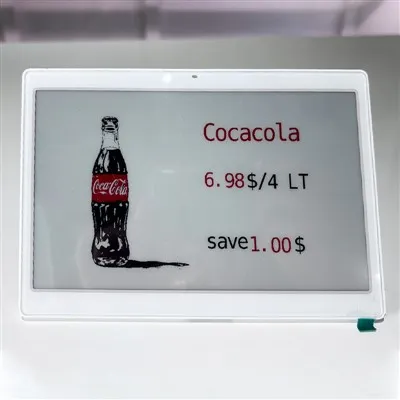
Front view: a wide layout for the main price, product information and promotional copy.

Installed view: review the label position and shelf-edge clearance from the customer approach.
Give Every Piece of Information a Place

Use the 800 × 480-pixel canvas to build a deliberate information hierarchy. A spacious layout is most useful when shoppers can quickly distinguish the selling price from supporting details.
01 Lead with the buying information
Make the product name, selling price and unit easy to identify. Keep comparable products consistent in font size and field position.
02 Give promotions their own space
Separate offer wording from the regular price. Preview longer product names and promotional messages before using the template across a category.
03 Add useful supporting content
Use the supported image and barcode controls where they help identify the item. Test the final layout at the intended shelf position.
Electronic Label Specifications
These values apply to the EPD-E4E75R-M label. Channel dimensions, rail length and the complete mounting assembly are confirmed separately.
| Parameter | EPD-E4E75R-M |
|---|---|
| Model | EPD-E4E75R-M |
| Label dimensions | 175.2 × 119.7 × 9.9 mm |
| Display resolution | 800 × 480 pixels |
| Display window | 163 × 97 mm |
| Equipment net weight | 251 g |
| LED indicator | Supports seven colors |
| Operating temperature | 0°C to 40°C |
| Power supply | Li-MnO2 battery |
| NFC | Supported |
| Communication | 2.4 GHz wireless frequency hopping |
Configuration References, Explained

Confirm the Exact Model
This product is listed as 7.3 inches; the original reference graphic uses 7.5-inch naming and the code SF-E4E75R-M. Identify your required configuration by the full model, display window and approved drawing.
Use the metric specification table above for this listing. Confirm the final label and mounting dimensions before ordering.

Separate Screen, Indicator & System Options
The seven-color specification describes the LED indicator. Screen colors are a separate hardware selection.
The original graphic illustrates connection and mounting options. Confirm mobile operation, compatible gateways, NFC behavior and LED controls against the selected software and label version.
Plan the Mounting Fit from Label to Shelf
Screen size is only one part of the installation. Review the label housing, channel profile and shelf connection together.


Check the Complete Connection
Label to channel: verify the rear attachment, retention points and removal method for this housing.
Channel to shelf: match the profile, fixing method and required rail length to the actual fixture.
Installed assembly: check secure support for the 251 g label, product clearance and practical service access.
For a fit review, send front and side photographs of your shelf edge, its dimensions, the required rail lengths and your planned label spacing.
Which Mounting Format Matches Your Fixture?
Compare the installation approach before selecting accessories. Similar screen-size names do not establish compatibility between different housings or mounting systems.
Extrusion Rail Channel
Consider a continuous shelf-edge track when you need to organize multiple label positions along a fixture. Confirm the channel profile, rail length and the correct label connection.
Metal Insert Channel
Compare a metal insert arrangement when the fixture calls for a different support structure. Review the mounting geometry and label interface before choosing the accessory.
Acrylic Shelf Bracket
Review an individual bracket format where a continuous rail does not match the intended display position. Check its footprint, fixing method and compatible label model.
Build a Template Your Team Can Reuse
The template editor supports text, price, unit and promotional fields, image insertion, barcode generation and immediate preview. The online library provides categorized layouts for different retail scenarios.
| Content to Configure | Layout & Preview Check |
|---|---|
| Product name & description | Use the text controls to identify the exact item. Preview long names so they do not crowd the price. |
| Price, unit & promotion | Give the main selling price a clear position. Keep units and offer conditions close enough to read together. |
| Images & barcodes | Add supported image and barcode elements. Check image clarity and barcode scanning on the actual label. |
| Template selection & preview | Choose from categorized retail templates, download supported layouts and preview edits before deployment. |
For connected pricing, review your data fields, product-to-label mapping and update process with the selected management platform. Explore the complete electronic shelf label solution to discuss system requirements.
Turn Your Fixture Requirements into a Quotation

Specify the Assembly, Appearance & Packing
The original customization graphic highlights size, color, style, material and packaging options. Translate these into a clear project specification:
- Fit: shelf profile, rail lengths, label position and available clearance.
- Appearance: required finish, color and presentation style.
- Components: material and fixing requirements for each mounting part.
- Delivery: protection, identification and packing by store or installation area.
Confirm customization feasibility, sample scope, quantity and lead time against an approved drawing. Dimensions printed in promotional artwork should not be used as the mounting drawing.
See How the Shelf Layout Comes Together
These original demonstration photographs include several label sizes and display types. Use them to review merchandising layouts rather than identify every unit as this model.

Match the Display to the Product Group
Use a wider information layout where product details or promotions need extra space. Check that label placement leaves room for shoppers to select products and for staff to replenish the shelf.

Category & Promotional Shelves
Compare label positions and spacing along the rail before repeating the arrangement.

Mixed-Format Display Fixtures
Plan each label size and mounting position separately when combining different display formats.
What Should Your Pilot Installation Confirm?
Evaluate the installation and the digital workflow together before repeating the configuration across a larger store area.
Mechanical Acceptance
- Label retention and shelf fixing remain secure during routine handling.
- The display sits in the intended position without obstructing product access.
- Staff can remove or service the label using the agreed method.
Digital Acceptance
- Product mapping, price fields and promotional wording display correctly.
- Updates complete through the selected gateway and management workflow.
- NFC interactions and LED indications perform the tasks agreed for the software package.
Questions to Resolve Before Ordering
Ready to Specify Your Shelf-Edge Display?
Send shelf photographs, required rail lengths, label quantities and system requirements. We can review the mounting configuration and prepare a quotation for the agreed project scope.
Hot Tags: 7.3 inch electronic shelf label, ESL extrusion rail channel, electronic shelf label mounting rail, wide shelf label track, EPD-E4E75R-M