


LEGOYO / LARGE-FORMAT TRANSPARENT LCD
More room for your product story.
42×23" Non-Touch Transparent LCD Display
A larger digital layer for merchandise, brand visuals and product presentations.
Keep the product in the presentation
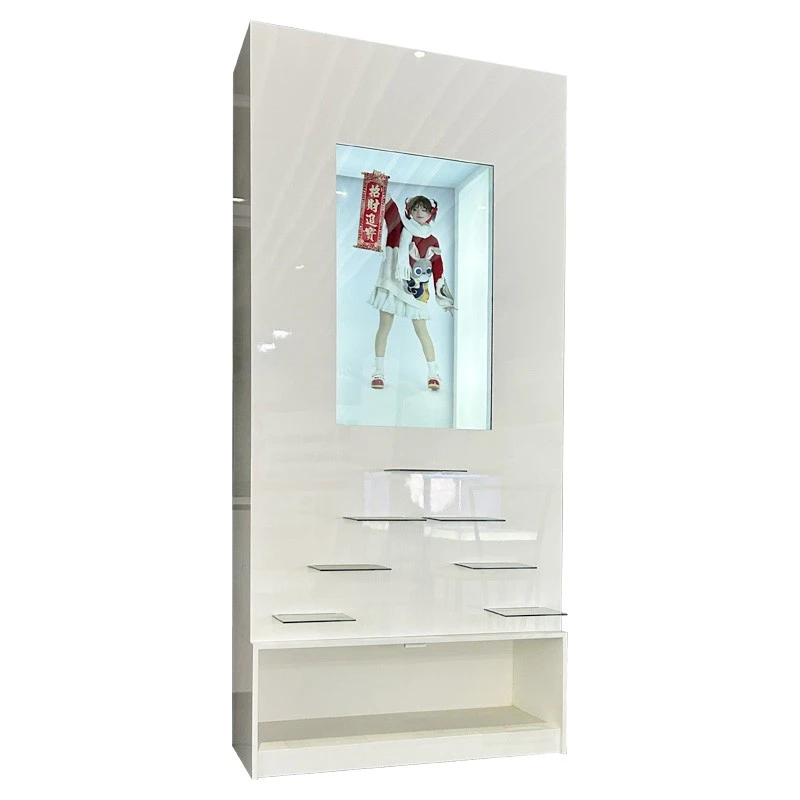
Bring video and images into the same viewing area as the product behind the screen. The larger format gives brands room for campaign visuals, feature explanations and product stories within a planned display environment.
This model is non-touch, making it suited to a curated playback experience. Plan the screen, enclosure, lighting and content together for the effect you want to achieve.
1920 × 1080 Full HD
43% Light transmittance
3.2 kg Screen weight
View specifications / Plan the integration
The photograph is an integration example. Confirm cabinet, shelving, lighting and other supplied components in your quotation.
See the display in a real presentation
01 / PRODUCT VIEWS
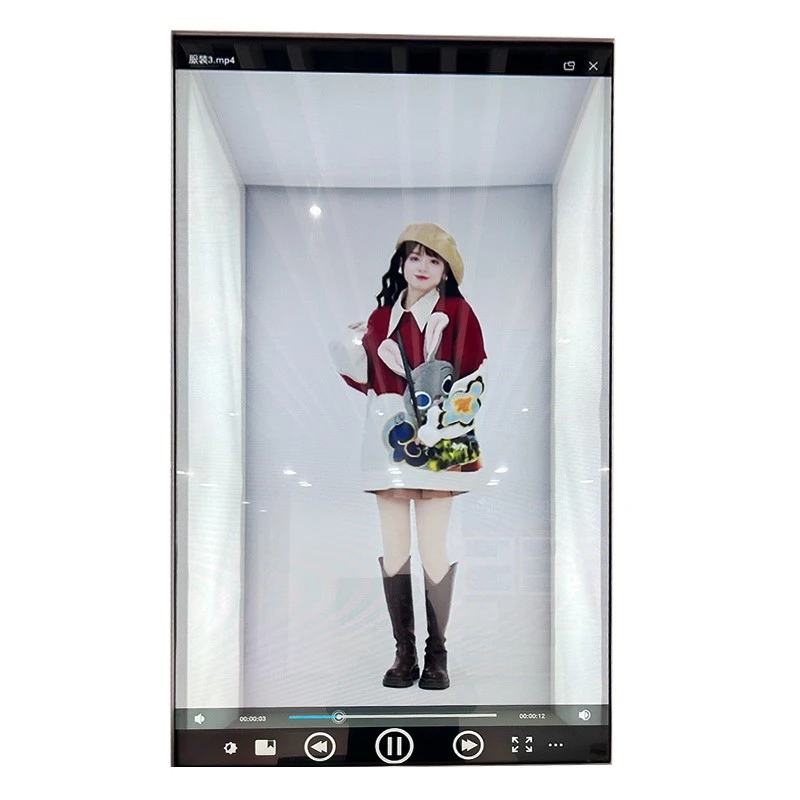
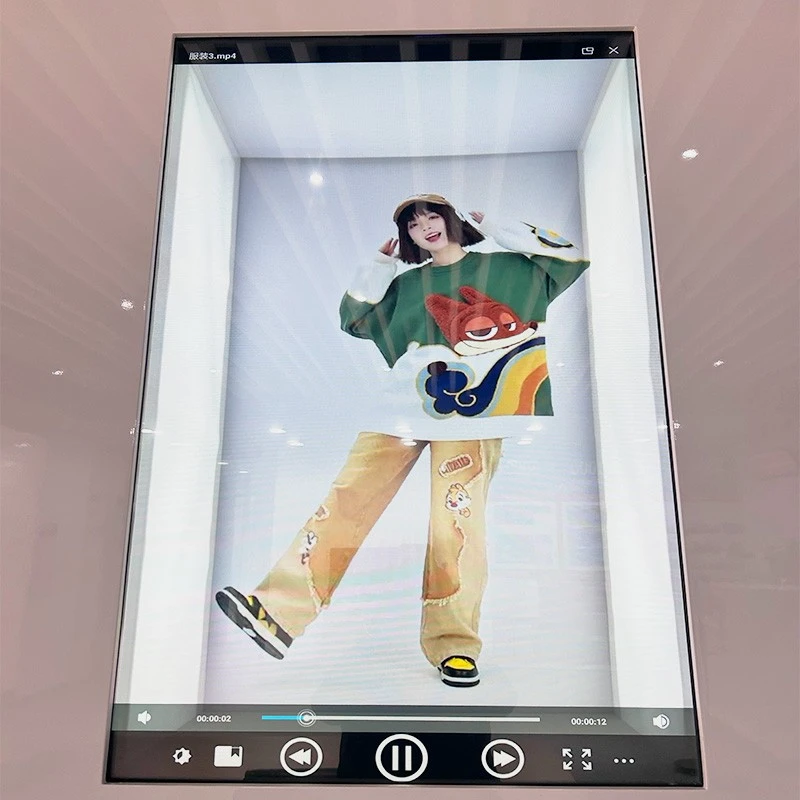
Use the photographs to discuss the visual result, then validate the screen with your own content and installation conditions.
The media and playback controls visible in the photographs are demonstration content. Playback software, supported formats and supplied hardware should be specified for your project.
Match the digital message to the physical display
02 / APPLICATIONS
Fashion & accessories
Present campaign imagery, styling stories or collection highlights alongside merchandise. Keep the key message short enough to understand while customers browse.
Branded product showcases
Add feature explanations or product videos to a dedicated display area. Position the physical item and digital graphics so each supports the other.
Showrooms & exhibitions
Create a product presentation with a controlled viewing position. Use the larger format for introductions and visual sequences that staff can reference during a demonstration.
Exhibit & collection displays
Place explanatory media near a visible object or collection. Review lighting, access and the visual effect with the exhibit team before fixing the design.
Looking for a complete enclosure concept? Explore our transparent display case solutions or discuss the fixture you already have.
Specify the setting around the screen
03 / INTEGRATION PLANNING
A transparent display needs a coordinated installation rather than a screen specification alone.
Start with the viewing experience
Share where the display will be installed, what will sit behind it and how visitors will approach it. These details help define the enclosure, content format and viewing conditions.
Panel or showcase?
A panel specification and a complete fixture quotation describe different supply scopes. Compare the display, playback hardware, enclosure, lighting and accessories included in each proposal.
For a related furniture-style format, review the transparent LCD showcase with wood display cabinet .
|
Installation checklist
|
|
|
Dimensions & clearance
|
Confirm the active display area, overall panel dimensions and space for the physical product.
|
|
Lighting & reflections
|
Review the light around and behind the panel in conditions close to the final installation.
|
|
Power & ventilation
|
Plan cable entry, power access, ventilation and service access for the complete assembly.
|
|
Mounting & orientation
|
The panel data lists vertical and horizontal orientation. Confirm the structure and content orientation for the selected installation.
|
Review the numbers that matter to your project
04 / TECHNICAL SPECIFICATIONS
Compare the display performance, installation requirements and operating conditions for your project.
|
Display format & operation
|
|
|
Screen size / nominal format
|
42" × 23"
|
|
Screen operation
|
Non-touch
|
|
Panel technology
|
Transparent display panel
|
|
Lighting technology
|
Backlight
|
|
Resolution
|
1920 × 1080 (FHD)
|
|
Brightness
|
200 cd/m² at APL 100%
600 cd/m² at APL 25% |
|
Contrast ratio
|
1500:1
|
|
Color
|
10bit (R), 1.07B
1B = 1 billion |
|
Response time
|
1 ms (G to G); 8 ms (MPRT)
|
|
Light transmittance
|
43%
|
|
Refresh rate
|
60 Hz
|
|
Mechanical & installation
|
|
|
Screen weight
|
3.2 kg
|
|
Panel orientation
|
Vertical & horizontal
|
|
Environment & power
|
|
|
Operating temperature
|
5°C to 45°C
|
|
Operating humidity
|
30% to 80%
|
|
Operating elevation
|
0 to 5000 m
|
|
Input voltage
|
100 V to 220 V AC
|
|
Rated power consumption
|
≤180 W
|
APL = Average Picture Level. Brightness values refer to the stated APL conditions. The 3.2 kg value is the screen weight; enclosure, lighting, mounting and packing weights are separate.
Confirm the final outline drawing, active area, mounting points and interfaces before producing the surrounding fixture.
Make the digital layer useful and easy to manage
05 / CONTENT & PLAYBACK
Plan both the message visitors see and the way your team will update it.
01
Design around the object
Use a clear headline, short supporting text and visuals positioned around the item being displayed. Avoid filling every part of the screen with competing information.
02
Choose the playback setup
It supports video and photo presentation with replaceable content. Define the playback device, media formats and update method for the configuration you need.
03
Check the result on the display
Review sample content at the intended viewing distance. Evaluate the visibility of the message and the physical product together, including reflections and changing ambient light.
Define the system before ordering
Specify USB media access, Android or Windows compatibility, Bluetooth and audio requirements as part of the project review. These items should be matched to the selected playback hardware and software.
This model provides non-touch presentation. If on-screen interaction is essential, compare a dedicated transparent LCD touch display and discuss the size and mounting requirements separately.
Build a clear brief for a comparable quotation
06 / CUSTOMIZATION & PROCUREMENT
For multiple locations, identify which dimensions, finishes, connections and content elements need to remain consistent.
|
Project brief
|
|
|
Size & layout
|
Available installation space, required screen format, object dimensions and viewing position.
|
|
Frame & appearance
|
Preferred color, material, finish and any fixture or brand design references.
|
|
Playback & connectivity
|
Media examples, playback source, operating system, interfaces, audio and content update requirements.
|
|
Enclosure & lighting
|
Panel-only or fixture scope, lighting plan, access requirements and supplied accessories.
|
|
Quantity & delivery
|
Required quantity, destination, target project date and packaging needs.
|
Size, color, style, material and packaging customization can be discussed for your project. Feasibility and the supplied configuration should be agreed before the order is finalized.
Questions to resolve before ordering
07 / FAQ
Plan your next transparent display project.
Send your installation drawing or reference photos, required quantity and examples of the content you want to show. Include your enclosure, playback and packaging requirements so we can discuss the right configuration.
Useful starting points: installation space / product dimensions / media requirements / quantity / destination and schedule
Explore more formats in the transparent LCD screen range .
Hot Tags: 42x23 transparent LCD display, non-touch transparent screen, large format transparent display, see-through LCD panel, retail showcase display, custom transparent LCD screen


