



Many deployment defects survive laboratory demos because the demo never recreates the geometry, service action, or exception that occurs in the field. For kiosk FRU traceability, the narrow question is How should a kiosk track field-replaceable units so hardware swaps, warranty history, configuration restore, and recurring failure analysis remain trustworthy? This guide is written for fleet operators, kiosk OEMs, field-service organizations, enterprise asset managers, and reliability teams. It deliberately owns component-level traceability and post-repair configuration integrity; neighboring pages should keep ownership of broader selection, networking, software, optical, or maintenance topics.
That distinction matters because the same symptom can come from hardware, configuration, installation, environment, or service history. The project should be able to name the approved state for kiosk identity hierarchy, show how fru serialization interacts with it, and reproduce at least one adverse condition such as "A service ticket references only "Kiosk 4" and cannot distinguish replaced hardware from the original unit." on production-equivalent hardware. Where a numerical limit matters, use the exact model documentation, applicable standard, or an approved project requirement; do not turn a sample value into a universal claim.

For adjacent context, use Kiosk Display, Kiosk Peripheral Integration, Kiosk FAT and SAT Checklist. Those resources provide broader product or integration context; the acceptance result for this article still has to be proven on the exact project configuration.
During topic research, public technical/product material from KIOSK Information Systems, Zebra Technologies, and Samsung Business was reviewed to understand category terminology and common buyer questions. Competing commercial claims are not treated as LEGOYO facts and are not linked from this publishable article. Model-specific limits, certifications, measured performance, case outcomes, and ROI must be verified against the applicable primary source before they are used in a project decision.
Define the system boundary before you compare solutions
Remote-monitoring pages own telemetry; this page owns unit-to-FRU identity, replacement history and post-repair baseline. A clear boundary prevents two common mistakes: buying a component because a generic capability sounds right, and rejecting a component for a failure that is actually caused by the enclosure, player, site, workflow, or service process. The test object should be the production-equivalent system with the same interfaces that will exist after rollout.
Start the design review by writing three columns: what is controlled by the component supplier, what is created by integration, and what can change after handover. Then add the user-visible consequence when each item leaves the approved state. This creates a useful handoff between engineering, procurement, commissioning, and field service.
Scope-to-failure map
| Control point | What the project must define | Representative failure to challenge |
|---|---|---|
| Kiosk identity hierarchy | Separate site ID, kiosk asset ID, chassis serial, compute identity and individual FRU serials. | A service ticket references only "Kiosk 4" and cannot distinguish replaced hardware from the original unit. |
| FRU serialization | Define which replaceable modules require supplier part number, revision, serial/lot and installation date. | A recurring failure is suspected but affected part lots cannot be identified. |
| Replacement workflow | Capture removed part, installed part, reason, technician, timestamp and disposition in one service record. | A replacement fixes the symptom but the failed unit disappears without analysis or warranty return. |
| Configuration restore | Associate each FRU with calibration, firmware, drivers or configuration that must be restored after replacement. | A new touch controller works but ships with default tuning rather than the kiosk baseline. |
| Warranty and RMA linkage | Tie supplier warranty/RMA records to the same part identity used by field service. | Warranty credits and reliability data diverge because procurement and service use different identifiers. |
| Fleet analysis | Preserve enough history to correlate incidents by FRU revision, supplier lot, site conditions and service action. | A part revision problem repeats across sites before anyone sees the common pattern. |
Engineering controls that deserve explicit requirements
The following controls are not generic feature-list items. Each one can change the field result for kiosk FRU traceability, so the approved state, evidence method, owner, and retest trigger should be visible in the project record.
Kiosk identity hierarchy
Review this interface with production and service in the same room, because both can change it. Separate site ID, kiosk asset ID, chassis serial, compute identity and individual FRU serials. The evidence should make it possible to distinguish a defect in kiosk identity hierarchy from a change in fru serialization. A useful negative case is: A service ticket references only "Kiosk 4" and cannot distinguish replaced hardware from the original unit. Record the configuration before corrective action so the recovery does not erase the cause.
For production and service, identify the physical datum, software setting, firmware revision, material, or workflow that establishes kiosk identity hierarchy. State which substitutions are allowed without retest and which ones invalidate the old result. This turns a one-time pilot observation into a maintainable requirement.
FRU serialization
The supplier answer is only the starting point; the delivered configuration must make the result observable. Define which replaceable modules require supplier part number, revision, serial/lot and installation date. The evidence should make it possible to distinguish a defect in fru serialization from a change in replacement workflow. A useful negative case is: A recurring failure is suspected but affected part lots cannot be identified. Record the configuration before corrective action so the recovery does not erase the cause.
Replacement workflow
Treat this as a change-controlled parameter whenever it can alter field behavior. Capture removed part, installed part, reason, technician, timestamp and disposition in one service record. The evidence should make it possible to distinguish a defect in replacement workflow from a change in configuration restore. A useful negative case is: A replacement fixes the symptom but the failed unit disappears without analysis or warranty return. Record the configuration before corrective action so the recovery does not erase the cause.
For production and service, identify the physical datum, software setting, firmware revision, material, or workflow that establishes replacement workflow. State which substitutions are allowed without retest and which ones invalidate the old result. This turns a one-time pilot observation into a maintainable requirement.
Configuration restore
A design review should connect this item to a test, an owner, and a retest trigger. Associate each FRU with calibration, firmware, drivers or configuration that must be restored after replacement. The evidence should make it possible to distinguish a defect in configuration restore from a change in warranty and rma linkage. A useful negative case is: A new touch controller works but ships with default tuning rather than the kiosk baseline. Record the configuration before corrective action so the recovery does not erase the cause.
Warranty and RMA linkage
Put this item in the controlled requirement set before the pilot is signed off. Tie supplier warranty/RMA records to the same part identity used by field service. The evidence should make it possible to distinguish a defect in warranty and rma linkage from a change in fleet analysis. A useful negative case is: Warranty credits and reliability data diverge because procurement and service use different identifiers. Record the configuration before corrective action so the recovery does not erase the cause.
For production and service, identify the physical datum, software setting, firmware revision, material, or workflow that establishes warranty and rma linkage. State which substitutions are allowed without retest and which ones invalidate the old result. This turns a one-time pilot observation into a maintainable requirement.
Fleet analysis
This control needs a reproducible baseline, not an informal setup note. Preserve enough history to correlate incidents by FRU revision, supplier lot, site conditions and service action. The evidence should make it possible to distinguish a defect in fleet analysis from a change in kiosk identity hierarchy. A useful negative case is: A part revision problem repeats across sites before anyone sees the common pattern. Record the configuration before corrective action so the recovery does not erase the cause.
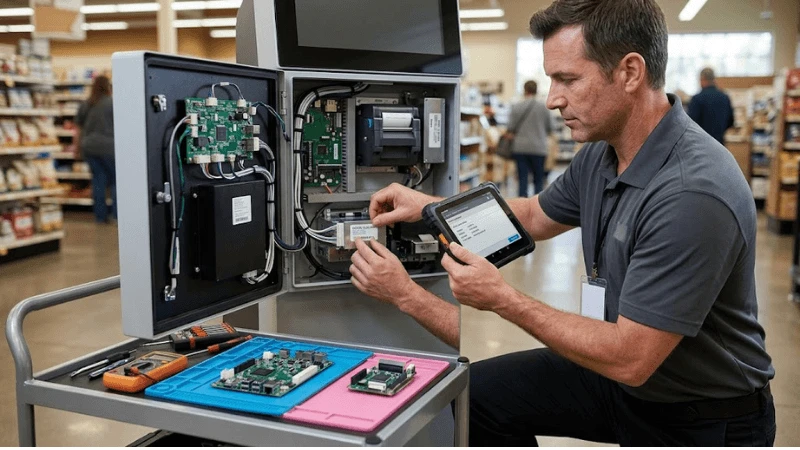
Failure modes: diagnose the interface, not just the visible symptom
Field teams often replace the most visible component first. That can make an intermittent problem disappear while leaving the true interface defect in place. A better fault model starts with the observable symptom, lists the two or three controlled variables that can create it, and captures evidence before reset or replacement.
| Observed failure | Primary control to inspect | Useful reproduction condition | First diagnostic action |
|---|---|---|---|
| A service ticket references only "Kiosk 4" and cannot distinguish replaced hardware from the original unit. | Kiosk identity hierarchy | scan/record complete as-built unit identity | capture the state before changing configuration |
| A recurring failure is suspected but affected part lots cannot be identified. | FRU serialization | replace one representative FRU and update parent-child relationship | isolate the interface and reproduce on a known-good reference |
| A replacement fixes the symptom but the failed unit disappears without analysis or warranty return. | Replacement workflow | restore required configuration/firmware after replacement | compare unit/revision history before replacing parts |
| A new touch controller works but ships with default tuning rather than the kiosk baseline. | Configuration restore | verify removed-part disposition and RMA linkage | restore the approved baseline and rerun the adverse case |
| Warranty credits and reliability data diverge because procurement and service use different identifiers. | Warranty and RMA linkage | query fleet history for the replaced serial or lot | contain the user impact, then preserve logs/photos/measurements |
Do not use a single successful retry as proof of root cause. If a reboot, reconnection, cleaning step, or module swap restores service, record it as recovery evidence and keep the incident open until the team can explain why the state changed. Recurrence after the same service action is especially valuable evidence.
Build an acceptance test that represents the field
A factory demo should answer the project question, not merely show that the product turns on. For kiosk FRU traceability, include the normal condition, a tolerance edge, a service/replacement state, and at least one controlled failure. Preserve the exact unit and revision so the evidence can be reused during troubleshooting without pretending that a later substitution is identical.
Minimum test sequence
- Scan/record complete as-built unit identity
- Replace one representative fru and update parent-child relationship
- Restore required configuration/firmware after replacement
- Verify removed-part disposition and rma linkage
- Query fleet history for the replaced serial or lot
- Rebuild a kiosk record from service history after a simulated depot return
| Step | Condition | Main control exercised | Evidence to retain |
|---|---|---|---|
| 1 | Scan/record complete as-built unit identity | Kiosk identity hierarchy | Pass/fail result tied to unit, revision, configuration, and test condition |
| 2 | Replace one representative fru and update parent-child relationship | FRU serialization | Pass/fail result tied to unit, revision, configuration, and test condition |
| 3 | Restore required configuration/firmware after replacement | Replacement workflow | Pass/fail result tied to unit, revision, configuration, and test condition |
| 4 | Verify removed-part disposition and rma linkage | Configuration restore | Pass/fail result tied to unit, revision, configuration, and test condition |
| 5 | Query fleet history for the replaced serial or lot | Warranty and RMA linkage | Pass/fail result tied to unit, revision, configuration, and test condition |
| 6 | Rebuild a kiosk record from service history after a simulated depot return | Fleet analysis | Pass/fail result tied to unit, revision, configuration, and test condition |
Acceptance criteria should be observable. "Works normally" is weak because it does not define the task, population, environment, duration, or failure threshold. Prefer statements such as "the defined workflow completes under the approved production configuration and the specified adverse condition produces the expected state, alert, containment, or recovery." Attach measurements where the decision genuinely depends on them.
What to save in the evidence package
- Exact product model, hardware/firmware/software revision and production BOM state
- Fixture, enclosure, player, network, power, content, merchandise or peripheral configuration that affects the test
- Test method, tools and relevant environmental or operating conditions
- Pass/fail result plus photographs, logs, measurements, event records or inspection notes appropriate to the topic
- Open deviations, corrective actions, temporary controls and the person who can close them
- Retest triggers for supplier substitution, software update, site change and field replacement
RFQ questions that expose hidden integration scope
Two quotations are not comparable until they carry the same responsibility boundary. For kiosk FRU traceability, ask suppliers to answer with the exact quoted configuration, the evidence they can provide, and the conditions they exclude. A "yes" to a feature question is less useful than a drawing, supported-state definition, test record, service instruction, or sample that the buyer can verify.
- Which modules are field replaceable and individually serialized?
- Are supplier part/revision/serial identifiers machine-readable?
- What configuration must be restored after each FRU replacement?
- How are RMA and warranty records linked to field serials?
- Can replacement history be exported for fleet reliability analysis?
- What component substitutions require renewed acceptance testing?
Normalize the quote before comparing price
- Exact model and revision, including accessories and project options
- Included integration work versus buyer/system-integrator responsibility
- Test evidence supplied with the production configuration
- Known exclusions, tolerance limits and conditions that require a different design
- Spare/replacement strategy and configuration restoration method
- Change-notification commitment for parts or firmware that can alter the approved result
A different technical architecture is not automatically inferior. Keep the outcome and evidence requirement fixed, then allow each supplier to show how its architecture achieves them. Mandating an implementation only makes sense when an adjacent system interface genuinely requires it.

Keep the approved state alive after handover
Commissioning closes the project only if operations can recognize the same state later. Give field teams a concise baseline for kiosk identity hierarchy, fru serialization, and replacement workflow; include a safe recovery sequence and say which actions require engineering review. If a technician can change the result during normal service, that service step belongs in the control plan.
Fleet signals worth trending
- FRU replacements by revision
- repeat repair rate
- unknown/unserialized replacement count
- configuration restore failures
- warranty/RMA recovery by tracked part
Trend these signals by site, hardware revision, software release and last service action. One incident rarely proves a design defect, but clustering can reveal a supplier lot, configuration change, environmental condition, or maintenance practice that was invisible during pilot testing. Preserve enough history to compare "before" and "after" rather than counting tickets alone.
Retest triggers
- A supplier substitution changes kiosk identity hierarchy or the part that establishes it.
- A firmware, driver, player, OS or configuration change can affect fru serialization.
- A fixture, enclosure, mounting, wiring, lighting, power, cleaning, site or workflow change alters replacement workflow.
- A field replacement changes configuration restore or removes a calibration/configuration dependency.
- The adverse condition "A service ticket references only "Kiosk 4" and cannot distinguish replaced hardware from the original unit." appears again in the field.
Decision gate: approve, revise, or stop
- Boundary: Can another team reproduce the approved state for kiosk identity hierarchy?
- Interface: Is ownership clear where fru serialization interacts with replacement workflow?
- Adverse case: Did the test include "A service ticket references only "Kiosk 4" and cannot distinguish replaced hardware from the original unit." or an equally representative failure?
- Recovery: Can service restore operation without destroying diagnostic evidence?
- Lifecycle: Is there a retest trigger when configuration restore or another controlled dependency changes?
Close the review as approve, revise, or stop. If a gap is accepted temporarily, record the owner, temporary control, evidence still required, and the event that closes the exception. For related engineering boundaries, see Kiosk Remote Monitoring, Kiosk OS Lockdown, Kiosk Offline Mode and Network Failover, Payment Kiosk Hardware Design.
FAQ
Q: What is the first thing to verify for kiosk FRU traceability?
A: Start with the approved baseline for kiosk identity hierarchy and fru serialization. Capture the current configuration and recent service/change history before resetting or replacing parts.
Q: Can a supplier datasheet replace project acceptance testing?
A: No. Product documentation defines a starting capability boundary. Project testing proves the final combination of hardware, configuration, enclosure, site conditions, workflow and service method that will actually be deployed.
Q: Which test should be included in a pilot?
A: At minimum include scan/record complete as-built unit identity, replace one representative FRU and update parent-child relationship, and one adverse/service condition such as rebuild a kiosk record from service history after a simulated depot return. The objective is to expose the interface most likely to change after rollout.
Q: What should trigger a retest?
A: Retest after a component, firmware, driver, mounting, optical, electrical, environment, workflow or service change that can affect kiosk identity hierarchy, fru serialization, or replacement workflow.
Q: How should two supplier solutions be compared?
A: Normalize the exact configuration, inclusions, exclusions, evidence, integration responsibility, service access, replacement method and change-control commitment. Only then compare commercial terms.
Q: What evidence is most useful months after deployment?
A: Evidence tied to unit identity and revision: configuration readback, photographs, measurements, logs, test conditions, defect disposition, service history and the exact acceptance requirement. Context makes the record reusable.
Final recommendation
The strongest approach to kiosk FRU traceability is to make the field condition reproducible. Freeze the configuration that matters, challenge it with a realistic adverse case, preserve evidence, and make service/revision changes trigger an explicit retest. That is more useful than a long feature list because it tells procurement what to buy, commissioning what to prove, and operations what to protect.
For wider project context, return to LEGOYO Products, LEGOYO Solutions, and LEGOYO Technical Blog. When the site conditions, interfaces, intended workflow and acceptance evidence are ready for a configuration review, use Request a Quote.





