


A kiosk can become unreachable even when its application includes an auto-restart function. The operating system can hang before the application runs, a device driver can deadlock, the storage stack can stall, or the computer can stop responding to remote management. A hardware watchdog timer exists for this class of failure: an independent timer expects a periodic heartbeat and, if the expected heartbeat stops, can trigger a controlled reset or another recovery action defined by the hardware design.
This guide explains how to use a kiosk hardware watchdog as one layer in a broader recovery architecture. It does not replace the software controls in self-service terminal solution deployments; it complements them. The key engineering question is not "does the motherboard have a watchdog?" but "which failure states can it detect, who is allowed to feed it, what action occurs on timeout, and what evidence proves the kiosk does not enter a destructive reset loop?"
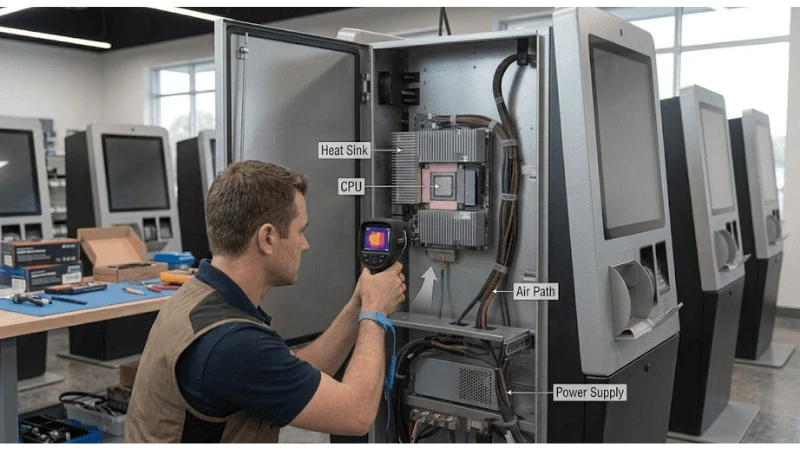
Use Layered Recovery Instead of One Big Reset Button
Different failures deserve different recovery actions. An application that has lost a network session may only need a process restart. A frozen UI service may need a service restart. A hung operating system may require a system reset. A peripheral with its own firmware may need its USB or power domain cycled. Jumping immediately to a hard power cycle can recover availability, but it can also hide the root cause and create unnecessary storage or transaction risk.
| Recovery layer | Best suited to detect | Typical action | Evidence to log |
|---|---|---|---|
| Application supervisor | UI crash, process exit, stale internal heartbeat | Restart application or service | Process state, error code, app log |
| OS/service manager | Service dependency or boot-state failure | Restart service or OS | Service state, event log, boot reason |
| Hardware watchdog | Loss of trusted software heartbeat or OS hang | Hardware reset or platform-defined recovery | Watchdog timeout/reset reason |
| Peripheral controller | Printer/scanner/payment device unresponsive | Device reset or isolated power cycle | Device state, command timeout, reset count |
| Remote operations | Repeated or ambiguous faults | Escalate, quarantine, dispatch | Fleet history and technician action |
Define the Watchdog Owner and Heartbeat
The most important design decision is which software component feeds the watchdog. If every process can refresh it, one healthy background service can keep the timer alive while the customer-facing application is frozen. If only the UI process feeds it, a transient application pause can reset an otherwise healthy kiosk. A robust design usually places ownership in a small supervisor that checks a defined set of health conditions before refreshing the hardware timer.
That supervisor should answer a business-relevant question: is the kiosk healthy enough to continue unattended operation? The inputs might include application heartbeat, critical service state, transaction engine state, storage availability, and required peripheral readiness. Do not include every possible metric. A noisy non-critical sensor should not be able to reboot the fleet.
Choose the Timeout From Real Boot and Transaction Behavior
A watchdog timeout must be long enough to tolerate the slowest legitimate operation the supervisor is expected to observe, including boot, update, database maintenance, or a planned service transition. It must also be short enough that an unattended kiosk does not remain frozen for an unacceptable period. That balance cannot be copied from another project.
Measure actual boot and recovery times on production hardware. Add explicit maintenance modes for software updates, storage checks, or diagnostics so the watchdog behavior is deterministic during planned long operations. If the timer is simply disabled during maintenance and never re-enabled, the protection is illusory; re-enable state should be part of the post-maintenance verification.
Prevent Reset Loops With Escalation Logic
A hardware reset does not fix a persistent root cause. If a corrupt application, failing SSD, unstable power supply, or peripheral short causes the kiosk to hang after every boot, a watchdog can create an endless cycle. The design therefore needs a retry counter or boot-history policy that changes behavior after repeated watchdog resets.
For example, after an initial reset the kiosk may attempt normal boot; after repeated resets inside a defined observation window, it can enter a restricted recovery state, disable a suspect peripheral, or flag the unit for service. The exact policy depends on the platform and application. Pair that decision with the storage-health ideas in the kiosk storage endurance guide so repeated resets do not mask an underlying write or storage problem.
Log the Reset Reason Before Evidence Disappears
A fleet team needs to distinguish watchdog recovery from user power cycling, scheduled reboot, brownout, software-requested restart, and technician action. Use platform-supported reset-reason registers, firmware logs, OS events, or management-controller data where available. Send the event to remote monitoring after the system returns.
The recovery record should include the kiosk ID, time, previous boot duration, watchdog stage, relevant application/peripheral state, software version, and whether the unit returned to service. If the watchdog fires but the event is never surfaced, operations sees only a short outage and engineering loses the pattern that could reveal a fleet defect.
Coordinate the Watchdog With Power and Peripheral Recovery
Some kiosk failures are not computer failures. A printer can remain electrically powered but stop responding. A USB scanner can disappear from the bus. A payment terminal may have its own certified recovery requirements. Resetting the host computer can leave the peripheral in the same bad state or interrupt a transaction that needed a different recovery path.
Treat peripheral recovery as an explicit state machine. The kiosk ESD and grounding guide is relevant because ESD-induced disturbances can present as intermittent USB or touch faults, while a watchdog sees only the downstream symptom. If a peripheral has an isolated controllable power domain, define when it may be cycled and how the application confirms it has returned before resuming customer service.
Design a Fault-Injection Test, Not Just a "Watchdog Enabled" Check
Qualification should deliberately create the failures the recovery architecture claims to handle. The goal is controlled fault injection on a test kiosk-not destructive testing on live payment transactions. Each test should define the injected fault, expected detection layer, expected recovery action, maximum acceptable customer-facing state, and evidence that the kiosk returns to a known-good condition.
| Fault injection | Expected detector | Expected recovery evidence |
|---|---|---|
| Kill customer application | Application supervisor | App restart without full reboot if safe |
| Stop a critical service | Service manager/supervisor | Service recovery or escalated OS restart |
| Suspend watchdog supervisor | Hardware watchdog | Watchdog timeout and recorded hardware reset reason |
| Make approved test peripheral unresponsive | Peripheral monitor | Isolated recovery or defined escalation |
| Interrupt network | Connectivity logic | Offline/failover behavior; no unnecessary watchdog reset |
| Repeat fault after reboot | Escalation policy | Reset-loop prevention state and service alert |
Include update and maintenance states in the same matrix. A fleet that survives a forced hang but reboots halfway through every long firmware update is not correctly designed. Conversely, a watchdog permanently suppressed by the update agent can leave the kiosk unprotected after a failed update.
Integrate Watchdog Events With Remote Fleet Monitoring
A reset that restores service is still an incident signal. Count watchdog recoveries by unit, software version, site, and peripheral configuration. Look for clusters after a release or hardware change. Repeated resets should open an investigation even if customers rarely report them, because automatic recovery can hide a degradation trend.
The broader fanless kiosk thermal design guide context also belongs in the event model. Temperature excursions, unstable power, or peripheral faults can precede watchdog events. Correlating those signals is more useful than treating each reboot as an isolated software crash.
Write Watchdog Requirements Into the Hardware and Software RFQ
- Identify whether the computing platform exposes a hardware watchdog and what reset action it can perform.
- Define how the watchdog is configured at boot and how configuration persists across updates.
- Specify which supervisor owns the heartbeat and which health conditions it evaluates.
- Require a way to distinguish watchdog reset from other reset causes.
- Define maintenance/update behavior and how protection is restored afterward.
- Specify retry-loop prevention and remote escalation after repeated timeouts.
- Require fault-injection evidence on the production software and hardware configuration.
- Document any peripheral or payment constraints that prohibit automatic reset in certain states.
Common Design Mistakes
- Feeding the watchdog from a low-level loop that stays alive even when the user experience is frozen.
- Using a timeout shorter than legitimate boot or update operations.
- Hard-resetting the whole kiosk for every peripheral fault.
- Failing to record the reset reason, making automatic recovery invisible to operations.
- Disabling the watchdog during service and not verifying that it was re-enabled.
- Allowing repeated resets forever instead of entering a controlled recovery or service state.
- Assuming a motherboard feature is active without verifying firmware and OS configuration.
FAQ
Q: Is a hardware watchdog the same as kiosk application auto-recovery?
A: No. Application auto-recovery normally depends on the operating system still functioning. A hardware watchdog can provide a recovery path when the trusted software heartbeat stops, including some OS-hang conditions, depending on platform implementation.
Q: Should the kiosk reboot whenever a printer stops responding?
A: Not by default. Use the narrowest safe recovery action. If the printer can be reset independently, that is usually less disruptive than rebooting the host. The exact policy depends on transaction state and peripheral design.
Q: How long should the watchdog timeout be?
A: There is no universal value. Measure legitimate operations on the production system, define the maximum tolerated frozen state, and build explicit maintenance modes for long planned operations.
Q: What makes a watchdog acceptance test credible?
A: The test should intentionally stop the heartbeat or create a defined hang condition, verify the expected reset, confirm the reason is logged, prove the kiosk returns to service, and demonstrate that repeated faults do not cause an uncontrolled loop.
Final Engineering Perspective
A kiosk hardware watchdog is valuable when it is part of a layered, observable recovery design. Give one trusted supervisor ownership of the heartbeat, select timeouts from measured behavior, preserve reset evidence, isolate peripheral recovery where possible, and test repeated faults. Teams evaluating the hardware platform can start with the kiosk display category and product catalog pages, use display solutions overview for system context, and use request a project quotation to define watchdog, remote-monitoring, and recovery requirements for the intended kiosk configuration.
Define the Boot-State Watchdog Enable Sequence
A hardware watchdog should not begin enforcing a normal-runtime timeout before the kiosk is capable of producing the expected heartbeat. Early boot can include firmware initialization, storage checks, operating-system recovery, device enumeration, network setup, application launch, and peripheral discovery. If the supervisor is armed too early with a timeout designed for steady-state operation, a slow but legitimate boot can be misclassified as a hang and trapped in a reset loop.
Document exactly which component enables the watchdog, when it starts being serviced, and which state transition marks the beginning of normal monitoring. Some designs use a generous boot window and a shorter runtime window; others arm the hardware only after the application or a dedicated supervisor reaches a known state. The correct design depends on the platform, but the requirement should be testable and visible in logs.
Coordinate Watchdogs with Updates and Rollback
Software updates are one of the highest-risk times for automatic recovery because long install phases, expected reboots, storage activity, and migration steps can look like failures to a simplistic watchdog. The update agent, operating system, and hardware supervisor need a defined contract. That may mean temporarily changing the allowed recovery state, recording an update-in-progress marker, or ensuring the rollback mechanism can distinguish an interrupted update from an application hang.
Do not solve this by disabling recovery indefinitely during maintenance. If power is lost or the update agent itself hangs, the kiosk still needs a bounded path back to a known state. Test interrupted downloads, interrupted installation, reboot during migration, failed application launch after update, and rollback to the previous image. The evidence should show not only that the unit eventually boots, but which software version and configuration it returns to.
| Fault injection | Expected supervisor behavior | Evidence |
|---|---|---|
| Application process stops heartbeating | Escalate according to the defined recovery ladder | Heartbeat timeout, action taken, recovered version |
| Operating system becomes unresponsive | Hardware-level reset if higher layers cannot recover | Reset reason and boot completion record |
| Peripheral blocks a transaction | Recover the device or transaction without unnecessary full reboot where possible | Peripheral state and recovery action |
| Update is interrupted | Resume, rollback, or enter service state according to release policy | Update marker, active version, rollback result |
| Repeated boot failure | Stop endless cycling and surface a serviceable fault state | Reset counter and terminal diagnostic state |
Use Reset Counters and Service Thresholds
Automatic recovery is valuable only if repeated failures remain visible. A kiosk that reboots every hour may appear "online" to a basic availability dashboard while customers repeatedly lose transactions. Persist the reset reason and a bounded history across reboots. Count watchdog resets separately from planned maintenance reboots, operator restarts, brownouts if detectable, and application-controlled recovery.
Service thresholds should be based on the deployment's business and reliability requirements, not copied from a generic rule. The important pattern is escalation: a first isolated recovery may only create telemetry; repeated recovery in a defined period may create a maintenance ticket; persistent boot loops should move the unit into a controlled diagnostic state rather than endlessly cycling. Keep enough state to diagnose the problem without writing excessive logs that increase storage wear.
That last point connects watchdog design to the kiosk storage endurance guide strategy. Recovery events, crash dumps, and telemetry are useful, but they must be retained with deliberate limits. Electrical resets should also be interpreted alongside the kiosk ESD and grounding guide design, because an environmental disturbance can look like a software reliability problem if reset-cause evidence is weak.
Validate the Recovery Ladder on the Released Hardware
A laboratory test should intentionally break each layer that the design claims to recover. Stop the application heartbeat, deadlock a supervised service in a controlled test build, disconnect or stall a representative peripheral, create a network outage, force an update interruption, and verify the behavior after repeated failed boots. Do not rely only on pulling mains power; a power-cycle test proves restart behavior but does not prove that the watchdog can detect the failure modes it is meant to supervise.
Record detection time, recovery action, transaction-state handling, reset reason, time to a usable kiosk state, and whether remote telemetry preserves the event. For fanless or thermally constrained systems, repeat critical recovery tests after the hardware has reached its normal operating temperature because boot timing and storage behavior can differ from a cold bench unit. The thermal architecture in the fanless kiosk thermal design guide is therefore a useful adjacent qualification input.
Specify Watchdog Ownership in the RFQ
Ask who owns the hardware watchdog, how the heartbeat is generated, which failures it can and cannot observe, how timeout values are configured, how reset causes are persisted, what prevents endless reset loops, and how update/rollback states are handled. Also ask whether the quoted controller hardware exposes the same watchdog features across all approved board revisions. A feature present on a development motherboard is not a production guarantee unless it is tied to the released BOM and firmware configuration.
For integration planning, use the kiosk display category and self-service terminal solution pages to define the terminal boundary, keep reliability findings with the LEGOYO technical blog record, and route architecture questions through contact LEGOYO. These controls turn automatic reboot from a vague checkbox into a verifiable recovery subsystem.





