


So You're Looking at ESLs. Here's What Actually Matters.
Let's skip the market projections and get to the point. The ESL space hit roughly $2 billion globally in 2025, growing at double digits. You've probably seen the headlines. What matters more for your buying decision is understanding which problems these systems actually solve-and which ones they don't.
Here's the thing: electronic shelf labels aren't magic. They're infrastructure. And like any infrastructure investment, the ROI depends entirely on how well the solution fits your operation, not how impressive the spec sheet looks.
Beyond the headline-grabbing Walmart rollout, we're seeing a shift in how retailers view these assets: they aren't just price tags anymore, they are "connected store nodes." In 2025, our mid-market clients are prioritizing ESLs that integrate with pick-to-light systems to speed up online order fulfillment, effectively turning their shelf edges into logistics tools. We're also seeing a surge in demand for fixture-integrated screens-where the digital rail is built directly into the shelving structure rather than clipped on-reducing the cluttered look of early-generation deployments.
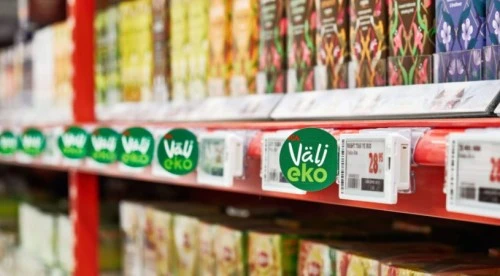
E-Paper vs. LCD: It's Not About "Better"-It's About Where
The display technology debate usually gets framed wrong. Vendors push their preferred tech, and buyers end up comparing apples to oranges. Here's a more useful way to think about it: where does the label live, and what job does it need to do?
E-Paper Does the Heavy Lifting
Think of e-paper like a really smart sticky note. Once it updates, it just... sits there. No power drain. That's why battery life runs 5+ years in normal use-the display only sips energy during the refresh cycle, maybe 3-15 seconds depending on the model.
What that means practically:
You can deploy thousands of these across your store without running a single power line. Freezer section? No problem-there are variants rated down to -25°C. The paper-like look reads clean under fluorescent lighting, and viewing angles are forgiving (nearly 180°), so customers don't need to crouch to read bottom-shelf prices.
Where e-paper earns its keep:
Standard shelf-edge pricing across high-SKU categories
Refrigerated and frozen sections
Warehouse bin labels and backroom inventory tags
Any location where you're counting tags in the hundreds or thousands
LCD Grabs Attention (When You Need It To)
LCD screens are the opposite play. They need constant power, but they deliver what e-paper can't: motion, video, vivid color, instant content swaps with zero visible refresh lag. You're not deploying 5,000 of these. You're putting them at endcaps, feature displays, or anywhere you want to stop someone mid-aisle.
Where LCD makes sense:
Endcap promotions with rotating content
New product launches that need demo loops
High-margin feature items where visual impact drives conversion
Cross-merchandising displays showing recipes or bundle deals
Most stores that get this right run a hybrid setup. E-paper handles 90%+ of your shelf edge. LCD goes where the marketing budget says "make this pop." Trying to do it all with one technology usually means overpaying or underperforming.
Don't fall into the "all-or-nothing" trap. For most 25,000+ sq. ft. supermarkets, we recommend a 95/5 split: deploy power-efficient E-ink tags (2.66"–4.2") for the thousands of center-store SKUs, but reserve high-bright LCD bar screens (28"–49") for high-margin "inspiration zones" like end-caps, cosmetics, and fresh food headers. We recently guided a regional grocery chain to use this hybrid approach, and they found that while E-ink saved labor, the strategic LCDs drove a 15% lift in impulse buys for promoted items-paying for their higher energy consumption many times over.
Sizing Isn't About Specs. It's About Sight Lines.
Here's where a lot of buyers go wrong: they pick tag sizes based on what fits the rail or what the vendor has in stock. That's backwards. Start with how your customers actually shop. How far are they standing from the shelf? What's the lighting like? Are they scanning quickly or reading closely?
The Compact Tags (2.66" – 4.2")
These work when shelf spacing is tight and shoppers are close. Think convenience stores, grab-and-go coolers, or cosmetics walls where customers literally lean in. The 2.66" size slots into standard C-channel rails without modification. Bump up to 4.2" if you need room for a promo flag or multi-line product description-but know that larger tags in cramped spaces can actually obscure product visibility.
Scenario fit: High-density planograms, impulse categories, checkout lane add-ons

It supports dynamic content such as prices, barcodes, QR codes, and promotional messages, while ensuring stability through its durable metal stand.

Designed to slot into label holders, it ensures accurate pricing and smooth integration for modern retail stores.
The Mid-Range Tags (4.2" – 5.8")
This is the workhorse zone for most grocery and general merchandise. Customers browse from 2-4 feet back, so font size needs to scale up. The 5.8" hits a sweet spot-large enough for easy reads at arm's length, compact enough to fit standard shelf layouts without custom mounting.
Scenario fit: Center store grocery, pharmacy OTC sections, pet food aisles, general merchandise
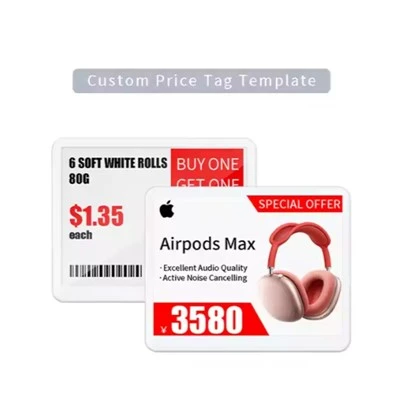
Highlighting the paper-like display, 7-color LED indicators, and built-in NFC for seamless customer interaction.
The Big Boys (7.3"+)
These belong on endcaps, bulk displays, or anywhere customers are viewing from 6+ feet away. Electronics and appliance stores lean hard on this size because spec-heavy products need room to breathe. Also useful for warehouse-style retail where you're competing with signage clutter and need to punch through visually.
Scenario fit: Endcap features, warehouse bulk bins, electronics/appliance specs, outdoor garden sections.

Advanced wireless connectivity, and durable design to offer the perfect display solution for various retail environments.
Integration: The Part Nobody Wants to Talk About
Here's the unsexy truth about ESL projects: the hardware is the easy part. Integration is where deployments stall, budgets bloat, and timelines slip. Your ESL system needs to talk to your price file. Sounds simple. Except your price file lives in a POS system that's 8 years old, connected to an ERP that runs batch updates overnight, feeding a promotional engine that marketing manages in a spreadsheet.
Before you pick a vendor, answer these questions honestly:
Where does your pricing data actually live? Not where it's supposed to live-where does it actually get updated day-to-day?
How often do prices change? Once a week? Multiple times daily? The answer affects what integration architecture makes sense.
Who owns the POS relationship? If you're on a major platform (Oracle Retail, NCR, SAP), most ESL vendors have pre-built connectors. If you're running something custom or legacy, budget 30-60 days for API development.
What's your IT bandwidth? A vendor that handles integration soup-to-nuts costs more upfront but saves you from tying up your internal team for months.
The Three Integration Paths
API Integration (Real-Time): Your systems talk directly. Prices update in the POS, and tags refresh within minutes. This is the cleanest setup but requires modern infrastructure on both ends.
File Export (Batch): Your system dumps a price file on a schedule-overnight, every 4 hours, whatever. The ESL middleware picks it up and pushes updates. Lower technical bar, but you're always a cycle behind.
Database Connector (Direct Query): The ESL system reads directly from your pricing tables. Fast updates, but your IT team will have opinions about external systems querying production databases.
Hardware installation is fast, but data integration is where projects stall. While modern cloud POS platforms (like Shopify POS or Lightspeed) can often integrate in 2-4 weeks via standard APIs, legacy on-premise systems (Oracle Micros or older NCR builds) often require custom middleware, pushing timelines to 8-12 weeks. The biggest gotcha we see is Wi-Fi interference: retailers often underestimate how crowded the 2.4GHz spectrum is in a store full of shoppers; we always recommend a pre-deployment RF survey to ensure your price updates don't get stuck in a traffic jam.
Communication Tech: The Wireless Backbone
ESL tags are wireless devices, which means they need a communication protocol to receive updates from the server. This is more important than it sounds-the wrong choice can mean dead spots, slow updates, or interference headaches.
|
Protocol |
What It Does Well |
Watch Out For |
|
Sub-GHz RF |
Long range (30-50m), punches through shelving |
May need FCC compliance attention |
|
BLE 5.0 |
Low power, smartphone-friendly for future features |
Shorter range, needs more base stations |
|
Infrared |
Very fast, no radio interference |
Requires line-of-sight |
|
Optical Wireless |
Extremely low power, high reliability |
Less common, fewer vendor options |
Most 2026 deployments are landing on BLE or proprietary RF protocols. The Bluetooth SIG baked ESL-specific support into the 5.4 spec, so expect BLE to become the de facto standard over the next few years.
What this means for site planning: You'll need a site survey before finalizing quantities. Base station placement depends on store layout, shelving materials (metal kills RF range), and any special environments like freezers that need hardened equipment.
Deployment: Pilot First, Always
I don't care how confident the vendor is or how tight your timeline feels. Run a pilot first. Here's why: every store has quirks. The planogram software says one thing, the actual shelf layout says another. The POS integration works perfectly in staging and throws errors in production. The store team discovers they hate the mounting hardware on day three. A well-structured pilot catches all of this before you've committed six figures.
What a Good Pilot Looks Like
Scope: 500-1,000 tags minimum. Less than that and you won't hit enough edge cases to learn anything useful.
Coverage: At least 3-4 departments. You need to test different shelf types, environmental conditions (refrigerated vs. ambient), and category-specific workflows.
Duration: 8-12 weeks. You want to run through multiple promotional cycles to see how updates perform under real load.
Success metrics (define these upfront):
Update success rate (target: 99%+)
Time from POS change to shelf display
Staff feedback on workflow changes
Tag failure/replacement rate
Full-Store Conversion: When It Makes Sense
Some retailers skip straight to full deployment. That can work if:
You've already piloted successfully at another location
Your IT team has integration bandwidth and experience
The store is a new build where you're starting clean
Leadership has budget committed and won't flinch at 6-figure initial costs
The upside of going all-in: faster time to ROI, cleaner operational transition, no awkward hybrid period where half the store is digital and half is paper. The downside: higher risk if something goes sideways, and more pressure on staff training.
What About Cost? Let's Get Real.
I'm not going to give you a neat ROI formula with perfect round numbers. Real deployments don't work that way. What I can tell you is what the cost buckets look like and how to think about payback:
Hardware costs range from around $6-8 per tag for small e-paper units up to $100+ for large color displays or LCD screens. A typical grocery store running 25,000-35,000 SKUs will see hardware costs somewhere in the $200K-$450K range depending on mix and vendor.
Base stations run $200-500 each, and you'll need one per ~1,500-2,500 square feet depending on protocol and shelving density.
Installation adds $0.50-$2.00 per tag if you're using professional deployment services. Some teams do it in-house, but that's time your staff isn't on the floor.
Software licensing is often bundled year one, then $0.10-$0.50 per tag annually after that.
The payback math is mostly about labor. Manual price changes eat 10-15+ hours weekly at a mid-sized store. At current wage rates, that's $15K-$40K annually in labor alone. Error reduction and dynamic pricing capability add on top of that, but they're harder to quantify.
Most grocery deployments we've seen hit breakeven somewhere in the 14-22 month range. Pharmacy and general merchandise tend to run a bit longer-18-28 months-because price change frequency is lower.
Realistically, most of our clients see a full payback in 18–24 months strictly on labor savings (eliminating the 10-15 hours/week spent on manual tagging). However, retailers who actively use Dynamic Pricing-automatically lowering prices on perishables near expiration or matching competitor flash sales-often accelerate that ROI to under 14 months. Conversely, ROI slows significantly if you over-spec the hardware (e.g., putting 4-color graphic tags on low-margin goods) or fail to train staff on the pick-to-light features that drive operational efficiency.
Picking a Vendor: What to Actually Ask
The vendor pitch will focus on features. Your evaluation should focus on fit.
Non-negotiables:
Do they have documented integration with your POS platform?
What's the real-world battery life on deployed tags, not lab conditions?
Where's their nearest service support? Can they respond in 24-48 hours if something breaks?
What does their warranty actually cover, and for how long?
Important but negotiable:
Display resolution and color options
Dashboard UX and reporting capabilities
Advanced features like NFC or LED flash indicators
Nice-to-haves:
AI pricing integrations
Computer vision tie-ins
Mobile app for store teams
If you're evaluating vendors and want to compare options across e-ink sizes and LCD digital signage, Legoyo's ESL product line covers the full range from 2.66" compact tags through 15.6" LCD screens. Worth putting on your shortlist for quotes.
A Few Things That Trip People Up
Freezer deployments need special tags. Standard e-paper dies below 0°C. Make sure you're specifying low-temp variants for refrigerated and frozen sections-they cost a bit more but won't fail six months in.
Metal shelving kills RF range. If your fixtures are steel, plan for more base stations than the vendor's calculator suggests. Get a site survey, not a spreadsheet estimate.
Staff buy-in matters more than you think. The tech works fine. The question is whether your store teams will actually use it correctly. Budget time for training, and designate a floor champion who owns troubleshooting.
Don't over-engineer year one. Start with pricing automation. Get that solid. Then layer on promotional content, NFC features, or dynamic pricing once the foundation is stable.
Looking Ahead
The best buy electronic price tags for your operation depend on your store format, your systems landscape, and your operational priorities. There's no universal answer.
What we can say is that ESL technology has matured past the early-adopter phase. The question isn't whether this works-it's whether it works for you, right now, at a price that makes sense.
For detailed product specs and to explore sizing options across e-ink and LCD categories, kiosketagscreen.com has the full rundown.
References
- Mordor Intelligence. "Electronic Shelf Label Market Size, Growth Drivers, Scope 2025-2030." https://www.mordorintelligence.com/industry-reports/electronic-shelf-market
- IMARC Group. "U.S. Electronic Shelf Label Market Share Report 2025-33." https://www.imarcgroup.com/united-states-electronic-shelf-label-market
- Grand View Research. "Electronic Shelf Label Market Size | Industry Report, 2033." https://www.grandviewresearch.com/industry-analysis/electronic-shelf-label-market-report
- ComQi. "Cost Savings and ROI: The Financial Impact of Electronic Shelf Labels." https://comqi.com/esl-roi/
- U.S. Chamber of Commerce. "How Digital Shelf Labels Improve Retail Sales." https://www.uschamber.com/co/good-company/launch-pad/digital-shelf-labels-in-retail





