



Electronic Shelf Label Accessibility: Font Size, Contrast, and Information Hierarchy is not a question that can be answered by one brochure value. For retail design teams, accessibility leads, ESL buyers, store operations managers, and content administrators, the real decision is how to make shelf information readable and understandable across real aisle conditions. A reliable project therefore starts with the operating task, records the installed conditions, and converts every important claim into evidence that can be reviewed before rollout.
This guide uses a readability-first design system that treats template governance, viewing distance, glare, and exception text as operational controls. It does not assume that a particular product, architecture, certification, return, or performance level applies to every project. Published specifications should be tied to the exact model and configuration, while legal, safety, accessibility, payment, and cybersecurity obligations should be reviewed by qualified parties for the relevant market.
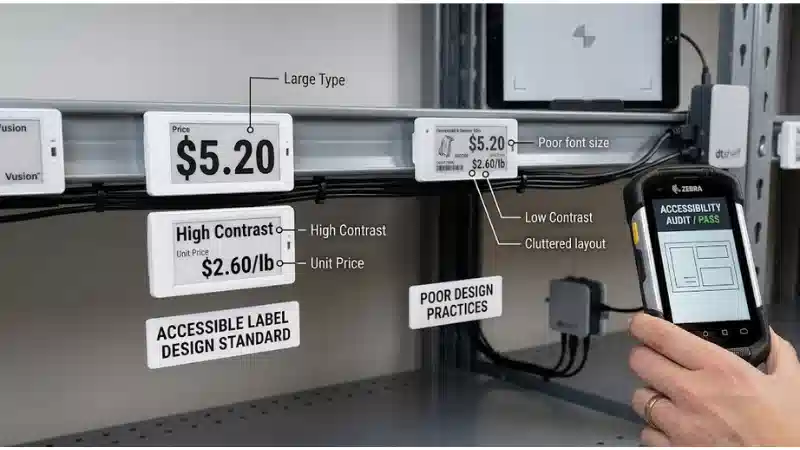
The recommended output is a decision package: scope, requirements, drawings or data maps, test method, expected result, captured evidence, defect ownership, recovery procedure, and the conditions that require retesting. That package gives procurement, engineering, content, operations, and suppliers a common basis for approval instead of relying on subjective impressions.
Define the design job
For electronic shelf label accessibility, this stage should produce a reviewable output rather than an informal agreement. The team should connect the requirement to the intended user, operating condition, owner, and acceptance evidence.
Define the reading task before selecting a template
This requirement should be decided before hardware is ordered. Define the reading task before selecting a template. This matters because a shelf can show stale, unreadable, or incorrectly mapped information even when the device itself appears online. The project should separate glance information from detail information and assign each field a visual priority, and retain the most relevant parts of update logs, endpoint acknowledgments, binding records, shelf audits, exception queues, and signed test results as evidence. For a project team, this changes the decision: test the requirement under normal aisle approach, close inspection, and assisted-shopping scenarios, name the owner who accepts or escalates exceptions, and state whether the conclusion applies only to the tested configuration. Supplier documentation can define a starting boundary, but local validation is still required.
Teams that need the broader product context can review the electronic shelf label solutions before locking this requirement.
Use hierarchy rather than shrinking every field to fit
This is a system question rather than a single-component feature. Use hierarchy rather than shrinking every field to fit. This matters because a shelf can show stale, unreadable, or incorrectly mapped information even when the device itself appears online. The project should reserve dominant space for price and product identity, then place unit price, promotion dates, and legal text in secondary zones, and retain the most relevant parts of update logs, endpoint acknowledgments, binding records, shelf audits, exception queues, and signed test results as evidence. In a pilot, the difference becomes obvious: test the requirement under the smallest supported label format and the longest expected product name, name the owner who accepts or escalates exceptions, and state whether the conclusion applies only to the tested configuration. Supplier documentation can define a starting boundary, but local validation is still required.
Treat accessibility as a repeatable content rule
The specification only becomes useful when it is tied to a real operating condition. Treat accessibility as a repeatable content rule. This matters because a shelf can show stale, unreadable, or incorrectly mapped information even when the device itself appears online. The project should create approved templates and reject content that violates minimum internal readability rules, and retain the most relevant parts of update logs, endpoint acknowledgments, binding records, shelf audits, exception queues, and signed test results as evidence. Operations should translate the requirement into a repeatable check: test the requirement under all departments, languages, and promotion types, name the owner who accepts or escalates exceptions, and state whether the conclusion applies only to the tested configuration. Supplier documentation can define a starting boundary, but local validation is still required.
This checkpoint should be read alongside the site's guidance on electronic shelf label product range, because adjacent decisions can change the result.
Translate the job into measurable requirements
For electronic shelf label accessibility, this stage should produce a reviewable output rather than an informal agreement. The team should connect the requirement to the intended user, operating condition, owner, and acceptance evidence.
Evaluate text at real shelf distance
A strong design separates the intended outcome from the method used to achieve it. Evaluate text at real shelf distance. This matters because a shelf can show stale, unreadable, or incorrectly mapped information even when the device itself appears online. The project should print or display prototypes on actual rails and assess them from the expected approach angle, and retain the most relevant parts of update logs, endpoint acknowledgments, binding records, shelf audits, exception queues, and signed test results as evidence. For a project team, this changes the decision: test the requirement under bright aisles, low shelves, top shelves, and refrigerated cases, name the owner who accepts or escalates exceptions, and state whether the conclusion applies only to the tested configuration. Supplier documentation can define a starting boundary, but local validation is still required.
For related implementation context, use the retail electronic shelf labels resource as a starting point and verify the local configuration.
Control glare and contrast as a system
The most common mistake is to approve the visible result without testing the process behind it. Control glare and contrast as a system. This matters because a shelf can show stale, unreadable, or incorrectly mapped information even when the device itself appears online. The project should test screen surface, ambient lighting, viewing angle, color mode, and fixture reflections together, and retain the most relevant parts of update logs, endpoint acknowledgments, binding records, shelf audits, exception queues, and signed test results as evidence. In a pilot, the difference becomes obvious: test the requirement under day and evening lighting conditions, name the owner who accepts or escalates exceptions, and state whether the conclusion applies only to the tested configuration. Supplier documentation can define a starting boundary, but local validation is still required.
Avoid color-only communication
The buyer should define both the supported condition and the condition that triggers redesign. Avoid color-only communication. This matters because a shelf can show stale, unreadable, or incorrectly mapped information even when the device itself appears online. The project should pair color cues with text, icons, borders, or placement so meaning survives limited color rendering, and retain the most relevant parts of update logs, endpoint acknowledgments, binding records, shelf audits, exception queues, and signed test results as evidence. Operations should translate the requirement into a repeatable check: test the requirement under promotions, warnings, stock status, and loyalty prices, name the owner who accepts or escalates exceptions, and state whether the conclusion applies only to the tested configuration. Supplier documentation can define a starting boundary, but local validation is still required.
The next linked decision is covered in electronic shelf label technology; keep the boundaries separate so one article does not substitute for a project test.
Electronic Shelf Label Accessibility Decision Table
The table below turns the topic into a compact review structure. Add project-specific limits, test tools, owners, and approval signatures before using it as an acceptance record.
| Decision area | What to verify | Evidence |
|---|---|---|
| Information hierarchy | Price and product are identifiable first | Timed comprehension check and shelf photographs |
| Text fit | Worst-case records do not hide required fields | Overflow report and template screenshots |
| Contrast and glare | Content remains readable in installed lighting | Aisle test at multiple angles |
| Color meaning | Meaning does not depend on color alone | Monochrome and limited-color review |
| Placement | Label is visible and aligned to the correct product | Shelf audit and exception log |
Build the content or physical design
For electronic shelf label accessibility, this stage should produce a reviewable output rather than an informal agreement. The team should connect the requirement to the intended user, operating condition, owner, and acceptance evidence.
Design for variable data, not perfect samples
This requirement should be decided before hardware is ordered. Design for variable data, not perfect samples. This matters because a shelf can show stale, unreadable, or incorrectly mapped information even when the device itself appears online. The project should stress-test long names, large prices, decimal formats, multiple currencies, and date ranges, and retain the most relevant parts of update logs, endpoint acknowledgments, binding records, shelf audits, exception queues, and signed test results as evidence. For a project team, this changes the decision: test the requirement under worst-case catalog records and multilingual stores, name the owner who accepts or escalates exceptions, and state whether the conclusion applies only to the tested configuration. Supplier documentation can define a starting boundary, but local validation is still required.
Teams that need the broader product context can review the electronic shelf edge labels before locking this requirement.
Separate shopper content from staff-only codes
This is a system question rather than a single-component feature. Separate shopper content from staff-only codes. This matters because a shelf can show stale, unreadable, or incorrectly mapped information even when the device itself appears online. The project should use distinct zones or screens for operational identifiers so the customer message remains clear, and retain the most relevant parts of update logs, endpoint acknowledgments, binding records, shelf audits, exception queues, and signed test results as evidence. In a pilot, the difference becomes obvious: test the requirement under labels that support picking, replenishment, or planogram tasks, name the owner who accepts or escalates exceptions, and state whether the conclusion applies only to the tested configuration. Supplier documentation can define a starting boundary, but local validation is still required.
Create fallback rules for missing fields
The specification only becomes useful when it is tied to a real operating condition. Create fallback rules for missing fields. This matters because a shelf can show stale, unreadable, or incorrectly mapped information even when the device itself appears online. The project should define what the label shows when unit price, promotion date, image, or loyalty data is unavailable, and retain the most relevant parts of update logs, endpoint acknowledgments, binding records, shelf audits, exception queues, and signed test results as evidence. Operations should translate the requirement into a repeatable check: test the requirement under partial data feeds and delayed system updates, name the owner who accepts or escalates exceptions, and state whether the conclusion applies only to the tested configuration. Supplier documentation can define a starting boundary, but local validation is still required.
This checkpoint should be read alongside the site's guidance on electronic shelf labels in grocery stores, because adjacent decisions can change the result.
Prototype under realistic conditions
For electronic shelf label accessibility, this stage should produce a reviewable output rather than an informal agreement. The team should connect the requirement to the intended user, operating condition, owner, and acceptance evidence.
Test comprehension, not only visual appearance
A strong design separates the intended outcome from the method used to achieve it. Test comprehension, not only visual appearance. This matters because a shelf can show stale, unreadable, or incorrectly mapped information even when the device itself appears online. The project should ask representative users to identify price, product, promotion conditions, and unit price without coaching, and retain the most relevant parts of update logs, endpoint acknowledgments, binding records, shelf audits, exception queues, and signed test results as evidence. For a project team, this changes the decision: test the requirement under older adults, low-vision users, staff, and first-time visitors, name the owner who accepts or escalates exceptions, and state whether the conclusion applies only to the tested configuration. Supplier documentation can define a starting boundary, but local validation is still required.
For related implementation context, use the how electronic shelf labels work resource as a starting point and verify the local configuration.
Measure template exceptions
The most common mistake is to approve the visible result without testing the process behind it. Measure template exceptions. This matters because a shelf can show stale, unreadable, or incorrectly mapped information even when the device itself appears online. The project should track records that overflow, truncate, wrap unexpectedly, or use an unapproved template, and retain the most relevant parts of update logs, endpoint acknowledgments, binding records, shelf audits, exception queues, and signed test results as evidence. In a pilot, the difference becomes obvious: test the requirement under pilot batches and high-change promotional periods, name the owner who accepts or escalates exceptions, and state whether the conclusion applies only to the tested configuration. Supplier documentation can define a starting boundary, but local validation is still required.
Include physical placement in acceptance
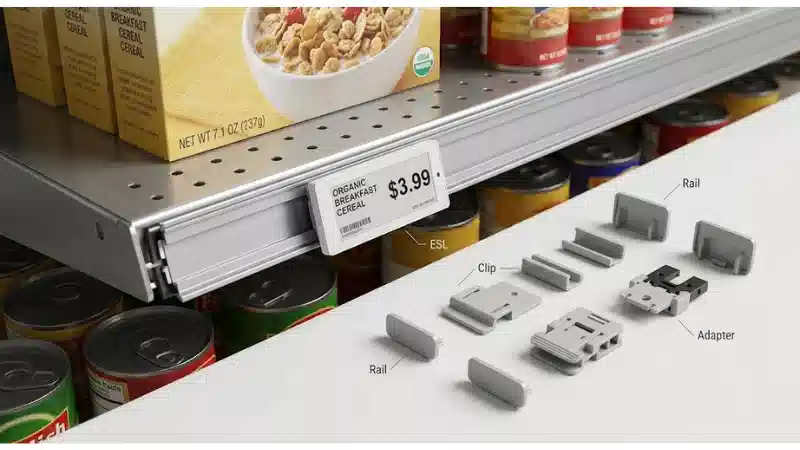
The buyer should define both the supported condition and the condition that triggers redesign. Include physical placement in acceptance. This matters because a shelf can show stale, unreadable, or incorrectly mapped information even when the device itself appears online. The project should verify label angle, rail height, obstruction, and product alignment during shelf audits, and retain the most relevant parts of update logs, endpoint acknowledgments, binding records, shelf audits, exception queues, and signed test results as evidence. Operations should translate the requirement into a repeatable check: test the requirement under endcaps, peg hooks, freezer doors, and deep shelves, name the owner who accepts or escalates exceptions, and state whether the conclusion applies only to the tested configuration. Supplier documentation can define a starting boundary, but local validation is still required.
The next linked decision is covered in ESL refresh rates and display performance; keep the boundaries separate so one article does not substitute for a project test.
Validate readability and usability
For electronic shelf label accessibility, this stage should produce a reviewable output rather than an informal agreement. The team should connect the requirement to the intended user, operating condition, owner, and acceptance evidence.
Control changes through a template owner
This requirement should be decided before hardware is ordered. Control changes through a template owner. This matters because a shelf can show stale, unreadable, or incorrectly mapped information even when the device itself appears online. The project should require review before adding fields, fonts, icons, or promotional treatments, and retain the most relevant parts of update logs, endpoint acknowledgments, binding records, shelf audits, exception queues, and signed test results as evidence. For a project team, this changes the decision: test the requirement under central content teams and local store overrides, name the owner who accepts or escalates exceptions, and state whether the conclusion applies only to the tested configuration. Supplier documentation can define a starting boundary, but local validation is still required.
Teams that need the broader product context can review the ESL gateway placement before locking this requirement.
Maintain a small approved template library
This is a system question rather than a single-component feature. Maintain a small approved template library. This matters because a shelf can show stale, unreadable, or incorrectly mapped information even when the device itself appears online. The project should limit variants by label size, department, language, and promotion type, and retain the most relevant parts of update logs, endpoint acknowledgments, binding records, shelf audits, exception queues, and signed test results as evidence. In a pilot, the difference becomes obvious: test the requirement under multi-store deployments with local merchandising needs, name the owner who accepts or escalates exceptions, and state whether the conclusion applies only to the tested configuration. Supplier documentation can define a starting boundary, but local validation is still required.
Use versioning and rollback
The specification only becomes useful when it is tied to a real operating condition. Use versioning and rollback. This matters because a shelf can show stale, unreadable, or incorrectly mapped information even when the device itself appears online. The project should record template release, affected labels, test evidence, and rollback method, and retain the most relevant parts of update logs, endpoint acknowledgments, binding records, shelf audits, exception queues, and signed test results as evidence. Operations should translate the requirement into a repeatable check: test the requirement under high-volume price events and seasonal resets, name the owner who accepts or escalates exceptions, and state whether the conclusion applies only to the tested configuration. Supplier documentation can define a starting boundary, but local validation is still required.
This checkpoint should be read alongside the site's guidance on ESL data readiness, because adjacent decisions can change the result.
Control lifecycle changes
For electronic shelf label accessibility, this stage should produce a reviewable output rather than an informal agreement. The team should connect the requirement to the intended user, operating condition, owner, and acceptance evidence.
Ask suppliers for rendering evidence
A strong design separates the intended outcome from the method used to achieve it. Ask suppliers for rendering evidence. This matters because a shelf can show stale, unreadable, or incorrectly mapped information even when the device itself appears online. The project should request sample templates, supported font behavior, truncation rules, and device screenshots, and retain the most relevant parts of update logs, endpoint acknowledgments, binding records, shelf audits, exception queues, and signed test results as evidence. For a project team, this changes the decision: test the requirement under each proposed label size and color capability, name the owner who accepts or escalates exceptions, and state whether the conclusion applies only to the tested configuration. Supplier documentation can define a starting boundary, but local validation is still required.
For related implementation context, use the POS and ERP integration resource as a starting point and verify the local configuration.
Include readability in the pilot scorecard
The most common mistake is to approve the visible result without testing the process behind it. Include readability in the pilot scorecard. This matters because a shelf can show stale, unreadable, or incorrectly mapped information even when the device itself appears online. The project should define pass criteria for identification, price comprehension, glare, and overflow handling, and retain the most relevant parts of update logs, endpoint acknowledgments, binding records, shelf audits, exception queues, and signed test results as evidence. In a pilot, the difference becomes obvious: test the requirement under representative aisles rather than a conference-room demo, name the owner who accepts or escalates exceptions, and state whether the conclusion applies only to the tested configuration. Supplier documentation can define a starting boundary, but local validation is still required.
Keep legal review separate from visual review
The buyer should define both the supported condition and the condition that triggers redesign. Keep legal review separate from visual review. This matters because a shelf can show stale, unreadable, or incorrectly mapped information even when the device itself appears online. The project should confirm mandatory price information and local rules with qualified counsel or compliance teams, and retain the most relevant parts of update logs, endpoint acknowledgments, binding records, shelf audits, exception queues, and signed test results as evidence. Operations should translate the requirement into a repeatable check: test the requirement under jurisdictions with unit-pricing, tax, deposit, or promotion disclosure requirements, name the owner who accepts or escalates exceptions, and state whether the conclusion applies only to the tested configuration. Supplier documentation can define a starting boundary, but local validation is still required.
The next linked decision is covered in ESL pilot checklist; keep the boundaries separate so one article does not substitute for a project test.
Implementation Checklist
Use this checklist as a planning aid, then adapt it to the exact product, site, jurisdiction, and service model.
- Define the primary shopper task for each template
- Test the smallest label size with the longest records
- Review content in actual aisle lighting
- Use text or icons in addition to color
- Create fallback states for missing data
- Record template version and approval owner
- Add readability checks to store audits
- Retest after major planogram or lighting changes
Common Project Mistakes
- Selecting a solution from a headline specification before defining how to make shelf information readable and understandable across real aisle conditions.
- Testing an open bench sample while ignoring the final fixture, enclosure, content, network, and service environment.
- Accepting a supplier statement without recording the exact model, configuration, assumption, method, and evidence boundary.
- Treating a successful normal-flow demonstration as proof of failure detection, fallback, recovery, and reconciliation.
- Leaving ownership ambiguous across buyer, integrator, software team, store operations, facilities, and service provider.
- Approving rollout without version control, defect closure, training, spares, monitoring, and a retest trigger for future changes.
Questions to Ask Suppliers and Integrators
- Which exact label, gateway, mounting, firmware, and software configuration is being offered?
- Which operating limits and assumptions are documented for the proposed configuration?
- What evidence can be supplied from representative installed conditions rather than a demonstration?
- How are exceptions, failed updates, binding errors, and device replacement identified and closed?
- Which APIs, data fields, security roles, support responsibilities, and change-notification rules apply?
- What is the acceptance test, defect process, warranty boundary, spare strategy, and end-of-support policy?
FAQ
Q: What font size should an ESL use?
A: There is no universal number that fits every label, viewing distance, typeface, and jurisdiction. Set an internal minimum through installed-condition testing and keep required information readable without relying on zoom or staff explanation.
Q: Should promotions use red text?
A: Color can help, but it should not be the only carrier of meaning. Add wording, borders, icons, or consistent placement so the promotion remains understandable on limited-color and monochrome displays.
Q: How do you test ESL readability?
A: Use actual devices on actual fixtures, load worst-case records, test from normal approach angles, and ask users to identify the product, price, unit price, and promotion conditions without coaching.
Q: Can one template work for every label size?
A: Usually not. A controlled family of templates is safer because information density and available pixels change with label size. The field hierarchy should remain consistent even when layout changes.
Q: Who should own ESL templates?
A: Assign one accountable business owner with input from operations, merchandising, IT, accessibility, and compliance. Local teams can request changes, but uncontrolled store-level templates create inconsistency and support risk.
Conclusion
A defensible electronic shelf label accessibility decision connects the intended result to the complete installed system, a named operating owner, and evidence from realistic conditions. Start by defining how to make shelf information readable and understandable across real aisle conditions; then document the configuration, run normal and failure tests, close defects, and retain the evidence used for approval. The strongest procurement outcome is not the longest specification. It is a controlled requirement set that suppliers can answer, project teams can test, and operations can sustain after handover.





