


The Basic Difference You Need to Know First
LCD bar screens and LED bar screens work in completely different ways. Once you understand this, picking between them gets much easier.
LCD bar screens work by controlling light that comes from behind. There's a backlight unit, and liquid crystal molecules twist and turn to let light through or block it. The crystals themselves don't produce any light-they're essentially shutters with color filters.
LED bar screens make their own light. Tiny red, green, and blue LEDs produce both light and color at the same time. Every pixel is its own little light source.

Brightness
Brightness decides where a display will actually work. We measure this in nits (cd/m²), and there are hard limits you can't work around with clever installation tricks.

For indoor retail with controlled lighting, you need at least 350 nits. Somewhere in the 500-700 range works better. Put that display near a window, and suddenly you're looking at 700 minimum, with 1000-1500 being safer. Semi-outdoor spots with indirect sun push that to 2000-3500 nits. Full outdoor in direct sunlight? 5000 nits at minimum, and most installers recommend 6000-8000.
LCD tops out around 2500 nits, and only specialized high-brightness models get there. Those units run thicker-maybe 40-60% more depth-and burn out faster.
LED starts at 800 and goes past 10,000 nits.
Full outdoor means LED.
Pixel Density and Viewing Distance
LCD bar screens come with fixed pixel counts from the factory. Take a 37-inch LCD bar screen at 1920×540. You're getting a consistent 60+ PPI no matter where you stand. That's sharp at half a meter, unnecessary at five meters.
LED bar screens let you choose pixel density through pixel pitch. The math is straightforward: take your pixel pitch in millimeters and multiply by 1.0 to 1.5 to get your optimal viewing distance in meters.
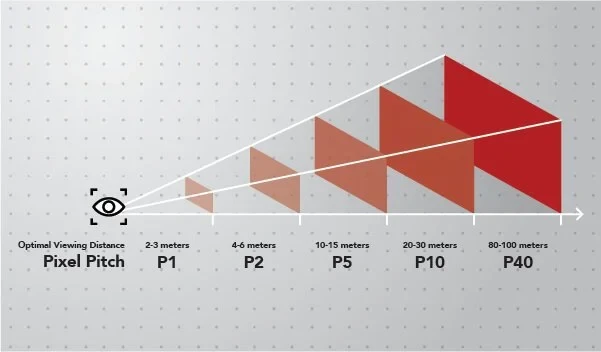
P4.0 is where most projects land-it covers the 4-6 meter sweet spot that works for mall installations, airport signage, and retail storefront windows. Go tighter if you need to. P2.0 handles the 2-3 meter range, and you're paying roughly double. P1.2 exists for those rare situations where people stand within arm's reach of a large LED wall. At 5x the cost.
LCD makes sense when viewers get closer than 2 meters and you're showing detailed text or graphics. LED wins when viewing distance exceeds 2.5 meters and visual impact matters more than fine print.
Contrast Ratio: Why LED Wins on Dark Backgrounds

Contrast ratio measures the difference between the brightest white and the darkest black a display can produce.
LCD has a structural problem here. The backlight runs across the entire panel all the time. When you want to show black, those pixels can't completely block the light. You get dark gray instead of true black. IPS panels typically achieve 1000:1 to 1500:1 contrast. VA panels do better at 3000:1 to 5000:1.
Each LED pixel can turn off completely. No current means no light, which means actual black. Standard SMD LED panels hit 5000:1 to 8000:1. Higher-end COB LED can reach 10,000:1 or even 100,000:1.
If your content uses dark backgrounds or high-contrast logos, this matters. For text on light backgrounds, most people won't notice.
Color Performance
LCD bar screens typically cover 72-100% of sRGB, work in 8-bit color depth (16.7 million colors), and achieve ΔE color accuracy between 2-5. Consistency is their strength-the backlight diffuses evenly, so colors match across the whole panel without calibration.
LED offers wider gamut (90-140% sRGB) and deeper color depth (10-16 bit, over a billion colors). Out-of-the-box accuracy is worse, with ΔE running 3-6, and getting colors to match across modules takes work. Any serious LED installation includes colorimeter-based calibration.
Refresh Rate and Camera Capture
Refresh rate becomes a real concern when people will photograph or film your display. This happens constantly in retail and public spaces now.
LCD runs at 60Hz standard, with 120Hz available on premium models. This is fine for human eyes but can produce banding when someone shoots video with their phone. Commercial LED panels typically run 1920Hz to 3840Hz, which eliminates those scan-line artifacts that appear in smartphone footage.
Want to test this yourself? Record the display with your phone's slow-motion mode at 240fps. Horizontal black bars scrolling through the image means the refresh rate isn't high enough.
Panel Technology
LCD Panel Types
IPS (In-Plane Switching) panels give you 178°/178° viewing angles with excellent color accuracy. Response time runs 8-14ms, and black levels are moderate-you'll notice grayish blacks rather than true blacks. These work well for shelf-edge displays viewed from multiple angles and menu boards where color accuracy matters.
VA (Vertical Alignment) panels offer 178°/160° viewing angles. The vertical performance often degrades at extreme angles. Color accuracy is good, response time is faster at 4-8ms, and black levels beat IPS. These suit video-heavy content and brands using dark color schemes.
ADS/AFFS variants are industrial-grade options with extended temperature tolerance from -30°C to +80°C. Worth the premium only for transportation or extreme environments.
LED Packaging Technologies
The terminology gets confusing fast.
SMD (Surface-Mount Device) dominates indoor and semi-outdoor installations. Three LED chips (red, green, blue) mount on a single bracket and get encapsulated in resin. Pixel pitches range from P1.0 to P10.
The vulnerabilities are real: exposed LED surfaces can get physically damaged, moisture can seep in at resin boundaries, and direct finger contact can dislodge components. For retail floors and transit stations where people might touch the display, this matters.

COB (Chip-on-Board) mounts LED chips directly on the PCB substrate, then covers everything with a uniform protective layer. The whole module surface ends up smooth and continuous-better physical durability, moisture resistance, and improved contrast from light-absorbing coating between pixels. Costs run 30-50% higher than equivalent SMD.
GOB (Glue-on-Board) is the compromise option: standard SMD technology with an epoxy coating added after assembly. COB-like protection at lower cost. You'll see slight brightness reduction (5-10%) and potential yellowing with extended UV exposure.
Native vs. Cut Panels
Bar screen manufacturers get their panels two ways, and the difference matters more than most buyers realize.
Native Bar Panels
These are made using manufacturing masks designed specifically for ultra-wide aspect ratios. The dimensions are intentional from the start. Suppliers like BOE, AUO, Innolux, and CSOT make dedicated stretched-format product lines.
What you get: even backlight distribution all the way to the edges, full structural integrity with standard glass thickness, consistent seals around the whole perimeter, and standard resolution patterns like 1920×158, 1920×360, or 1920×540.

Cut and Resized Panels
These start as standard 16:9 panels that get physically cut to bar dimensions after manufacturing. A 1920×1080 panel might become multiple 1920×270 strips.
Cutting breaks the seal between glass layers-light leaks at the edges. Glass integrity gets compromised at cut lines, which means more breakage during shipping and installation. The original backlight was designed for the full panel, so partial panels get uneven illumination. And those compromised seals let moisture in, accelerating liquid crystal degradation over time.
Spotting cut panels: look for non-standard vertical resolutions like 158, 203, or 270 pixels. Ask for panel specification sheets with actual manufacturer part numbers. Real native panels have documented model numbers in supplier catalogs.
Cut panels run 30-50% cheaper. The discount is there because the quality is genuinely lower.
Real Applications
Retail Shelf-Edge Displays
You've got controlled indoor lighting, people standing really close (sometimes under a meter when they're reaching for products), and content that's mostly text and pricing. Plus you're probably rolling out dozens or hundreds of these things.
LCD wins here, and it's not particularly close. Nobody stands 4 meters away from a shelf edge. Your viewers are close, which means you actually need that pixel density LCD provides. Text looks crisp because of how LCD handles subpixel rendering. And when you're buying 200 units instead of 2, that price difference between LCD and LED really adds up.
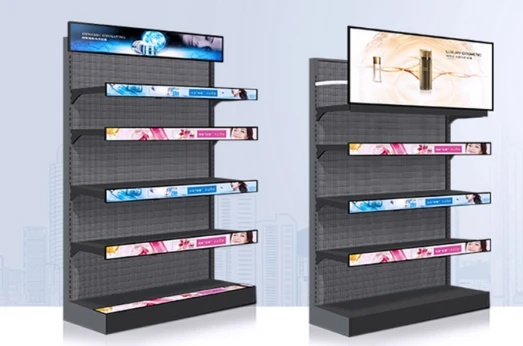

The thin profile helps too. Most shelf-edge mounting rails were designed with LCD dimensions in mind, so you're not fighting the hardware.
Something in the 500-700 nit range with IPS panels works well. VA works if everyone approaches from the same direction, but that's rarely how people shop. Make sure you're getting native panels, and size-wise you're typically looking at the 23-42 inch range.
Transportation Information Displays
Trains, buses, airports. The environment is harsh in ways people don't think about until something breaks. Constant vibration. Temperature swings that would kill consumer electronics. And these things run 18+ hours a day.
Certification requirements basically make this decision for you. The rail industry has EN50155, automotive needs E-Mark certification, and the approval pathways for LCD are mature and well-documented. LED certification for transportation? Still catching up.
Beyond the paperwork, industrial LCD mounting systems have decades of proven vibration resistance. The weight matters too when you're putting displays in vehicles. And since people are sitting or standing relatively close, you're not wasting LCD's resolution advantage.
You'll want industrial-rated IPS panels that handle at least -20°C to +60°C. Vibration specs should show 1G continuous tolerance minimum, ideally with 3G shock resistance. Brightness around 700-1000 nits handles the glare from windows.
Outdoor Storefront and Window Displays
Sunlight changes everything. We're talking 100,000 lux hitting your display on a clear day. LCD physically cannot compete here.
LED is the only real option outdoors. You need 5000-8000 nits to fight direct sunlight, and that's just not something LCD can deliver. Weather resistance matters too since you'll want IP65 or better on the front surface. The longer viewing distances (people across the street, passing cars) mean you'd be overpaying for LCD's pixel density anyway.

Go with P3-P6 pixel pitch depending on how far away your typical viewer stands. Make sure you're getting 3840Hz refresh so it photographs well on social media. Operating temperature range should handle whatever your local climate throws at it.
Large-Scale Indoor Installations
Malls, airports, convention centers, corporate lobbies. Big spaces with high ceilings and viewers who might be 20 meters away.
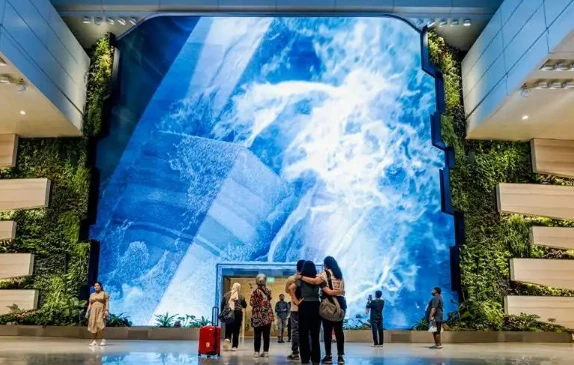
The seamless factor is what kills LCD here. Biggest LCD panel you'll find is around 88 inches. Want to go longer? You're tiling panels together, and those bezels are visible. Designers try to incorporate bezels into the aesthetic.
LED modules lock together seamlessly. Want a 30-meter continuous display? LED handles it. Curved installation wrapping around a column? LED handles it. The viewing distances in these spaces align perfectly with P2.5-P4 pixel pitch, which is LED's sweet spot anyway.
For premium installations P2.5 works well. Standard commercial work does fine with P3-P4. Brightness depends on the space but typically 800-1500 nits covers most indoor scenarios. Definitely get front-access module design because someone's going to need to service this thing eventually, and you don't want to explain why you need to close off a section of the mall to access the back of the display.
Restaurant and QSR Menu Boards
Budget matters here. Restaurant margins are thin, and owners scrutinize every equipment purchase.
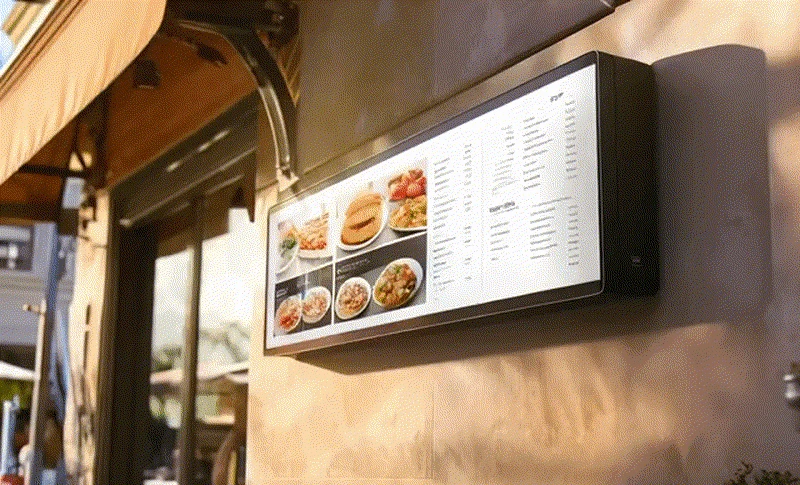
The content is mostly text with occasional food photography. LCD renders text beautifully. The viewing distance is usually that 1.5-4 meter range where either technology works fine technically, but LCD costs significantly less to buy and operate.
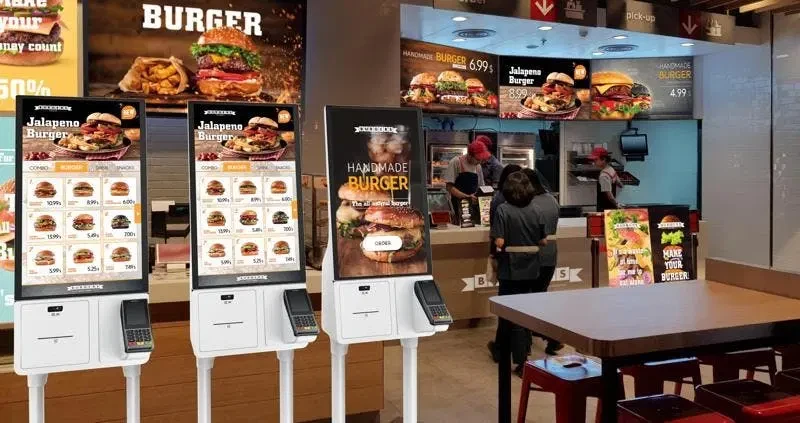
One thing to consider: kitchens generate grease and steam. Even in the dining area, that stuff migrates. You want some kind of protective glazing over the display. Tempered glass overlay is standard. If you're doing self-service ordering, PCAP touch capability adds maybe 15-20% to the cost but opens up new functionality.
Brightness around 500-700 nits handles typical restaurant lighting. IP54 on the front surface should be considered mandatory, not optional.
Long-Term Cost Considerations
Upfront cost is just the start. Below is a rough comparison. Results will vary based on electricity rates, usage patterns, and whether anything breaks.
For an LCD bar screen (37-inch equivalent): acquisition runs about $400, power at 12 hours daily operation costs maybe $8 per year depending on rates, set aside around $40 annually for maintenance, and backlight replacement around year 4 adds another $150 or so. Roughly $800 over five years.
For an LED bar screen of equivalent display area at P2.5: acquisition runs around $900, power costs a bit more at maybe $13 annually under the same conditions. Maintenance reserves can be lower since LED tends to be more durable. Module replacement typically isn't needed within five years if decent quality is purchased. Somewhere around $1,050-1,100 total.
LED runs about 35% more than LCD over five years in typical indoor scenarios.
The math shifts for different situations. Longer deployments favor LED-LCD backlights degrade faster after year 5 while LED maintains 70%+ brightness through year 8. Outdoor installations push high-brightness LCD models to $800+ while delivering worse longevity, making LED cost-equivalent or cheaper. Large seamless installations require complex bezel alignment with LCD, and at scale, LED's simpler assembly cuts labor costs enough to close the gap.
What to Ask For When Buying
For LCD Bar Screens
Start with the panel itself. You want to know who actually made it (BOE, AUO, Innolux) and the specific model number. This matters because it's how you verify you're getting a native panel rather than something that was cut down from a standard display. Cut panels are cheaper for a reason.
Brightness specs can be misleading. Some manufacturers measure at the center of the panel where it's brightest, others give you an average across the whole surface. Ask which method they used. A 700-nit center measurement might only be 550 nits in the corners.
Get the backlight type in writing since edge-lit and direct-lit have different uniformity characteristics. Color gamut should be specified as a percentage of sRGB or another standard you can actually verify. Don't just accept "good color reproduction" as an answer.
The operational stuff matters too: temperature range, MTBF figures, what exactly the warranty covers (panels only? backlight? power supply?). And make sure you know the mounting interface dimensions before you design your installation hardware.
For LED Bar Screens
LED quality varies enormously, and the chip manufacturer is your first clue. Nationstar, Kinglight, Cree, Nichia are names you want to see. Generic "high-quality LED" means nothing.
Don't trust the spec sheet on pixel pitch. Bring calipers if you're doing a factory inspection.
Refresh rate is easy to verify yourself. Pull out your phone, switch to slow-motion video at 240fps, and record the display. Black bars scrolling through the image means the refresh rate isn't what they claimed. This takes 30 seconds and has saved clients from bad purchases.
Brightness measurements are another area where manufacturers get creative. If you're spending serious money, bring a calibrated meter to the inspection. A display rated at 6000 nits that actually delivers 4500 isn't going to cut it in direct sunlight.
Some less obvious things to nail down: Is color calibration included in the delivery, or is that an extra charge? What's the flatness tolerance between modules? (Visible seams often come from modules that don't sit perfectly flush.) How long will they guarantee spare module availability? Five years minimum, because a display you can't repair is a liability. And get the dead pixel policy in writing with actual numbers, not just "industry standard acceptable rate."
So Which One?
LCD works better for: close viewing under 1.5 meters, text-heavy content, standard indoor lighting, budget-conscious projects, installations under 3 meters total length, touch-enabled applications, and transportation environments with vibration concerns.
LED makes more sense for: viewing distances beyond 3 meters, video-dominant content, high ambient light environments, any semi-outdoor or outdoor application, premium brand presentations, seamless runs exceeding 5 meters, 24/7 operation planned beyond 5 years, and curved or architecturally creative installations.
The 1.5-3 meter viewing range with standard indoor lighting could go either way. Look at other factors. Count up which advantages matter for the specific project. When it's close to even, LCD usually wins on cost unless seamless length, outdoor brightness, or video impact is specifically needed.





