"What type of digital signage do I need?" sounds like a hardware question, but the useful answer starts with the communication job. A restaurant menu board, a supermarket shelf-edge display, a self-service kiosk, a transparent product showcase, and a large lobby screen can all be digital signage while solving very different problems.
The mistake is to treat "digital signage type" as a single list of screen technologies. A buyer normally needs to classify the project in several ways at once: what the audience must do, how far away they view the content, whether motion is required, whether the user needs to interact, where the screen will be installed, and how the content will be managed.
This guide organizes the main types of digital signage around those decisions. It is a format-selection map, not a product catalogue. Exact brightness, ingress protection, operating temperature, touch stack, interface, enclosure, mounting, and lifecycle requirements should be confirmed for the specific equipment and installation environment.

What counts as digital signage?
AVIXA describes digital signage as electronic visual communication using digital displays to present information, communication, or engagement content. A typical system may include the display itself, a media player or embedded computing layer, and content-management software.
That definition is intentionally broad. Digital signage is not synonymous with one display technology. LCD, LED, projection, touch displays, kiosks, shelf-edge screens, and other electronic display formats can all be used in signage systems when they are delivering managed visual content.
For a buyer, the first distinction is therefore not "LCD or LED?" It is "What must this display do for the viewer?" Once the task is clear, the physical format and system architecture become much easier to narrow down.
There are five useful ways to classify digital signage
A single installation can belong to several categories at the same time. A touchscreen kiosk, for example, is interactive, close-viewed, indoor, portrait-oriented, and application-driven. A shelf-edge bar LCD is usually passive, close-viewed, fixture-integrated, panoramic, and content-scheduled. Classifying by only one dimension hides important differences.
| Classification dimension | Typical options | Why it matters |
|---|---|---|
| Viewer task | Inform, promote, navigate, transact, compare, assist | Defines what the screen must help the viewer accomplish |
| Interaction | Passive, touch, assisted interaction, sensor-triggered | Changes software, UI, hardware, accessibility, and support needs |
| Viewing distance | Shelf edge, counter, room, corridor, large venue | Changes screen size, content density, typography, and placement |
| Environment | Indoor, window-facing, semi-outdoor, outdoor, special temperature or high-contact areas | Changes enclosure, brightness, thermal, weather, cleaning, and durability requirements |
| Physical format | Flat panel, video wall, kiosk, bar display, transparent display, e-paper label | Determines how the display integrates with architecture, fixtures, and products |
The best format is the one that satisfies all five dimensions without making the system unnecessarily complex.

Quick comparison of common digital signage formats
| Format | Typical information job | Viewing pattern | Interaction | Main design question |
|---|---|---|---|---|
| Standard commercial flat-panel display | Promotion, menu, information, schedule, wayfinding support | Room or corridor distance | Usually passive | Can viewers read the intended message at the actual distance and ambient light? |
| Video wall or large-format display | High-impact messaging, dashboards, large-area information | Longer distance or large audience | Usually passive | Does the content need one large visual canvas or several independent zones? |
| Interactive kiosk | Search, check-in, order, payment, ticketing, assisted self-service | Arm's-length | Direct user interaction | Is the project really a software workflow with a screen, rather than a signage loop? |
| Bar or stretched LCD | Shelf-edge promotion, category navigation, product guidance, narrow-space messaging | Close to medium distance | Usually passive; touch can be project-specific | Does the physical fixture require an ultra-wide display rather than a conventional aspect ratio? |
| Transparent display | Overlay digital content on a visible physical product | Close to medium distance | Passive or interactive depending on design | Must the viewer see the merchandise and digital layer at the same time? |
| Electronic shelf label / e-paper label | Price and compact product information at the shelf edge | Very close distance | Primarily passive | Is the information mostly static between controlled data updates rather than motion-rich content? |
This table is a starting point, not a specification. Each format still needs its own environment, content, integration, mounting, and operational review.

1. Standard commercial flat-panel signage
Conventional commercial LCD or similar flat-panel displays are the general-purpose format most people picture when they hear "digital signage." They are used for menu boards, wall-mounted promotions, corporate communications, directories, queue information, transport information, and many other indoor applications.
This format works well when the message needs a familiar rectangular canvas and the viewer is not expected to manipulate the screen directly. The main design variables are less about novelty and more about the installation: viewing distance, ambient light, orientation, duty cycle, mounting, content resolution, player architecture, and service access.
Content should be designed for the actual viewing distance. A screen mounted several meters away cannot carry the same information density as a close-viewed product display. Likewise, a menu board needs stable hierarchy and legibility, while a promotional screen can devote more space to motion and imagery.
Choose this format when: you need a versatile passive information or promotional screen and the installation does not require a specialized physical relationship with a shelf, product enclosure, or self-service workflow.
2. Video walls and large-format signage
Video walls combine multiple displays into a larger visual surface, while large-format displays or direct-view LED systems can create a similar high-impact role with a different hardware architecture. These formats are useful when one conventional screen does not provide enough visual scale, audience reach, or information area.
The selection question is not simply "How large can the screen be?" It is whether the communication task benefits from one coordinated canvas. A control-room dashboard, transit information wall, event display, retail feature wall, or large lobby installation may justify a larger visual field. A small message placed on an oversized display does not.
Buyers should also separate content design from display architecture. A large canvas increases visibility, but it also exposes weak source content, inconsistent layouts, and poor viewing-distance assumptions. Service access, alignment, thermal management, structural support, and content rendering should be considered as part of the installation rather than treated as afterthoughts.
Choose this format when: visual scale itself is part of the communication requirement or a large audience must see coordinated content from farther away.
3. Interactive kiosks
A kiosk becomes a different class of digital signage because the user is no longer only viewing content. The screen is part of a task flow: check in, search, order, register, pay, print, scan, verify, or request service.
This changes the project from "screen plus content" to a combination of interface design, software state management, peripherals, network access, accessibility, privacy, physical ergonomics, and support. A kiosk can display promotional content when idle, but its primary value comes from completing an interaction.
That distinction matters during procurement. A display that is visually excellent can still be a poor kiosk if touch targets are hard to reach, the application cannot recover from an error, the payment or scanner workflow is unclear, or service access is difficult.
KioskTagScreen separates this product family into its own self-service kiosk display category because the integration task is materially different from passive signage.
Choose this format when: the viewer must complete a structured action, not merely absorb information.
4. Shelf-edge and bar LCD signage
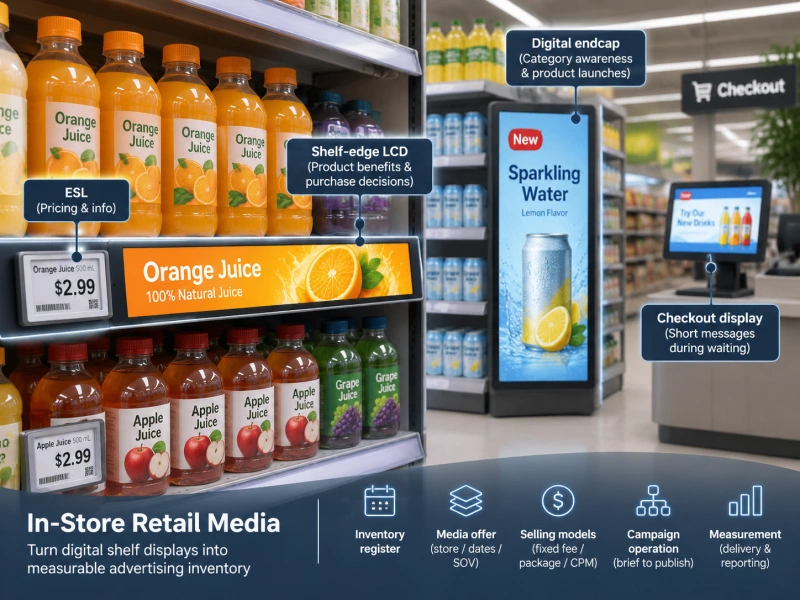
Bar LCD displays, also called stretched or ultra-wide displays, are designed for narrow horizontal spaces that conventional 16:9 screens do not fit naturally. In retail, that makes them useful at shelf edges, gondola tops, aisle headers, category strips, and other fixture-integrated positions.
The information job is different from a wall display. Shelf-edge signage is close to the product, so it can connect promotional motion, category guidance, product education, or campaign content directly to the purchase location. The narrow geometry also forces stronger content discipline: horizontal composition, fewer words, clear focal points, and attention to the physical fixture.
Do not select a bar display only because it looks distinctive. First confirm the available installation envelope, viewing distance, mounting method, power path, player or control architecture, orientation, and the content format the merchandising team can actually produce.
The bar LCD display category owns the commercial product-selection task. Buyers who are already evaluating this format can use the bar LCD buying guide for a deeper procurement review.
Choose this format when: the display must live inside a narrow retail fixture or shelf architecture and motion-rich content is valuable at that position.
5. Transparent digital displays
A transparent display is useful when the physical object behind the screen remains part of the message. Instead of replacing the view of a product with a conventional screen, the display layer can place graphics, text, or video in front of merchandise inside a showcase or engineered fixture.
This is a specialized role. If the viewer does not need to see a physical object through the digital layer, a conventional display may be simpler. Transparent systems also require the buyer to think about the complete optical environment: the product behind the panel, internal illumination, background, ambient reflections, cover materials, viewing angle, and content colors all affect the final result.
KioskTagScreen's current transparent LCD category is the commercial owner for this format. The site also has a separate guide to how transparent LCD showcases work for buyers who need the optical and integration details.
Choose this format when: the physical merchandise and digital information must be visible together as one presentation.
6. Electronic shelf labels and e-paper signage
Electronic shelf labels sit next to digital signage rather than fitting perfectly into the same category as motion-oriented screens. They are digital displays, but their primary job is usually controlled shelf-edge data: price, unit information, product details, promotion state, or compact operational cues.
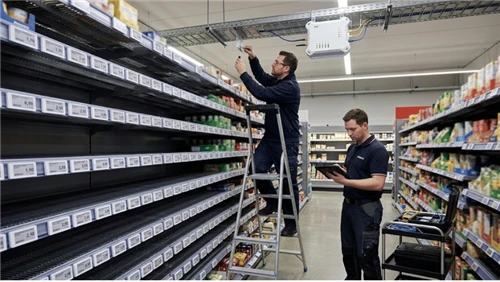
Many ESLs use e-paper because a static image can remain visible without continuous display power between updates. That makes the format well suited to information that changes periodically but does not need video or animation. It also means the selection logic is different from a bar LCD: the buyer is evaluating data integrity, label binding, wireless delivery, update confirmation, device lifecycle, and shelf operations as much as visual presentation.
The electronic shelf label category owns commercial ESL selection. Use an ESL when the shelf information is primarily structured data that must stay synchronized with a controlled source; use powered LCD signage when motion, richer graphics, or broader visual storytelling is a core requirement.
Choose this format when: compact shelf information must remain legible and persistent between controlled data updates, without requiring continuous motion content.
Indoor and outdoor are environment classes, not just screen categories
"Indoor digital signage" and "outdoor digital signage" are often listed as separate types, but it is more useful to treat them as environment classes that modify the hardware requirements of any format.
An outdoor or window-facing project can introduce higher ambient light, direct sun exposure, heat load, moisture, dust, temperature variation, vandalism risk, and more difficult maintenance access. Those conditions influence enclosure design, optical performance, thermal strategy, mounting, ingress protection, and service procedures.
The same principle applies to special indoor environments. A screen near a refrigerated case, cooking area, production line, hospital corridor, or high-contact public zone can have different cleaning, temperature, safety, or durability requirements from a screen in a climate-controlled lobby.
Do not infer suitability from a product category name. Environmental ratings and operating limits should be checked against the exact proposed model and installation condition.
Passive versus interactive signage is a software decision as much as a hardware decision
Adding touch does not automatically make a signage project better. Interaction is valuable only when it lets the viewer complete a useful task more efficiently than a passive message would.
A passive display can run scheduled promotions, menus, information, navigation cues, or live data without asking the viewer to make choices. An interactive system needs a user interface, application logic, state handling, input validation, error recovery, accessibility consideration, analytics boundaries, and often integration with another system.
That means "interactive or not?" should be decided before screen procurement. If the content team only needs to publish scheduled media, a kiosk-style application stack may add cost and support work without adding user value. If the user must search a catalogue, check in, place an order, or complete a transaction, passive signage will not complete the job.
Use the information job to choose a format
A practical digital signage selection can begin with six questions. The answers usually narrow the format faster than comparing product brochures.
- What must the viewer accomplish? See a promotion, read a menu, find a destination, compare products, complete a transaction, or verify shelf information?
- How far away is the viewer? Shelf-edge content, counter content, room signage, and large-venue signage need different visual density and scale.
- Does the content need motion? If video or animation is essential, powered display formats are a natural fit. If the information is mostly static between controlled updates, e-paper may be more appropriate.
- Does the viewer need to interact? If yes, define the software task and peripherals before treating the project as a touchscreen purchase.
- What is unusual about the installation? Narrow fixture, transparent showcase, outdoor exposure, limited service access, high-contact area, or special mounting can determine the physical format.
- Who will operate the content and system? Clarify CMS ownership, publishing workflow, device monitoring, update responsibility, support, and change control.
| If the dominant need is... | Start by evaluating... | Then verify... |
|---|---|---|
| General promotion or information | Commercial flat-panel signage | Viewing distance, brightness, orientation, player/CMS, mounting |
| Large visual impact | Video wall or large-format display | Content resolution, structure, serviceability, viewing geometry |
| Self-service workflow | Interactive kiosk | Application flow, touch, peripherals, accessibility, error recovery |
| Narrow shelf or fixture integration | Bar / stretched LCD | Mechanical envelope, mounting, power, content layout, control architecture |
| Digital layer over physical merchandise | Transparent display | Optical stack, internal lighting, reflections, content design, enclosure |
| Persistent shelf data with periodic updates | Electronic shelf label / e-paper | Data source, mapping, wireless delivery, reconciliation, device lifecycle |

Three classification mistakes to avoid
Do not classify only by display technology
"LCD," "LED," and "e-paper" describe important technology choices, but they do not describe the entire user task. A kiosk and a wall display may both use LCD while requiring completely different software, mechanics, service access, and operating ownership.
Do not use screen size as a substitute for viewing design
A larger screen is not automatically more readable. Content density, typography, viewing distance, orientation, placement height, glare, and message duration all affect whether the viewer can actually use the information.
Do not assume one signage format should cover the whole site
A retail environment may legitimately use several display classes: shelf-edge e-paper for structured price data, bar LCD for motion-rich shelf promotion, standard displays for category or wall messaging, transparent displays for product showcases, and kiosks for self-service. The goal is not hardware uniformity for its own sake; it is a manageable architecture in which each format has a clear job.
Build a signage architecture, not a screen collection
The strongest digital signage programs treat format selection as part of an information architecture. Decide which content belongs at the shelf, which belongs on a wall or menu board, which requires interaction, which should be synchronized across locations, and which displays need specialized physical integration.
Then define the operating model: where content originates, who approves it, how it is scheduled, how devices are monitored, what happens when a screen is offline, and who owns support. A display format is only one layer of that system.
KioskTagScreen's product portfolio currently spans electronic shelf labels, bar LCD displays, transparent LCD screens, and self-service kiosks. This article is the navigation layer between those categories: use it to identify the format family first, then move to the dedicated product or technical guide for specifications, integration, testing, and procurement.