


This guide covers the technology behind it, where it genuinely adds value, and what to evaluate before choosing one for a commercial installation.

What Is a Transparent LCD Showcase?
A transparent LCD showcase is a display unit that combines a see-through LCD panel with a physical product enclosure. When the screen is inactive, the panel behaves like glass - giving viewers a clear look at whatever sits inside. When activated, the same panel overlays digital content - video, product information, or interactive graphics - directly on top of that physical view.
Unlike a standard LCD screen, which sits in front of a solid backlight that blocks any view behind it, a transparent LCD panel is engineered so that light can pass through the liquid crystal layer when no image is being rendered. The same surface acts as both a window and a screen. That dual function is what makes these units genuinely useful, rather than just visually interesting.
How It Works: The Technology Behind the Glass
Liquid Crystal Molecules and Voltage Control
The fundamental mechanism relies on liquid crystal molecules, which occupy a physical state between solid and liquid. In this intermediate state, their alignment responds directly to applied voltage. Without voltage, the molecules remain in a relatively disordered arrangement, allowing light to pass through with minimal obstruction. Apply voltage, and they align in a way that polarizes light and blocks the background - creating an opaque, image-rendering state on the panel surface.
This voltage-driven switching is what allows the display to move between transparent and opaque states without any mechanical components. The Society for Information Display maintains extensive published research on liquid crystal physics and flat panel display technology for those who want to go deeper into the underlying science.
How the Backlight Enables Transparency
In a conventional LCD, a solid backlight module sits directly behind the liquid crystal panel - which is why standard screens are opaque. Transparent LCD panels use edge-lit or repositioned backlight configurations that illuminate the crystal layer from the sides rather than from directly behind. This leaves the center of the panel open to light transmission. The product inside the showcase is typically lit by internal LEDs that supplement ambient light, keeping the displayed item visible through the panel even when content is running.
From Transparent to On-Screen: How the Switching Works in Practice
The transition between states is not strictly binary. Individual regions of the panel can display content while adjacent areas remain partially transparent at the same time. This is what produces the effect of digital text or graphics appearing alongside a clear view of a physical object - rather than the screen simply covering what is inside. The speed and precision of this switching depends on panel refresh rate and the quality of the driver electronics.
Key Performance Specifications You Should Understand
Transmittance rate measures how much light passes through the panel in transparent mode, expressed as a percentage. Commercial panels commonly fall in the 40%–70% range. Even at 70%, the panel absorbs considerably more light than plain glass, so the quality and positioning of interior showcase lighting matters - particularly for jewelry and luxury retail where how the product catches light directly affects customer perception.
Brightness, measured in nits (cd/m²), determines whether on-screen content remains legible against the ambient light in your installation space. As a practical baseline drawn from commercial display deployments: standard indoor retail environments generally require 700–1,000 nits; brightly lit spaces or areas near windows often need 1,500 nits or more. These benchmarks reflect commonly cited industry experience rather than fixed technical minimums - your specific environment should be assessed directly before specifying a unit.
Touch capability is optional and comes in two main forms. IR touch uses an infrared sensor grid around the panel perimeter and works reliably for basic navigation, including when wearing gloves. PCAP (projected capacitive) mirrors the technology in smartphones: faster, more accurate, and better suited to multi-touch or catalog-browsing interactions. For a closer look at which installation types benefit most from interactive capability, our overview of scenarios best suited for touchscreen displays covers the decision in more detail.
Where Transparent LCD Showcases Deliver Real Value
This technology works best in environments where a physical product and digital information genuinely need to occupy the same visual space. Four settings consistently see strong results.
Jewelry and Luxury Retail
A counter-level transparent showcase lets customers examine a piece directly while the panel displays material specifications, certifications, or brand context alongside it. The customer accesses information that would otherwise require staff to deliver - which changes the pacing and depth of the interaction. Transparent showcases are increasingly incorporated into broader retail display strategies that combine physical merchandising with targeted digital content.
Museums and Cultural Exhibitions
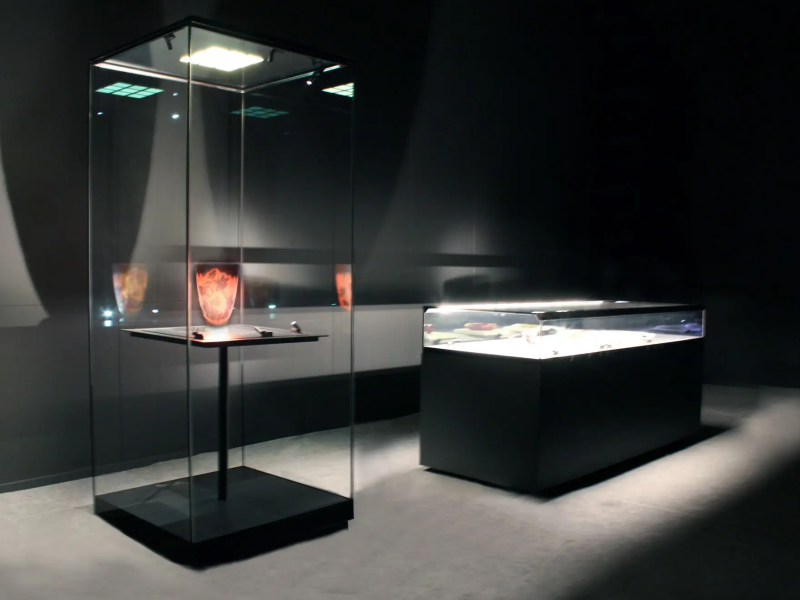
Museums use transparent showcases to present artifacts while layering contextual content - historical footage, interpretive text, geographic maps - on the same surface. Visitors see the actual object, not a photograph, which preserves the authenticity of the exhibit. The digital layer adds depth without displacing the primary experience of seeing the real thing.
Trade Shows and Product Launches
At events where a booth must compete for attention, a product displayed inside a transparent showcase running looped digital content draws considerably more dwell time than a static display. It also delivers a consistent message without requiring a live presenter for every interaction. The broader potential of interactive kiosk displays at trade shows is worth exploring if your events strategy involves multiple audience touchpoints.
Corporate Lobbies and Information Installations
In hotel lobbies, airports, and corporate reception areas, transparent showcases function as wayfinding points or promotional displays that feel architecturally considered rather than bolted on. Their see-through appearance is less visually dominant than a solid monitor on a stand. For self-service and information applications, they are often integrated within a wider kiosk display infrastructure.
Transparent LCD vs. Transparent OLED: What Actually Matters for Your Decision
Both technologies produce a see-through display, but the underlying engineering differs in ways that affect cost, image quality, and long-term reliability. This is a decision worth making at the specification stage, not after installation.
| Feature | Transparent LCD | Transparent OLED |
|---|---|---|
| Transparency level | 40%–70% (typical) | 40%–45% (varies by model) |
| Color and contrast quality | Good | Excellent (self-emissive pixels, true blacks) |
| Brightness in ambient light | Higher | Lower |
| Cost | Lower | Significantly higher |
| Long-term panel durability | Stable over extended use | More susceptible to pixel degradation with prolonged static content |
| Available sizes | Wide range (typically 12"–86") | More limited, especially in large formats |
| Best suited for | Retail, trade shows, information kiosks | Premium brand environments where image quality is the primary consideration |
For most commercial deployments, transparent LCD is the more practical choice - better brightness performance in real-world lighting conditions, a wider range of available sizes, and significantly lower cost. Transparent OLED makes sense where image quality and brand perception justify the investment and where content rotation keeps static-image risks low.
If you are also comparing transparent LCD against transparent LED screens versus traditional display formats, that comparison involves a different set of tradeoffs around pixel pitch, viewing distance, and installation depth.
What to Evaluate Before You Buy
Brightness for your specific environment. Measure the actual ambient light level in your intended installation location before specifying any unit. A display that performs well in a dim showroom may be unreadable under strong overhead track lighting or near a window. Request measured brightness figures from suppliers, not just rated specifications - these can differ meaningfully under real operating conditions.
Size and enclosure. Units range from small countertop formats to large freestanding installations. Confirm whether the supplier provides a complete housing or the panel only. If your space requires a custom cabinet - specific dimensions, branded finish, or integration with existing furniture - verify whether the supplier handles fabrication directly or subcontracts it. For a closer look at what the specification sheet does not tell you about transparent LCD for retail, that breakdown is useful reading before finalizing any order.
Operating system and content management. Most units run Android or Windows, with HDMI input as an additional option. If you plan to update content remotely or manage multiple units across locations, confirm that the unit supports a CMS platform over Wi-Fi or LAN before purchasing. Content management is frequently treated as an afterthought and consistently turns out to be the most operationally significant factor once the units are installed.
Budget. Entry-level countertop units start in the low thousands. Larger freestanding units with touch capability, CMS integration, and custom enclosures run considerably higher. Request itemized quotes that separate panel, housing, installation, and software costs - these are often bundled in ways that make it difficult to compare suppliers accurately.
Before confirming any order, these questions are worth putting to any supplier directly:
- What is the measured transmittance rate and actual brightness under operating conditions?
- Which CMS platforms does the unit support, and is remote content management included or licensed separately?
- What does the warranty cover - the panel only, or the complete unit including housing?
- What is the lead time for custom sizing or branded enclosures?
- Is regional technical support available after installation, and what are the response time commitments?
Frequently Asked Questions
- What transmittance rate should I expect from a transparent LCD showcase?
- Most commercial panels fall between 40% and 70%. Higher transmittance means a clearer view of the product inside, but it can reduce on-screen contrast if the backlight is not calibrated to compensate. Always ask suppliers for measured transmittance under operating conditions rather than relying on the specification sheet figure alone.
- Can transparent LCD showcases handle window-facing or outdoor environments?
- Standard units are designed for indoor use. Window-facing installations with direct sunlight typically require panels rated at 2,500 nits or above, along with appropriate housing to manage heat buildup. Fully outdoor-rated transparent LCD units exist but are specialized products with different specifications and price profiles compared to standard indoor models.
- How is content updated after installation?
- Most units support USB, SD card, or network-based content loading. Android-based systems are generally easier to manage at scale through a CMS platform. For installations with multiple units across locations, network-based content management is not optional - it is the only practical way to maintain consistent, current content without sending someone physically to each unit.
- IR touch or PCAP touch - which should I choose?
- IR touch is lower cost, works with gloves, and handles basic navigation reliably. PCAP is more responsive, supports multi-touch gestures, and provides a substantially better experience for customers browsing product catalogs or interacting with detailed content. For passive or looped content, IR is adequate. For active customer interaction, PCAP is the stronger investment.
- What size options are available?
- Commercial transparent LCD showcases typically range from around 12 inches to 86 inches diagonally. Countertop units start at the smaller end; freestanding or wall-mounted configurations generally begin at 32 inches and above. Custom sizes are available from manufacturers who handle enclosure fabrication in-house.
Is a Transparent LCD Showcase Right for Your Application?
Transparent LCD showcases work well when the physical product and the digital layer serve each other - when seeing the actual item matters, and when digital information adds context that a label or brochure cannot efficiently deliver. Jewelry, curated retail, museum exhibits, and product launch environments are natural fits. General digital signage, where there is no meaningful physical object to display alongside the content, is usually better served by a standard LCD display screen or, in certain architectural installations, a transparent LED screen.
For buyers specifically evaluating transparent LCD display solutions for retail, the decision usually comes down to three variables: the ambient light level in your space, whether touch interactivity is needed, and how content will be managed day-to-day after installation. Getting clear answers on those three points before comparing hardware specifications will prevent the most common post-purchase frustrations.
If you are ready to explore specific configurations, our transparent display case range covers a variety of sizes and setups for different installation requirements. You are welcome to contact our team directly or submit an inquiry for a recommendation tailored to your space.





