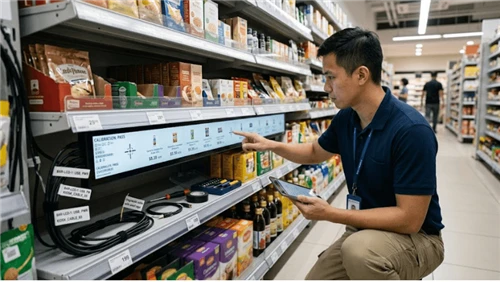
If you're running a small shop or testing digital price tags for the first time, you can program NFC tags with a free phone app in about five seconds each. That method works until it doesn't-somewhere past a couple hundred tags, the labor of walking to each shelf and tapping your phone stops making sense, and you need a system that pushes prices wirelessly from a computer. This guide covers both ends and the messy middle ground between them.
How to Program an NFC Price Tag with Your Phone
Download NFC Tools (free, works on Android and iOS) or NXP's TagWriter if you want finer control over memory allocation. Grab blank tags-NTAG213 or NTAG215 chips are the standard for retail because they support NDEF, which means every NFC phone on the market can read them without installing anything.
Open the app, tap "Write," pick "Custom URL/URI." That last part matters. You might see options for plain text, Wi-Fi credentials, contact cards-ignore them for price tags. URL records are the only format that triggers consistently across every phone brand. We've watched a pilot in a wine shop fall apart because someone programmed a URL plus a text record plus a Wi-Fi credential onto each tag "for convenience." Half the customers' phones opened a Wi-Fi dialog instead of the product page. The store owner blamed the tags. The tags were fine. The encoding was wrong.
Type in your URL. Hold the phone flat against the tag-center of the back panel on most Androids, top edge on iPhones. You'll hear a confirmation tone or feel a vibration. That's it for writing.
Before you move on to the next tag: test what you just wrote, and test it with a different phone. The device you used for writing sometimes caches the intended action and gives you a clean result even if the actual data on the chip is malformed. Grab a coworker's phone. Tap. Confirm the page loads.
One thing worth thinking about before you encode 200 tags with static URLs: if that product page ever moves-new website, new CMS, new URL structure-every physical tag is now pointing at a dead link. A redirect URL you control server-side (yourstore.com/nfc/sku12345) solves this. The tag always points to the redirect. You change the destination in your CMS whenever you want. The tag itself never needs reprogramming.
After testing, lock the tag. NFC Tools has a write-protect toggle. On NTAG chips, this is a one-way door-once locked, nobody can overwrite it, including you. If your prices change often enough that you'd need to rewrite tags regularly, locking defeats the purpose, so skip it. But an unlocked tag sitting on a public shelf is rewritable by any stranger with the same free app. That tradeoff is yours to make.
Where Phone Programming Hits a Wall
The math falls apart fast. Five seconds per tag sounds trivial until you multiply it by 8,000 SKUs plus walking time between shelves. That's north of 70 hours just for initial setup. And that's the easy part-the hard part is what happens next week when 300 prices change because of a vendor promo, and someone has to walk the floor again with a phone, tag by tag, aisle by aisle.
Paper labels are actually faster for bulk changes. Print a stack, grab a cart, walk once. NFC phone tapping is sequential by nature. You can't batch it. Every tag is a separate physical interaction. And unlike paper, where a misprint means you toss the label and print another, a bad NFC write means you have to diagnose whether the issue is the tag, the phone, the app, or the data-then redo the write and verify again. So if your tags need frequent updates-and price tags do, that's the whole point-the phone method creates more labor than it saves.
Where phone-programmed NFC tags still earn their keep: product authentication stamps on luxury goods, permanent links to spec sheets or safety data, one-time information encoding for trade show materials or event badges. Anything where the data behind the tag doesn't rotate with weekly ad cycles. For live retail pricing, you need the tags to update themselves.
How Retail Chains Handle NFC Price Tag Updates
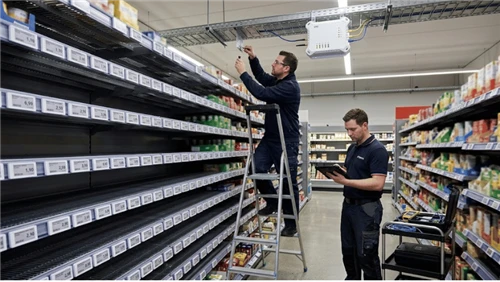
The commercial approach splits the NFC chip's job from the display update job. During installation, a store associate taps each electronic shelf label with a phone to register it in the management platform-binding the label's hardware ID to a product SKU. That's the only time NFC gets used operationally. After that tap, the label's BLE 5.0 radio takes over. Price data, promotional text, template changes-all of it pushes wirelessly from access points mounted on the ceiling or along shelf rails, driven by whatever your POS or ERP system feeds into the ESL platform's BLE, Wi-Fi, or sub-GHz gateway.
Walmart's deployment across 2,300+ U.S. stores runs on this architecture. ESL shipments industry-wide crossed 200 million units per quarter in 2025, largely because of that single rollout. The labels use E-ink displays-same technology as a Kindle-that consume power only during the one-second screen refresh and hold the image indefinitely afterward. Batteries last years. The NFC chip stays live so customers can tap for product details, but it's a secondary feature at that point, not the update mechanism.
Integration with your existing systems is the part that actually takes time. SAP, Oracle Retail, Shopify POS have pre-built ESL connectors. If you're on something custom or legacy, expect your IT team to spend two weeks to two months building an API bridge, depending on data format messiness and competing priorities on their sprint board. We've talked to stores that bought ESL hardware in January and didn't have the POS connector working until April-not because the technology was hard, but because nobody carved out the IT bandwidth up front. Once connected, a price change in your backend propagates to every affected shelf label automatically. No manual step in between.
Tampering is a question that comes up often, and the answer is more boring than people expect. The ESL platform signs each update with a digital key. Labels check the signature before refreshing. A random phone trying to NFC-write a fake price onto the tag gets ignored-the label only accepts data from its authenticated server. Most pricing errors on electronic shelf labels trace back to a SKU mapping mistake or a connector timeout, not someone with malicious intent and a smartphone.
Picking NFC Chips and Tag Sizes
NTAG213: 144 bytes, about $0.15 each in bulk, handles a URL or short identifier. NTAG216: 888 bytes, for when you need structured product data encoded directly on the chip rather than just a pointer to a server. The price difference is small enough that some buyers default to NTAG216 for everything-reasonable if you might want to encode more data later, wasteful if every tag just holds a URL that fits in 40 bytes. Both are NXP silicon, both support NDEF. The NTAG424 DNA adds AES-128 encryption with rolling per-tap signatures-relevant for anti-counterfeiting on high-value goods (luxury retail, pharma), not for grocery shelving where the cost premium and backend server requirement don't pencil out.
Avoid ICODE SLIX unless your supply chain specifically requires dual-frequency tags that also communicate with warehouse RFID infrastructure. We've seen procurement teams order ICODE after a logistics vendor recommended it, only to discover that the chips barely work with consumer smartphones. Unwinding that after 5,000 tags are already printed and shipped is not a fun conversation.
On sizing: 2.13" to 2.66" tags fit standard grocery and pharmacy shelf rails. 4.2" to 5.8" gives you room for multi-tier pricing and QR codes in electronics or wine departments. LCD signage from 7.3" to 15.6" covers endcaps and feature displays but needs wired power. Most deployments are 80–85% compact tags. Oversizing is a common mistake-a 4.2" label on a canned goods shelf blocks the product behind it and costs three times as much as the 2.13" that would have done the job.
What It Actually Costs
Tags: $3–$15 per unit. Gateways: $200–$500 each, and a 10-aisle store needs 6 to 10 of them (metal shelving eats BLE signal, so you'll need more gateways than the vendor's optimistic floor plan suggests-ask for a site survey before you commit to a gateway count). Software licensing: $0.50–$1.50 per label per year. None of these numbers include installation labor or the IT time for POS integration, which are the costs that tend to surprise people at procurement stage.
The payback case is straightforward. If your store spends 20 associate-hours per week on manual price changes at $15/hour, that's $15,600 a year in labor for a task that ESL reduces to minutes. Industry data from recent major deployments puts shelf-to-register price mismatches at 5–10% of transactions-each one a potential customer complaint or margin leak. Multi-location chains tend to break even in 18 to 24 months. A single store can test with sub-$1 NFC-only passive tags first-no gateway, no subscription-and upgrade to BLE if the pilot proves the concept.
How Our NFC Price Tags Update Without Per-Tag Programming
Our system skips the part where someone stands at a shelf with a phone. Daily price management runs through a browser dashboard: upload a .xlsx or .csv with your product data (SKU, name, price, barcode, promo text), and the platform matches each row to the shelf label it was bound to during installation, then pushes the updated display to every affected tag at once. The labels refresh within a second of receiving the data.
We built the upload around spreadsheet formats on purpose. Store managers, category buyers, regional merchandisers-these are the people actually running price changes, and they think in Excel columns, not API endpoints. The platform reads standard headers ("Price," "Retail_Price," "selling_price," whatever your ERP exports) and maps them automatically. Headers it doesn't recognize get flagged once; you assign them manually, and the system remembers the mapping for every future upload. Your existing ERP export drops in without reformatting. Most ESL platforms require middleware or IT involvement for routine price changes-ours doesn't.
Promos work the same way. Weekend sale on 30 items? Change the price column, add promo copy, upload. Monday, upload the original file, tags snap back. Multi-store operators push one file to 12 locations before doors open-no phone calls to store managers asking if they've finished the changeover, no printed price-change bulletins that sit unread in the back office. Failed updates get flagged with the label's physical shelf coordinates-so someone walks to that one tag, not every aisle. And the system catches bad data before it goes live: empty price fields, duplicate SKU rows, values that look wrong (a $0.03 steak triggers a validation warning, not a shelf update).