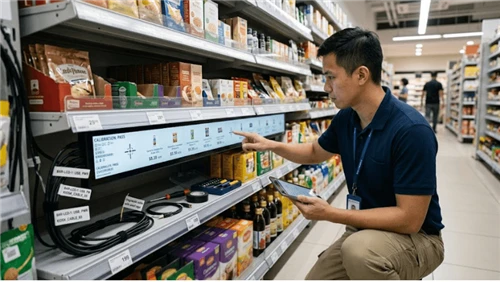
ePaper price tags use the same E-ink tech as Kindle e-readers. They hold an image without drawing power, run for years on tiny batteries, and stay readable under store lighting. Pretty straightforward.
I'm not going to give you the usual "what are electronic shelf labels" rundown. Instead, here's what actually matters after you've deployed them: they last forever, they update fast, and customers can read them. Let's get into it.
These Things Just... Keep Working
After you mount a few thousand of these tags, something weird happens. You stop thinking about them. They just sit there, doing their job, month after month.
Our 5.8-inch E-ink shelf label runs on four CR2450 coin-cell batteries. We're seeing five-plus years of life with three to five daily updates. That's real stores, real usage - morning price refresh, lunch promo swap, back to standard by closing. All on batteries smaller than a shirt button.
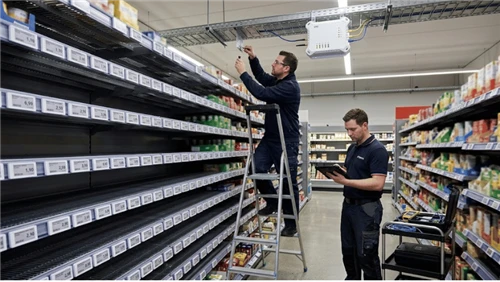
Here's why that matters: every device on a shelf edge has a maintenance cost. E-ink's cost is basically nothing. No wiring. No reboots. No technician visits for dead backlights. Put 15,000 labels in a store, and you've got 15,000 things you can mostly forget about. That's the difference between a technology that works in a demo and one that works in 200 locations.
Also worth mentioning: E-ink is reflective. No backlight to burn out. No liquid crystal layer going yellow under the lights. The screens are thin and handle everyday bumps fine. Cracked screens? We barely see support tickets for them.

The Freezer Aisle Problem
Most electronic labels hate the cold. Standard operating range is 0°C to 40°C - good for regular shelves and refrigerated cases. Freezer zones? Different story. Condensation gets behind the screen. Batteries tank in sustained cold. Displays ghost after too many frost cycles.
Our freezer-grade tags handle -25°C with IPX7 sealing. They deal with frost cycling and moisture that would kill unprotected electronics in a few months. Same goes for produce sections, fish counters, bakery cases, outdoor garden centers - anywhere conditions aren't stable. Rule of thumb: if paper labels fall apart in a week there, ePaper's durability actually shows up.

35,000 Updates an Hour From Your Back Office
Durability keeps tags running. Speed is where they start making money.
A decent ESL system on BLE 5.0 pushes over 35,000 price updates per hour. Wireless success rates in the field run above 99.9%. A full-store price reset - the kind that used to eat an entire shift with label guns, printouts, and people walking every aisle checking their work - now happens from one backend command. Store stays open the whole time.
Once you have that kind of reach, things that were physically impossible with paper become normal:
Perishable markdowns at 4 PM - system triggers automatically when items hit their sell-by window. Nobody walking the dairy case with a price gun. Flash promos that match your app - in-store price syncs with online in minutes, not by tomorrow morning. Competitive price responses across all locations - done in the time it takes to approve the change.
This isn't demo stuff. Retailers past the pilot phase are running these workflows every day.
Pick-to-Light: Underrated Feature
Our electronic shelf labels have multi-color LEDs with customizable flash patterns. Green for restocking. Blue for online order picks. Red for audit flags. Every tag becomes a visual guide for staff - no extra hardware or wiring.
Walmart's big ESL rollout uses pick-to-light heavily. Their e-commerce fulfillment speed improved noticeably. A price tag that doubles as a guidance system for associates - same battery, same mount, same device - adds up across thousands of shelf positions.

Readability: It Looks Like Paper
You have to see these in person to get it. ePaper looks like a printed label. No glow. No flicker. Shoppers read it the same way they read paper tags - fast, without thinking about it.
E-ink reflects ambient light instead of emitting its own. Bright store lighting makes it more readable, not less. Viewing angles are wide - tags read fine whether someone's standing in front, crouching at the bottom shelf, or glancing sideways from a cart.
Our 5.8-inch display runs 648×480 resolution. Sharp text, scannable barcodes, QR codes that work on the first scan. Colors are black, white, red, and yellow - enough to flag sales and clearance items from aisle distance. A red sale price on white background catches eyes better than a separate sticker, at least from what we've seen across different store formats.
Multi-Page Display: One Tag, Multiple Uses
A single ePaper tag holds several templates - price, promo layout, nutritional info, inventory status. Switch between them with a button press, NFC tap, or cloud command.
Pharmacy example: default page shows retail price, secondary page shows dosage warnings and stock levels for staff. No second label needed. Produce section: price by default, tap it for organic certification and allergen data. Paper labels were never built to pack that much information into one spot.
How It All Adds Up
Durability, speed, and readability work together. A tag that lasts years without wiring goes in places that were hard to label electronically before - deep freezers, outdoor garden centers, high-humidity bakery sections, warehouse racking where nobody wants to run cable. A tag that updates instantly and flashes LEDs works as both a customer price display and a staff tool at the same time. A tag that reads like paper from wide angles means one template works on top shelves, bottom rails, peg hooks, and bin mounts.
E-ink display tech has matured. It now beats paper labels on the things that matter at the retail shelf edge: how long they last, how little maintenance they need, how fast they update, and how readable they are in actual store conditions.
The cloud-connected ESL architecture behind modern deployments - real-time POS sync, inventory mapping, auto-location - amplifies all of that. But it needs solid hardware underneath. A display that survives years on a coin cell, reads clearly from anywhere reasonable, and updates reliably at scale. Without that foundation, the software doesn't have much to work with.
Electronic shelf labels have been around for years. What's changed is the underlying tech finally got good enough that paper labels are now the harder choice to defend.
Frequently Asked Questions
Q: How long do the batteries actually last?
A: Five-plus years on CR2450 coin-cells, with three to five price refreshes per day. The display holds its image without power between updates, so battery life is measured in years.
Q: How fast can you update prices across a whole store?
A: BLE 5.0 systems push over 35,000 tag updates per hour with solid wireless reliability. A full-store price refresh that used to take a team all shift now finishes in minutes from one backend command. Store stays open.
Q: What else can these tags do besides show prices?
A: Multi-page display cycles through pricing, promos, nutritional info, and inventory - switchable by button, NFC, or cloud command. LED pick-to-light handles picking, restocking, and audit workflows. NFC lets customers tap for product details or lets staff run price audits. QR codes drive loyalty signups, product comparisons, and review access.
Q: Do they work in freezers?
A: Standard E-ink tags cover 0°C to 40°C. For freezer zones, specialized tags rated to -25°C with IPX7 sealing handle frost cycling and condensation without ghosting or battery problems. Sealed housing keeps moisture out.
Q: Why is ePaper easier to read than other digital displays in stores?
A: E-ink reflects light instead of emitting it. Store lighting helps readability rather than causing glare. Wide viewing angles, sharp resolution for barcodes and QR codes, and color options (black, white, red, yellow) for visual hierarchy. End result looks like a printed label, which is how shoppers prefer to see prices.