


Transparent LCD Touch Integration: Sensor Selection, Calibration, and UX Testing is not a question that can be answered by one brochure value. For interactive-exhibit teams, kiosk engineers, retail designers, integrators, and transparent touch-display buyers, the real decision is how to add reliable touch without compromising optical clarity, product access, enclosure design, or application usability. A reliable project therefore starts with the operating task, records the installed conditions, and converts every important claim into evidence that can be reviewed before rollout.
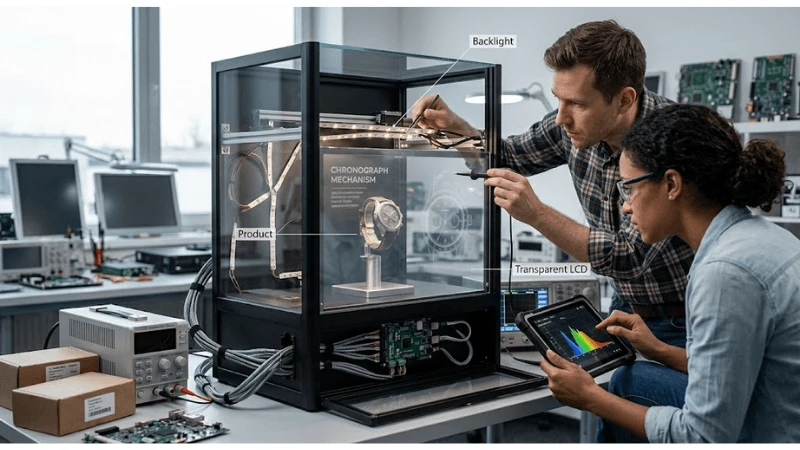
This guide uses an end-to-end integration method covering sensor technology, glass stack, bonding, controller, grounding, calibration, object placement, gestures, accessibility, and field recovery. It does not assume that a particular product, architecture, certification, return, or performance level applies to every project. Published specifications should be tied to the exact model and configuration, while legal, safety, accessibility, payment, and cybersecurity obligations should be reviewed by qualified parties for the relevant market.
The recommended output is a decision package: scope, requirements, drawings or data maps, test method, expected result, captured evidence, defect ownership, recovery procedure, and the conditions that require retesting. That package gives procurement, engineering, content, operations, and suppliers a common basis for approval instead of relying on subjective impressions.
Define system boundaries
For transparent LCD touch integration, this stage should produce a reviewable output rather than an informal agreement. The team should connect the requirement to the intended user, operating condition, owner, and acceptance evidence.
Define the interaction model
This requirement should be decided before hardware is ordered. Define the interaction model. This matters because the display can technically play video while the physical product becomes difficult to see or the digital overlay loses contrast. The project should define what users can touch, how long the task should take, what happens without touch, and how product viewing remains clear, and retain the most relevant parts of viewing tests, luminance and temperature readings, touch calibration records, content proofs, photographs, and service-access checks as evidence. For a project team, this changes the decision: test the requirement under browse, compare, rotate, request assistance, and call-to-action flows, name the owner who accepts or escalates exceptions, and state whether the conclusion applies only to the tested configuration. Supplier documentation can define a starting boundary, but local validation is still required.
Teams that need the broader product context can review the transparent display case solution before locking this requirement.
Set measurable acceptance criteria for the interaction model
This is a system question rather than a single-component feature. Set measurable acceptance criteria for the interaction model. This matters because the display can technically play video while the physical product becomes difficult to see or the digital overlay loses contrast. The project should capture user-flow diagrams, task success measures, and fallback states and compare it with an approved baseline, and retain the most relevant parts of viewing tests, luminance and temperature readings, touch calibration records, content proofs, photographs, and service-access checks as evidence. In a pilot, the difference becomes obvious: test the requirement under a representative pilot, worst-case content, and normal operating hours, name the owner who accepts or escalates exceptions, and state whether the conclusion applies only to the tested configuration. Supplier documentation can define a starting boundary, but local validation is still required.
Assign ownership and an exception path for the interaction model
The specification only becomes useful when it is tied to a real operating condition. Assign ownership and an exception path for the interaction model. This matters because the display can technically play video while the physical product becomes difficult to see or the digital overlay loses contrast. The project should record who reviews failures, who authorizes changes, and how the result is retested, and retain the most relevant parts of viewing tests, luminance and temperature readings, touch calibration records, content proofs, photographs, and service-access checks as evidence. Operations should translate the requirement into a repeatable check: test the requirement under handover, store changes, software releases, and supplier substitutions, name the owner who accepts or escalates exceptions, and state whether the conclusion applies only to the tested configuration. Supplier documentation can define a starting boundary, but local validation is still required.
This checkpoint should be read alongside the site's guidance on transparent display product range, because adjacent decisions can change the result.
Map interfaces and ownership
For transparent LCD touch integration, this stage should produce a reviewable output rather than an informal agreement. The team should connect the requirement to the intended user, operating condition, owner, and acceptance evidence.
Define the optical and mechanical stack
A strong design separates the intended outcome from the method used to achieve it. Define the optical and mechanical stack. This matters because the display can technically play video while the physical product becomes difficult to see or the digital overlay loses contrast. The project should document panel, sensor, cover glass, air gaps or bonding, enclosure frame, seals, and product-access door, and retain the most relevant parts of viewing tests, luminance and temperature readings, touch calibration records, content proofs, photographs, and service-access checks as evidence. For a project team, this changes the decision: test the requirement under different glass thicknesses, decorative printing, large formats, and service removal, name the owner who accepts or escalates exceptions, and state whether the conclusion applies only to the tested configuration. Supplier documentation can define a starting boundary, but local validation is still required.
For related implementation context, use the 27x10 transparent touch screen resource as a starting point and verify the local configuration.
Set measurable acceptance criteria for the optical and mechanical stack
The most common mistake is to approve the visible result without testing the process behind it. Set measurable acceptance criteria for the optical and mechanical stack. This matters because the display can technically play video while the physical product becomes difficult to see or the digital overlay loses contrast. The project should capture stack drawings, supplier limits, optical samples, and assembly records and compare it with an approved baseline, and retain the most relevant parts of viewing tests, luminance and temperature readings, touch calibration records, content proofs, photographs, and service-access checks as evidence. In a pilot, the difference becomes obvious: test the requirement under a representative pilot, worst-case content, and normal operating hours, name the owner who accepts or escalates exceptions, and state whether the conclusion applies only to the tested configuration. Supplier documentation can define a starting boundary, but local validation is still required.
Assign ownership and an exception path for the optical and mechanical stack
The buyer should define both the supported condition and the condition that triggers redesign. Assign ownership and an exception path for the optical and mechanical stack. This matters because the display can technically play video while the physical product becomes difficult to see or the digital overlay loses contrast. The project should record who reviews failures, who authorizes changes, and how the result is retested, and retain the most relevant parts of viewing tests, luminance and temperature readings, touch calibration records, content proofs, photographs, and service-access checks as evidence. Operations should translate the requirement into a repeatable check: test the requirement under handover, store changes, software releases, and supplier substitutions, name the owner who accepts or escalates exceptions, and state whether the conclusion applies only to the tested configuration. Supplier documentation can define a starting boundary, but local validation is still required.
The next linked decision is covered in transparent screen display; keep the boundaries separate so one article does not substitute for a project test.
Transparent Lcd Touch Integration Decision Table
The table below turns the topic into a compact review structure. Add project-specific limits, test tools, owners, and approval signatures before using it as an acceptance record.
| Touch layer | Decision | Evidence |
|---|---|---|
| Sensor and glass | Supported stack and thickness | Supplier documentation and sample |
| Electrical integration | Grounding and noise immunity | Installed interference test |
| Calibration | Edge and center accuracy | Grid-test record |
| UX | Task success and clear feedback | Observed user test |
| Operations | Cleaning and recovery | Field procedure and retest |
Choose the architecture
For transparent LCD touch integration, this stage should produce a reviewable output rather than an informal agreement. The team should connect the requirement to the intended user, operating condition, owner, and acceptance evidence.
Define controller, grounding, and noise control
This requirement should be decided before hardware is ordered. Define controller, grounding, and noise control. This matters because the display can technically play video while the physical product becomes difficult to see or the digital overlay loses contrast. The project should route power and signals, provide grounding, tune sensitivity, and separate interference sources, and retain the most relevant parts of viewing tests, luminance and temperature readings, touch calibration records, content proofs, photographs, and service-access checks as evidence. For a project team, this changes the decision: test the requirement under LED drivers, power supplies, metal frames, long cables, and nearby electronics, name the owner who accepts or escalates exceptions, and state whether the conclusion applies only to the tested configuration. Supplier documentation can define a starting boundary, but local validation is still required.
Teams that need the broader product context can review the wood display with transparent screen before locking this requirement.
Set measurable acceptance criteria for controller, grounding, and noise control
This is a system question rather than a single-component feature. Set measurable acceptance criteria for controller, grounding, and noise control. This matters because the display can technically play video while the physical product becomes difficult to see or the digital overlay loses contrast. The project should capture noise tests, grounding inspection, touch logs, and controller settings and compare it with an approved baseline, and retain the most relevant parts of viewing tests, luminance and temperature readings, touch calibration records, content proofs, photographs, and service-access checks as evidence. In a pilot, the difference becomes obvious: test the requirement under a representative pilot, worst-case content, and normal operating hours, name the owner who accepts or escalates exceptions, and state whether the conclusion applies only to the tested configuration. Supplier documentation can define a starting boundary, but local validation is still required.
Assign ownership and an exception path for controller, grounding, and noise control
The specification only becomes useful when it is tied to a real operating condition. Assign ownership and an exception path for controller, grounding, and noise control. This matters because the display can technically play video while the physical product becomes difficult to see or the digital overlay loses contrast. The project should record who reviews failures, who authorizes changes, and how the result is retested, and retain the most relevant parts of viewing tests, luminance and temperature readings, touch calibration records, content proofs, photographs, and service-access checks as evidence. Operations should translate the requirement into a repeatable check: test the requirement under handover, store changes, software releases, and supplier substitutions, name the owner who accepts or escalates exceptions, and state whether the conclusion applies only to the tested configuration. Supplier documentation can define a starting boundary, but local validation is still required.
This checkpoint should be read alongside the site's guidance on transparent OLED screen, because adjacent decisions can change the result.
Implement data and device controls
For transparent LCD touch integration, this stage should produce a reviewable output rather than an informal agreement. The team should connect the requirement to the intended user, operating condition, owner, and acceptance evidence.
Define calibration and coordinate mapping
A strong design separates the intended outcome from the method used to achieve it. Define calibration and coordinate mapping. This matters because the display can technically play video while the physical product becomes difficult to see or the digital overlay loses contrast. The project should align touch coordinates to displayed content and control scaling, rotation, bezel offsets, and multi-display behavior, and retain the most relevant parts of viewing tests, luminance and temperature readings, touch calibration records, content proofs, photographs, and service-access checks as evidence. For a project team, this changes the decision: test the requirement under native and scaled resolutions, portrait or landscape orientation, and software updates, name the owner who accepts or escalates exceptions, and state whether the conclusion applies only to the tested configuration. Supplier documentation can define a starting boundary, but local validation is still required.
For related implementation context, use the transparent LCD solutions for retail showcases resource as a starting point and verify the local configuration.
Set measurable acceptance criteria for calibration and coordinate mapping
The most common mistake is to approve the visible result without testing the process behind it. Set measurable acceptance criteria for calibration and coordinate mapping. This matters because the display can technically play video while the physical product becomes difficult to see or the digital overlay loses contrast. The project should capture calibration records, grid tests, and edge-accuracy results and compare it with an approved baseline, and retain the most relevant parts of viewing tests, luminance and temperature readings, touch calibration records, content proofs, photographs, and service-access checks as evidence. In a pilot, the difference becomes obvious: test the requirement under a representative pilot, worst-case content, and normal operating hours, name the owner who accepts or escalates exceptions, and state whether the conclusion applies only to the tested configuration. Supplier documentation can define a starting boundary, but local validation is still required.
Assign ownership and an exception path for calibration and coordinate mapping
The buyer should define both the supported condition and the condition that triggers redesign. Assign ownership and an exception path for calibration and coordinate mapping. This matters because the display can technically play video while the physical product becomes difficult to see or the digital overlay loses contrast. The project should record who reviews failures, who authorizes changes, and how the result is retested, and retain the most relevant parts of viewing tests, luminance and temperature readings, touch calibration records, content proofs, photographs, and service-access checks as evidence. Operations should translate the requirement into a repeatable check: test the requirement under handover, store changes, software releases, and supplier substitutions, name the owner who accepts or escalates exceptions, and state whether the conclusion applies only to the tested configuration. Supplier documentation can define a starting boundary, but local validation is still required.
The next linked decision is covered in transparent LCD procurement considerations; keep the boundaries separate so one article does not substitute for a project test.
Test failures and recovery
For transparent LCD touch integration, this stage should produce a reviewable output rather than an informal agreement. The team should connect the requirement to the intended user, operating condition, owner, and acceptance evidence.
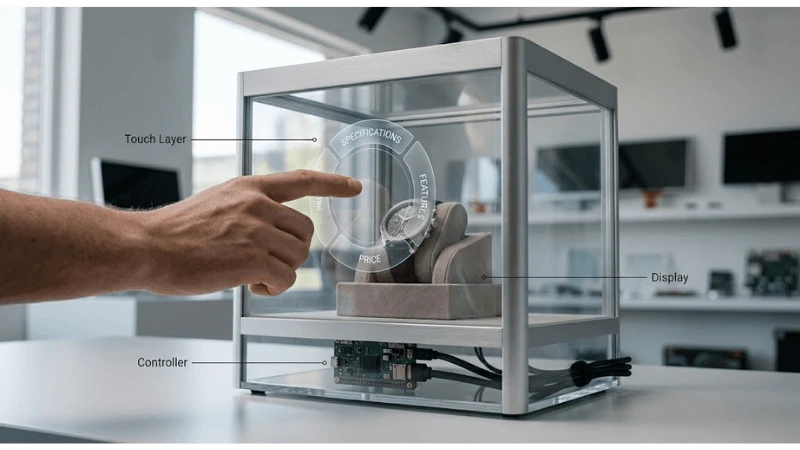
Define real-user and false-touch testing
This requirement should be decided before hardware is ordered. Define real-user and false-touch testing. This matters because the display can technically play video while the physical product becomes difficult to see or the digital overlay loses contrast. The project should test finger sizes, dwell, gestures, gloves where relevant, water or cleaning residue, palm contact, and non-user objects, and retain the most relevant parts of viewing tests, luminance and temperature readings, touch calibration records, content proofs, photographs, and service-access checks as evidence. For a project team, this changes the decision: test the requirement under opening hours, family groups, accessibility needs, and maintenance activity, name the owner who accepts or escalates exceptions, and state whether the conclusion applies only to the tested configuration. Supplier documentation can define a starting boundary, but local validation is still required.
Teams that need the broader product context can review the clear LCD screen comparison before locking this requirement.
Set measurable acceptance criteria for real-user and false-touch testing
This is a system question rather than a single-component feature. Set measurable acceptance criteria for real-user and false-touch testing. This matters because the display can technically play video while the physical product becomes difficult to see or the digital overlay loses contrast. The project should capture task trials, false-touch counts, videos, and issue logs and compare it with an approved baseline, and retain the most relevant parts of viewing tests, luminance and temperature readings, touch calibration records, content proofs, photographs, and service-access checks as evidence. In a pilot, the difference becomes obvious: test the requirement under a representative pilot, worst-case content, and normal operating hours, name the owner who accepts or escalates exceptions, and state whether the conclusion applies only to the tested configuration. Supplier documentation can define a starting boundary, but local validation is still required.
Assign ownership and an exception path for real-user and false-touch testing
The specification only becomes useful when it is tied to a real operating condition. Assign ownership and an exception path for real-user and false-touch testing. This matters because the display can technically play video while the physical product becomes difficult to see or the digital overlay loses contrast. The project should record who reviews failures, who authorizes changes, and how the result is retested, and retain the most relevant parts of viewing tests, luminance and temperature readings, touch calibration records, content proofs, photographs, and service-access checks as evidence. Operations should translate the requirement into a repeatable check: test the requirement under handover, store changes, software releases, and supplier substitutions, name the owner who accepts or escalates exceptions, and state whether the conclusion applies only to the tested configuration. Supplier documentation can define a starting boundary, but local validation is still required.
This checkpoint should be read alongside the site's guidance on transparent LCD showcase technology, because adjacent decisions can change the result.
Operate and change the integration
For transparent LCD touch integration, this stage should produce a reviewable output rather than an informal agreement. The team should connect the requirement to the intended user, operating condition, owner, and acceptance evidence.
Define monitoring, cleaning, and recovery
A strong design separates the intended outcome from the method used to achieve it. Define monitoring, cleaning, and recovery. This matters because the display can technically play video while the physical product becomes difficult to see or the digital overlay loses contrast. The project should define health checks, recalibration triggers, approved cleaning, remote restart, local reset, and escalation, and retain the most relevant parts of viewing tests, luminance and temperature readings, touch calibration records, content proofs, photographs, and service-access checks as evidence. For a project team, this changes the decision: test the requirement under controller replacement, application release, glass service, and repeated false touches, name the owner who accepts or escalates exceptions, and state whether the conclusion applies only to the tested configuration. Supplier documentation can define a starting boundary, but local validation is still required.
For related implementation context, use the see-through LCD retail displays resource as a starting point and verify the local configuration.
Set measurable acceptance criteria for monitoring, cleaning, and recovery
The most common mistake is to approve the visible result without testing the process behind it. Set measurable acceptance criteria for monitoring, cleaning, and recovery. This matters because the display can technically play video while the physical product becomes difficult to see or the digital overlay loses contrast. The project should capture maintenance records, configuration backup, recovery timing, and retest results and compare it with an approved baseline, and retain the most relevant parts of viewing tests, luminance and temperature readings, touch calibration records, content proofs, photographs, and service-access checks as evidence. In a pilot, the difference becomes obvious: test the requirement under a representative pilot, worst-case content, and normal operating hours, name the owner who accepts or escalates exceptions, and state whether the conclusion applies only to the tested configuration. Supplier documentation can define a starting boundary, but local validation is still required.
Assign ownership and an exception path for monitoring, cleaning, and recovery
The buyer should define both the supported condition and the condition that triggers redesign. Assign ownership and an exception path for monitoring, cleaning, and recovery. This matters because the display can technically play video while the physical product becomes difficult to see or the digital overlay loses contrast. The project should record who reviews failures, who authorizes changes, and how the result is retested, and retain the most relevant parts of viewing tests, luminance and temperature readings, touch calibration records, content proofs, photographs, and service-access checks as evidence. Operations should translate the requirement into a repeatable check: test the requirement under handover, store changes, software releases, and supplier substitutions, name the owner who accepts or escalates exceptions, and state whether the conclusion applies only to the tested configuration. Supplier documentation can define a starting boundary, but local validation is still required.
The next linked decision is covered in custom LCD for retail signage; keep the boundaries separate so one article does not substitute for a project test.
Implementation Checklist
Use this checklist as a planning aid, then adapt it to the exact product, site, jurisdiction, and service model.
- Define the no-touch fallback
- Document the complete optical stack
- Control grounding and electrical noise
- Calibrate at native production settings
- Test edges and small targets
- Measure false touches in real conditions
- Approve cleaning materials and method
- Back up settings and define recalibration triggers
Common Project Mistakes
- Selecting a solution from a headline specification before defining how to add reliable touch without compromising optical clarity, product access, enclosure design, or application usability.
- Testing an open bench sample while ignoring the final fixture, enclosure, content, network, and service environment.
- Accepting a supplier statement without recording the exact model, configuration, assumption, method, and evidence boundary.
- Treating a successful normal-flow demonstration as proof of failure detection, fallback, recovery, and reconciliation.
- Leaving ownership ambiguous across buyer, integrator, software team, store operations, facilities, and service provider.
- Approving rollout without version control, defect closure, training, spares, monitoring, and a retest trigger for future changes.
Questions to Ask Suppliers and Integrators
- Which exact transparent panel, optical stack, lighting system, player, enclosure, and touch option are proposed?
- What product, lighting, content, angle, temperature, and ambient-light assumptions support the visual claim?
- Can the supplier provide a production-size sample with the buyer's real product and content?
- How are lighting, thermal zones, optical defects, touch settings, and service access controlled?
- What changes to panel, glass, lighting, adhesive, controller, or enclosure trigger reapproval?
- What FAT/SAT evidence, cosmetic criteria, warranty, spare model, and lifecycle notice will be provided?
FAQ
Q: Can a touch sensor work through showcase glass?
A: Some touch systems can support specific glass thicknesses and constructions, but performance depends on the exact sensor, controller, tuning, grounding, and environment. Validate the production stack.
Q: Does touch reduce transparency?
A: Additional sensor, conductors, adhesives, glass, and coatings can affect light transmission, reflections, haze, and visual uniformity. Compare complete optical samples.
Q: Why does calibration change after installation?
A: Scaling, rotation, bezel offsets, controller settings, grounding, software changes, or replacing glass or electronics can alter coordinate mapping and touch behavior.
Q: How should false touches be tested?
A: Test cleaning residue, water, palms, sleeves, nearby objects, electrical noise, door movement, and normal user groups while logging events and application behavior.
Q: What is a good recovery plan for failed touch?
A: Provide a non-touch user path where possible, remote health checks, approved restart and recalibration steps, configuration backup, local escalation, and a documented replacement test.
Conclusion
A defensible transparent LCD touch integration decision connects the intended result to the complete installed system, a named operating owner, and evidence from realistic conditions. Start by defining how to add reliable touch without compromising optical clarity, product access, enclosure design, or application usability; then document the configuration, run normal and failure tests, close defects, and retain the evidence used for approval. The strongest procurement outcome is not the longest specification. It is a controlled requirement set that suppliers can answer, project teams can test, and operations can sustain after handover.





