


Kiosk Optical Bonding vs Air Gap: Choose the Right Touch Display Stack is not a question that can be answered by one brochure value. For kiosk OEMs, product managers, mechanical engineers, procurement teams, and display integrators, the real decision is how to compare bonded and air-gap display stacks using optical, environmental, mechanical, repair, cost, and lifecycle requirements. A reliable project therefore starts with the operating task, records the installed conditions, and converts every important claim into evidence that can be reviewed before rollout.
This guide uses a use-case decision model that evaluates the complete panel, touch sensor, adhesive or air gap, cover glass, coatings, sealing, enclosure, and field-repair process. It does not assume that a particular product, architecture, certification, return, or performance level applies to every project. Published specifications should be tied to the exact model and configuration, while legal, safety, accessibility, payment, and cybersecurity obligations should be reviewed by qualified parties for the relevant market.
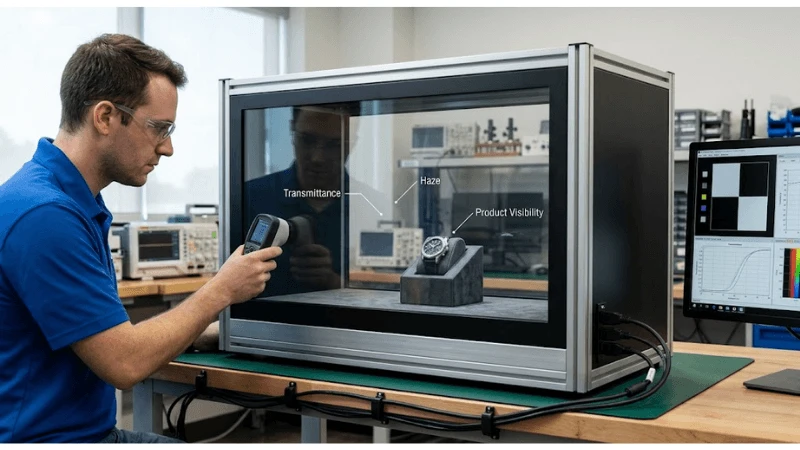
The recommended output is a decision package: scope, requirements, drawings or data maps, test method, expected result, captured evidence, defect ownership, recovery procedure, and the conditions that require retesting. That package gives procurement, engineering, content, operations, and suppliers a common basis for approval instead of relying on subjective impressions.
Start with the business requirement
For kiosk optical bonding, this stage should produce a reviewable output rather than an informal agreement. The team should connect the requirement to the intended user, operating condition, owner, and acceptance evidence.
Define the installed optical requirement
This requirement should be decided before hardware is ordered. Define the installed optical requirement. This matters because a kiosk can look operational while a scanner, printer, payment device, touch zone, or backend dependency has already failed. The project should define ambient light, reflections, viewing angle, brightness, contrast, protective glass, and camera use before selecting the stack, and retain the most relevant parts of user-flow tests, peripheral logs, remote alerts, thermal records, accessibility reviews, transaction traces, and signed acceptance results as evidence. For a project team, this changes the decision: test the requirement under indoor retail, window-facing, semi-outdoor, and outdoor kiosk locations, name the owner who accepts or escalates exceptions, and state whether the conclusion applies only to the tested configuration. Supplier documentation can define a starting boundary, but local validation is still required.
Teams that need the broader product context can review the self-service terminal solution before locking this requirement.
Set measurable acceptance criteria for the installed optical requirement
This is a system question rather than a single-component feature. Set measurable acceptance criteria for the installed optical requirement. This matters because a kiosk can look operational while a scanner, printer, payment device, touch zone, or backend dependency has already failed. The project should capture site survey, optical samples, photographs, and installed measurements and compare it with an approved baseline, and retain the most relevant parts of user-flow tests, peripheral logs, remote alerts, thermal records, accessibility reviews, transaction traces, and signed acceptance results as evidence. In a pilot, the difference becomes obvious: test the requirement under a representative pilot, worst-case content, and normal operating hours, name the owner who accepts or escalates exceptions, and state whether the conclusion applies only to the tested configuration. Supplier documentation can define a starting boundary, but local validation is still required.
Assign ownership and an exception path for the installed optical requirement
The specification only becomes useful when it is tied to a real operating condition. Assign ownership and an exception path for the installed optical requirement. This matters because a kiosk can look operational while a scanner, printer, payment device, touch zone, or backend dependency has already failed. The project should record who reviews failures, who authorizes changes, and how the result is retested, and retain the most relevant parts of user-flow tests, peripheral logs, remote alerts, thermal records, accessibility reviews, transaction traces, and signed acceptance results as evidence. Operations should translate the requirement into a repeatable check: test the requirement under handover, store changes, software releases, and supplier substitutions, name the owner who accepts or escalates exceptions, and state whether the conclusion applies only to the tested configuration. Supplier documentation can define a starting boundary, but local validation is still required.
This checkpoint should be read alongside the site's guidance on kiosk display product range, because adjacent decisions can change the result.
Convert requirements into specifications
For kiosk optical bonding, this stage should produce a reviewable output rather than an informal agreement. The team should connect the requirement to the intended user, operating condition, owner, and acceptance evidence.
Define the environmental and condensation risk
A strong design separates the intended outcome from the method used to achieve it. Define the environmental and condensation risk. This matters because a kiosk can look operational while a scanner, printer, payment device, touch zone, or backend dependency has already failed. The project should map temperature cycles, humidity, pressure, dust, cleaning, water exposure, and seal strategy across the optical cavity, and retain the most relevant parts of user-flow tests, peripheral logs, remote alerts, thermal records, accessibility reviews, transaction traces, and signed acceptance results as evidence. For a project team, this changes the decision: test the requirement under shipping, unconditioned vestibules, outdoor service, and repeated cleaning, name the owner who accepts or escalates exceptions, and state whether the conclusion applies only to the tested configuration. Supplier documentation can define a starting boundary, but local validation is still required.
For related implementation context, use the Android smart service touchscreen display resource as a starting point and verify the local configuration.
Set measurable acceptance criteria for the environmental and condensation risk
The most common mistake is to approve the visible result without testing the process behind it. Set measurable acceptance criteria for the environmental and condensation risk. This matters because a kiosk can look operational while a scanner, printer, payment device, touch zone, or backend dependency has already failed. The project should capture environmental test plan, seal drawings, and post-test inspection and compare it with an approved baseline, and retain the most relevant parts of user-flow tests, peripheral logs, remote alerts, thermal records, accessibility reviews, transaction traces, and signed acceptance results as evidence. In a pilot, the difference becomes obvious: test the requirement under a representative pilot, worst-case content, and normal operating hours, name the owner who accepts or escalates exceptions, and state whether the conclusion applies only to the tested configuration. Supplier documentation can define a starting boundary, but local validation is still required.

Assign ownership and an exception path for the environmental and condensation risk
The buyer should define both the supported condition and the condition that triggers redesign. Assign ownership and an exception path for the environmental and condensation risk. This matters because a kiosk can look operational while a scanner, printer, payment device, touch zone, or backend dependency has already failed. The project should record who reviews failures, who authorizes changes, and how the result is retested, and retain the most relevant parts of user-flow tests, peripheral logs, remote alerts, thermal records, accessibility reviews, transaction traces, and signed acceptance results as evidence. Operations should translate the requirement into a repeatable check: test the requirement under handover, store changes, software releases, and supplier substitutions, name the owner who accepts or escalates exceptions, and state whether the conclusion applies only to the tested configuration. Supplier documentation can define a starting boundary, but local validation is still required.
The next linked decision is covered in self-service ticketing interactive kiosk; keep the boundaries separate so one article does not substitute for a project test.
Kiosk Optical Bonding Decision Table
The table below turns the topic into a compact review structure. Add project-specific limits, test tools, owners, and approval signatures before using it as an acceptance record.
| Decision | Bonded stack consideration | Air-gap consideration |
|---|---|---|
| Reflection | Fewer internal reflective interfaces may help | More interfaces require optical review |
| Parallax | Reduced separation can improve alignment | Visible offset may increase with angle |
| Repair | Often replaced as an assembly | Individual layers may be more serviceable |
| Environment | Can remove a cavity but still needs sealing design | Cavity condensation must be controlled |
| Cost model | Higher assembly/process content | Potentially lower initial assembly cost |
Compare supplier responses
For kiosk optical bonding, this stage should produce a reviewable output rather than an informal agreement. The team should connect the requirement to the intended user, operating condition, owner, and acceptance evidence.
Define impact, flex, and mechanical support
This requirement should be decided before hardware is ordered. Define impact, flex, and mechanical support. This matters because a kiosk can look operational while a scanner, printer, payment device, touch zone, or backend dependency has already failed. The project should design cover glass thickness, frame support, adhesive area, edge protection, enclosure stiffness, and touch behavior as one assembly, and retain the most relevant parts of user-flow tests, peripheral logs, remote alerts, thermal records, accessibility reviews, transaction traces, and signed acceptance results as evidence. For a project team, this changes the decision: test the requirement under public impact, vandalism, transport shock, and maintenance access, name the owner who accepts or escalates exceptions, and state whether the conclusion applies only to the tested configuration. Supplier documentation can define a starting boundary, but local validation is still required.
Teams that need the broader product context can review the car wash payment kiosk display before locking this requirement.
Set measurable acceptance criteria for impact, flex, and mechanical support
This is a system question rather than a single-component feature. Set measurable acceptance criteria for impact, flex, and mechanical support. This matters because a kiosk can look operational while a scanner, printer, payment device, touch zone, or backend dependency has already failed. The project should capture mechanical drawings, impact-test evidence where required, and touch retest and compare it with an approved baseline, and retain the most relevant parts of user-flow tests, peripheral logs, remote alerts, thermal records, accessibility reviews, transaction traces, and signed acceptance results as evidence. In a pilot, the difference becomes obvious: test the requirement under a representative pilot, worst-case content, and normal operating hours, name the owner who accepts or escalates exceptions, and state whether the conclusion applies only to the tested configuration. Supplier documentation can define a starting boundary, but local validation is still required.
Assign ownership and an exception path for impact, flex, and mechanical support
The specification only becomes useful when it is tied to a real operating condition. Assign ownership and an exception path for impact, flex, and mechanical support. This matters because a kiosk can look operational while a scanner, printer, payment device, touch zone, or backend dependency has already failed. The project should record who reviews failures, who authorizes changes, and how the result is retested, and retain the most relevant parts of user-flow tests, peripheral logs, remote alerts, thermal records, accessibility reviews, transaction traces, and signed acceptance results as evidence. Operations should translate the requirement into a repeatable check: test the requirement under handover, store changes, software releases, and supplier substitutions, name the owner who accepts or escalates exceptions, and state whether the conclusion applies only to the tested configuration. Supplier documentation can define a starting boundary, but local validation is still required.
This checkpoint should be read alongside the site's guidance on self-service reception kiosk, because adjacent decisions can change the result.
Test the proposed solution
For kiosk optical bonding, this stage should produce a reviewable output rather than an informal agreement. The team should connect the requirement to the intended user, operating condition, owner, and acceptance evidence.
Define optical and touch validation
A strong design separates the intended outcome from the method used to achieve it. Define optical and touch validation. This matters because a kiosk can look operational while a scanner, printer, payment device, touch zone, or backend dependency has already failed. The project should compare reflection, parallax, haze, color, black level, touch accuracy, edge performance, and glove or wet behavior where relevant, and retain the most relevant parts of user-flow tests, peripheral logs, remote alerts, thermal records, accessibility reviews, transaction traces, and signed acceptance results as evidence. For a project team, this changes the decision: test the requirement under production glass, coatings, printed borders, brightness modes, and real content, name the owner who accepts or escalates exceptions, and state whether the conclusion applies only to the tested configuration. Supplier documentation can define a starting boundary, but local validation is still required.
For related implementation context, use the digital kiosk manufacturing guide resource as a starting point and verify the local configuration.
Set measurable acceptance criteria for optical and touch validation
The most common mistake is to approve the visible result without testing the process behind it. Set measurable acceptance criteria for optical and touch validation. This matters because a kiosk can look operational while a scanner, printer, payment device, touch zone, or backend dependency has already failed. The project should capture side-by-side samples, grid tests, photographs, and user trials and compare it with an approved baseline, and retain the most relevant parts of user-flow tests, peripheral logs, remote alerts, thermal records, accessibility reviews, transaction traces, and signed acceptance results as evidence. In a pilot, the difference becomes obvious: test the requirement under a representative pilot, worst-case content, and normal operating hours, name the owner who accepts or escalates exceptions, and state whether the conclusion applies only to the tested configuration. Supplier documentation can define a starting boundary, but local validation is still required.
Assign ownership and an exception path for optical and touch validation
The buyer should define both the supported condition and the condition that triggers redesign. Assign ownership and an exception path for optical and touch validation. This matters because a kiosk can look operational while a scanner, printer, payment device, touch zone, or backend dependency has already failed. The project should record who reviews failures, who authorizes changes, and how the result is retested, and retain the most relevant parts of user-flow tests, peripheral logs, remote alerts, thermal records, accessibility reviews, transaction traces, and signed acceptance results as evidence. Operations should translate the requirement into a repeatable check: test the requirement under handover, store changes, software releases, and supplier substitutions, name the owner who accepts or escalates exceptions, and state whether the conclusion applies only to the tested configuration. Supplier documentation can define a starting boundary, but local validation is still required.
The next linked decision is covered in custom supermarket touchscreen kiosk; keep the boundaries separate so one article does not substitute for a project test.
Model lifecycle obligations
For kiosk optical bonding, this stage should produce a reviewable output rather than an informal agreement. The team should connect the requirement to the intended user, operating condition, owner, and acceptance evidence.
Define repair and replacement model
This requirement should be decided before hardware is ordered. Define repair and replacement model. This matters because a kiosk can look operational while a scanner, printer, payment device, touch zone, or backend dependency has already failed. The project should decide whether the field replaces a complete bonded assembly, separate glass, touch sensor, or display and how calibration is restored, and retain the most relevant parts of user-flow tests, peripheral logs, remote alerts, thermal records, accessibility reviews, transaction traces, and signed acceptance results as evidence. For a project team, this changes the decision: test the requirement under warranty events, cracked glass, panel failure, and regional service capability, name the owner who accepts or escalates exceptions, and state whether the conclusion applies only to the tested configuration. Supplier documentation can define a starting boundary, but local validation is still required.
Teams that need the broader product context can review the outdoor touchscreen kiosk before locking this requirement.
Set measurable acceptance criteria for repair and replacement model
This is a system question rather than a single-component feature. Set measurable acceptance criteria for repair and replacement model. This matters because a kiosk can look operational while a scanner, printer, payment device, touch zone, or backend dependency has already failed. The project should capture service instructions, part numbers, replacement timing, and calibration records and compare it with an approved baseline, and retain the most relevant parts of user-flow tests, peripheral logs, remote alerts, thermal records, accessibility reviews, transaction traces, and signed acceptance results as evidence. In a pilot, the difference becomes obvious: test the requirement under a representative pilot, worst-case content, and normal operating hours, name the owner who accepts or escalates exceptions, and state whether the conclusion applies only to the tested configuration. Supplier documentation can define a starting boundary, but local validation is still required.
Assign ownership and an exception path for repair and replacement model
The specification only becomes useful when it is tied to a real operating condition. Assign ownership and an exception path for repair and replacement model. This matters because a kiosk can look operational while a scanner, printer, payment device, touch zone, or backend dependency has already failed. The project should record who reviews failures, who authorizes changes, and how the result is retested, and retain the most relevant parts of user-flow tests, peripheral logs, remote alerts, thermal records, accessibility reviews, transaction traces, and signed acceptance results as evidence. Operations should translate the requirement into a repeatable check: test the requirement under handover, store changes, software releases, and supplier substitutions, name the owner who accepts or escalates exceptions, and state whether the conclusion applies only to the tested configuration. Supplier documentation can define a starting boundary, but local validation is still required.
This checkpoint should be read alongside the site's guidance on touch screen kiosk supplier selection, because adjacent decisions can change the result.
Write decision-ready contract outputs
For kiosk optical bonding, this stage should produce a reviewable output rather than an informal agreement. The team should connect the requirement to the intended user, operating condition, owner, and acceptance evidence.
Define supplier evidence and lifecycle
A strong design separates the intended outcome from the method used to achieve it. Define supplier evidence and lifecycle. This matters because a kiosk can look operational while a scanner, printer, payment device, touch zone, or backend dependency has already failed. The project should request stack drawings, materials, bonding process control, rework policy, environmental evidence, cosmetic limits, warranty, and component-change notification, and retain the most relevant parts of user-flow tests, peripheral logs, remote alerts, thermal records, accessibility reviews, transaction traces, and signed acceptance results as evidence. For a project team, this changes the decision: test the requirement under the exact size, panel revision, glass, coating, touch controller, and adhesive, name the owner who accepts or escalates exceptions, and state whether the conclusion applies only to the tested configuration. Supplier documentation can define a starting boundary, but local validation is still required.
For related implementation context, use the touchscreen monitor kiosk applications resource as a starting point and verify the local configuration.
Set measurable acceptance criteria for supplier evidence and lifecycle
The most common mistake is to approve the visible result without testing the process behind it. Set measurable acceptance criteria for supplier evidence and lifecycle. This matters because a kiosk can look operational while a scanner, printer, payment device, touch zone, or backend dependency has already failed. The project should capture controlled drawings, sample approval, test reports, and change-control commitments and compare it with an approved baseline, and retain the most relevant parts of user-flow tests, peripheral logs, remote alerts, thermal records, accessibility reviews, transaction traces, and signed acceptance results as evidence. In a pilot, the difference becomes obvious: test the requirement under a representative pilot, worst-case content, and normal operating hours, name the owner who accepts or escalates exceptions, and state whether the conclusion applies only to the tested configuration. Supplier documentation can define a starting boundary, but local validation is still required.
Assign ownership and an exception path for supplier evidence and lifecycle
The buyer should define both the supported condition and the condition that triggers redesign. Assign ownership and an exception path for supplier evidence and lifecycle. This matters because a kiosk can look operational while a scanner, printer, payment device, touch zone, or backend dependency has already failed. The project should record who reviews failures, who authorizes changes, and how the result is retested, and retain the most relevant parts of user-flow tests, peripheral logs, remote alerts, thermal records, accessibility reviews, transaction traces, and signed acceptance results as evidence. Operations should translate the requirement into a repeatable check: test the requirement under handover, store changes, software releases, and supplier substitutions, name the owner who accepts or escalates exceptions, and state whether the conclusion applies only to the tested configuration. Supplier documentation can define a starting boundary, but local validation is still required.
The next linked decision is covered in restaurant self-service kiosk guide; keep the boundaries separate so one article does not substitute for a project test.
Implementation Checklist
Use this checklist as a planning aid, then adapt it to the exact product, site, jurisdiction, and service model.
- Define the real light and weather condition
- Compare complete production optical stacks
- Test touch after mechanical and environmental exposure
- Document condensation and sealing strategy
- Decide the field-replacement unit
- Confirm calibration after replacement
- Approve cosmetic acceptance limits
- Require supplier change notification
Common Project Mistakes
- Selecting a solution from a headline specification before defining how to compare bonded and air-gap display stacks using optical, environmental, mechanical, repair, cost, and lifecycle requirements.
- Testing an open bench sample while ignoring the final fixture, enclosure, content, network, and service environment.
- Accepting a supplier statement without recording the exact model, configuration, assumption, method, and evidence boundary.
- Treating a successful normal-flow demonstration as proof of failure detection, fallback, recovery, and reconciliation.
- Leaving ownership ambiguous across buyer, integrator, software team, store operations, facilities, and service provider.
- Approving rollout without version control, defect closure, training, spares, monitoring, and a retest trigger for future changes.
Questions to Ask Suppliers and Integrators
- Which exact display, touch stack, compute unit, enclosure, peripheral, software, and device-management versions are offered?
- Who owns each interface, certification obligation, backend dependency, security control, and field-support boundary?
- Can the supplier demonstrate complete and interrupted user transactions on a production-representative unit?
- How are component health, user-impact failures, remote actions, consumables, and service events monitored?
- What is the approved replacement, configuration restore, calibration, test, and inventory process?
- Which FAT/SAT gates, defect rules, warranty terms, spare parts, training, and end-of-life notices are contractual?
FAQ
Q: Does optical bonding automatically make a kiosk sunlight readable?
A: No. Readability also depends on panel luminance, reflections from every surface, coatings, content contrast, viewing angle, enclosure shading, and ambient conditions.
Q: Is an air gap always easier to repair?
A: It can allow separate layer replacement, but actual serviceability depends on enclosure access, seals, adhesives, contamination control, calibration, parts, and technician capability.
Q: Can optical bonding prevent condensation?
A: It removes or fills an internal gap in part of the stack, but the complete enclosure, seals, temperature cycles, and other cavities still require environmental design and testing.
Q: What should a side-by-side sample test include?
A: Use production glass and coatings, real brightness, representative content, intended angles, touch targets, ambient light, cleaning, and environmental conditions.
Q: What is the most important procurement output?
A: A controlled stack definition with optical and touch acceptance criteria, environmental evidence, cosmetic limits, repair model, warranty, and change-control obligations.
Conclusion
A defensible kiosk optical bonding decision connects the intended result to the complete installed system, a named operating owner, and evidence from realistic conditions. Start by defining how to compare bonded and air-gap display stacks using optical, environmental, mechanical, repair, cost, and lifecycle requirements; then document the configuration, run normal and failure tests, close defects, and retain the evidence used for approval. The strongest procurement outcome is not the longest specification. It is a controlled requirement set that suppliers can answer, project teams can test, and operations can sustain after handover.





