


Electronic shelf labels (ESLs) for clothing retail solve this directly. Connected to a central platform, they update store-wide in seconds - without touching a single hanger. But they are not a universal fix, and vendor marketing tends to skip the questions retailers actually need answered before committing to a multi-year hardware investment.
This guide covers what digital price tags actually deliver, where the hidden complexity lies, and how to evaluate systems for an apparel environment specifically.
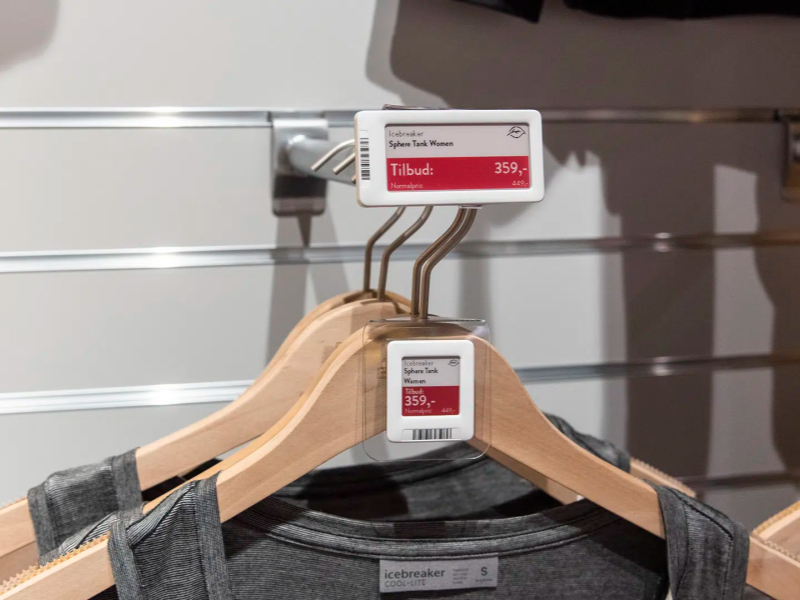
Why Standard ESLs Often Don't Work for Clothing
Most electronic shelf label systems were designed for grocery and hardware stores, where a tag stays fixed on a shelf edge and the product sits in front of it. That physical setup does not transfer to apparel retail.
In a clothing store, tags travel with individual garments. They get handled during fitting, move between display areas, and need to hang from a hanger or clip to a folded stack. Purpose-built systems for apparel account for this. If you are evaluating vendors, this is the first distinction to verify: is the hardware actually engineered for garment attachment, or is this a grocery ESL being sold into a different market? A tag that attaches awkwardly, looks industrial on a premium rack, or adds noticeable weight to a lightweight garment is a UX problem that compounds across thousands of SKUs.
What Digital Price Tags Can Display
Depending on the system, tags can show current and sale prices, SKU and size information, promotional countdowns, QR codes linking to extended product pages, and NFC interaction points for loyalty or checkout workflows. The practical value of each depends on your use case - a boutique with 200 SKUs needs different capabilities than a chain with 4,000.
NFC is not standard across all systems and typically requires premium tag hardware. QR codes, by contrast, can be displayed dynamically on the tag screen itself and linked to any URL - no additional hardware required. For most in-store information use cases, QR is sufficient. NFC adds tap-based interaction without requiring the customer to open a camera, which matters in high-traffic environments where speed is a priority.
The Operational Case: Where the Value Is Clearest
The staff hours saved per promotional cycle are real and measurable. A clothing chain running three major markdown cycles per year - end-of-season clearance, mid-season promotions, and flash sales - might spend 15–25 person-hours per location per cycle on manual label replacement. At ten locations, that is 150–250 hours of labor that can be reallocated to customer-facing work.
For omnichannel retailers, the synchronization benefit is equally significant. When a price changes on your website, the in-store tags need to match immediately. Manual reconciliation means it often does not - and price discrepancies at the register create compliance risk and customer friction. Digital tags that integrate with your POS or e-commerce platform make this automatic.
Display Technology: E-Ink vs. LCD
The majority of clothing retail ESLs use e-ink displays. E-ink is highly legible across lighting conditions, consumes minimal power (battery life of 3–7 years is typical under normal retail use, according to E Ink Holdings), and is durable enough to handle daily garment movement. Standard e-ink works in black, white, and red - sufficient for price and basic promotional text.
Color e-ink is available at a premium. For most apparel stores, high-contrast black-and-white is perfectly legible. Before paying for color capability, ask whether your use case genuinely requires it. For shelf-edge or display table applications, LCD bar screens offer full color and faster refresh rates at the cost of higher power consumption. Refresh rate matters more in environments where prices change multiple times per day.
Connectivity: BLE vs. Wi-Fi vs. Sub-GHz
Three wireless protocols dominate the market, and the tradeoffs are real. Understanding the differences between BLE, Wi-Fi, and sub-GHz before vendor demos is time well spent. The headline distinctions:
- Sub-GHz (proprietary radio): Strong wall penetration, low power draw, reliable in dense RF environments like shopping centers. Requires dedicated access point hardware installed in-store. Update speeds are typically 5–30 minutes for a full store sweep - fast enough for most markdown workflows.
- Bluetooth Low Energy (BLE): Faster per-tag updates (seconds to minutes), shorter range means more access points in large stores. Works well in smaller boutique environments.
- Wi-Fi: Fastest updates, but higher power consumption shortens battery life and the protocol is more demanding on network infrastructure. Better suited for dynamic pricing that responds to competitor prices in near real time.
Also confirm: what happens when internet connectivity is lost? In most systems, each tag stores the last content it received and continues displaying it until the connection is restored. Do not assume this - confirm it explicitly.
What It Actually Costs - and How to Calculate ROI
Per-unit hardware costs for e-ink ESLs typically range from $3–$8 per tag for standard black-and-white displays, $8–$15 for color e-ink. Software platform licensing runs roughly $200–$800 per month for small to mid-size deployments. Installation and POS integration - which typically requires custom development work - can add $3,000–$15,000 or more depending on your tech stack.
The core ROI frame: labor hours replaced per year × hourly cost, plus reduced pricing discrepancy incidents × cost per incident, plus paper and material savings per year. For a ten-location chain running three major markdown cycles, the labor savings alone frequently justify the hardware investment within 18–24 months. A structured ROI calculator can help you model this against your specific cost structure. This cost breakdown covers what the per-tag price actually includes.
The Integration Problem - and Why It Matters More Than Hardware
The most common source of post-deployment problems with digital price tag systems is not the hardware - it is the integration. If the system does not connect cleanly to your POS and inventory platform, the automation that justifies the investment does not work, and you end up with a more expensive version of the manual process you were trying to replace.
Before committing to any hardware, ask vendors specifically:
- Which POS and ERP systems do you support natively, and which require custom integration work?
- What does the integration setup process realistically look like, and how long does it take?
- Can you provide a reference from a retailer running our specific POS system?
- Who manages the integration if something breaks - us, you, or a third-party partner?
Generic assurances about seamless integration are not sufficient. Comparing ESL manufacturers on integration depth - not just hardware specs - is where the real evaluation happens. If a vendor cannot name references using your specific POS, treat that as a red flag.
What Different Retail Formats Should Prioritize
Fast Fashion and High-Volume Chains
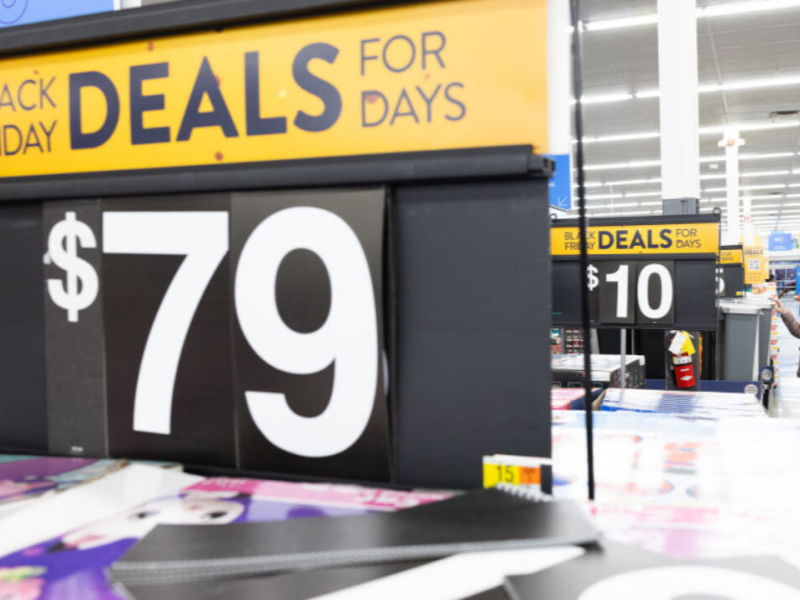
This is where digital price tags deliver the most straightforward operational case. The non-negotiable capabilities are update propagation speed, robust POS integration, and reliable central management across locations. Retail ESL solutions built for this environment prioritize those features. Walmart's large-scale digital shelf label rollout - which the company has cited publicly as a labor-saving initiative - is the most visible example of this model at scale.
Independent Boutiques
For smaller operations, the ROI math requires more scrutiny. Staff hours saved per cycle are smaller, and the upfront cost is spread across fewer items. The practical recommendation: run a scoped pilot on one section of the store for 60–90 days before full deployment. Define success metrics before you start - hours saved per cycle, pricing error reduction, customer engagement with QR features - and measure against them.
Luxury and Premium Fashion
For luxury retailers, customer experience often carries more weight than operational efficiency. A tag that surfaces brand storytelling, product provenance, or exclusive client services can enhance the premium feel of a store - but only if the hardware design is refined enough to belong in that environment. A visually incongruous tag in a luxury store does more harm than a paper one.
Sports and Outdoor Apparel
Sports retailers carry products with technical complexity - performance specs, sizing charts, material technologies - that paper tags cannot communicate. Digital tags that connect shoppers to detailed product information address an information gap specific to high-consideration purchases. For this category, the informational use case justifies the investment as much as the operational efficiency angle does.
Running a Pilot: What to Measure
Before committing to full deployment, running a scoped pilot is the most reliable way to surface problems that controlled vendor demos do not. A well-structured pilot should cover:
- Scope: 50–150 SKUs across one department is sufficient to evaluate system performance without a full capital commitment.
- Duration: 60–90 days, spanning at least one full promotional cycle.
- Success metrics defined upfront: Staff hours per price update event, pricing discrepancy incidents at POS, battery life in practice, tag failure rate.
- Integration stress test: Push a full store-wide price update and measure how long it takes for every tag to reflect the change.
- Staff feedback: The team using the management platform daily will surface usability issues that a demo will not.
Pay close attention to the difference between vendor-quoted update speeds and real-world performance in a store with concrete walls, multiple floors, or dense metal fixtures. Ask for the worst-case update time, not just the average.
Digital vs. Paper: Side-by-Side
For a detailed full-cycle cost comparison, this practical comparison of ESLs and paper labels covers the operational picture across a full year. The headline differences:
| Digital Price Tags | Paper Price Tags | |
|---|---|---|
| Price update speed | Seconds, system-wide | Manual replacement per item |
| Pricing accuracy | Automated, minimal discrepancy risk | Dependent on staff execution |
| Staff time per cycle | Minimal | High during promotions |
| Upfront investment | Higher | Lower |
| Omnichannel sync | Automated with POS integration | Manual reconciliation required |
| Environmental impact | Low - reusable hardware over years | High - single use per change |
| Hardware lifespan | 5–10 years | Single use |
Frequently Asked Questions
Are digital price tags worth it for a small clothing store?
It depends on how frequently prices change and whether you need to keep in-store pricing synchronized with an online channel. For boutiques with stable pricing and no e-commerce presence, the math is harder. For stores running regular promotions or managing omnichannel pricing, the case is stronger even at smaller scale. A 60-day pilot is the most reliable way to answer this for your specific situation.
How long do digital price tags last?
Most commercial ESL hardware is designed for a 5–10 year operational lifespan. Battery life - which is separate from overall hardware lifespan - typically runs 3–7 years for e-ink displays given their low power consumption. Ask vendors for specific figures, not marketing ranges.
How long does installation take?
Hardware installation for a single-location store typically takes 1–3 days. POS integration can take 2–8 weeks depending on your tech stack and the vendor's existing integration library. Budget the integration timeline conservatively - this is where most deployment delays originate.
What happens if the internet connection goes down?
In most systems, each tag stores the last content it received locally and continues displaying it until connectivity is restored. Confirm this behavior with any vendor you evaluate - do not assume it.
Can digital price tags attach to garment hangers?
Systems purpose-built for clothing retail offer tag formats specifically designed for hanger or rail attachment. This is a key differentiating factor - confirm that the tag hardware is designed for apparel, not repurposed from a grocery or hardware retail context.
Is e-ink better than LCD for clothing stores?
For individual garment tags, e-ink wins on battery life, weight, and legibility across lighting conditions. For shelf-edge or display table applications where full color or faster refresh rates matter, LCD is worth evaluating - at the cost of higher power requirements and shorter battery life.
The Bottom Line
Digital price tags for clothing stores solve real, well-defined operational problems: pricing accuracy, staff time, omnichannel synchronization, and the information gap between what shoppers can access online versus in-store. For retailers running frequent promotions or managing multiple locations, the case is strong. For smaller operations with stable pricing, a scoped pilot answers the question concretely before a full commitment.
What determines whether an implementation succeeds is rarely the hardware - it is whether the system integrates cleanly with your existing POS, and whether your team has what it needs to operate it. To explore available electronic shelf label solutions or discuss your store's specific requirements, speak with a specialist before selecting a vendor.





