How Do Electronic Shelf Labels Work? A Retailer's Complete Guide
If you've shopped at Walmart, Kroger, or Whole Foods lately, you may have noticed something different on the shelves. Those little paper price tags? They're disappearing. In their place: small digital screens that look a lot like tiny Kindles.
These are electronic shelf labels - ESLs for short - and they're rolling out fast. Walmart alone is installing them in 2,300 stores by 2026. Kroger is expanding after testing in 20 stores. Lidl, Aldi, Hy-Vee, Schnucks - the list keeps growing.
But how do these little screens actually work? What do they cost? And is the investment really worth it for a store your size?
Let's break it all down.
What Are Electronic Shelf Labels?
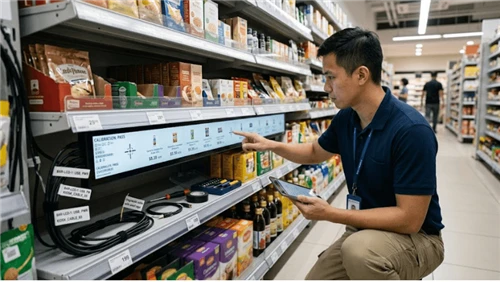
An electronic shelf label is a small, wireless digital display that sits on the edge of a retail shelf - right where a paper price tag would normally go. Instead of printed cardboard, you get a screen that shows the product price, and often a lot more: product name, barcode, stock status, promotional badges, even QR codes.
The "electronic" part is important. Every ESL in a store connects wirelessly to a central management system. When someone changes a price in the back-office software, that change shows up on the shelf - automatically, in seconds, across every label in the building. No printing. No walking the aisles with a cart full of paper tags. No mismatches between the shelf and the register.
That's the core idea. But the technology behind it is more interesting than it sounds.
How Electronic Shelf Labels Actually Work
Every ESL system has three main components working together. Think of it like a nervous system: a brain, a network, and the nerve endings.
1. The Central Management Software (the Brain)
This is the control center - a cloud-based or on-premise software platform where store managers (or HQ teams) manage all pricing, product information, and promotional content. The software usually integrates directly with your POS system and ERP, so when a price changes in your inventory system, the label updates automatically.
Good ESL management platforms also handle scheduling (set a promotion to go live next Tuesday at 6 AM), group management (update all dairy labels at once), and analytics (which labels have been updated, which haven't synced).
If you're already using a digital signage CMS for in-store displays, some platforms can manage both your signage screens and your shelf labels from the same dashboard - which simplifies things considerably.
2. The Communication Infrastructure (the Network)
ESL labels are wireless, but they need a way to receive updates from the central software. This happens through small communication gateways (sometimes called access points or base stations) installed throughout the store - usually one every 20–30 meters.
These gateways talk to the labels using one of several wireless protocols:
Radio Frequency (RF): The most common approach. Operates on sub-1 GHz, 433 MHz, or 2.4 GHz bands. Sub-1 GHz offers the best range and wall penetration, making it popular for large supermarkets.
Bluetooth Low Energy (BLE): Gaining ground fast, especially since the Bluetooth SIG introduced a dedicated ESL standard in 2023. BLE is energy-efficient and widely supported - over 5 billion Bluetooth-enabled devices ship annually.
Wi-Fi: Some ESL systems use the store's existing Wi-Fi network, which reduces infrastructure costs but can add congestion to your network.
NFC (Near Field Communication): Typically used alongside another protocol. NFC lets store staff tap a phone to an individual label for quick updates, diagnostics, or pairing.
The protocol choice matters because it affects range, battery life, update speed, and cost. Most modern systems use RF or BLE as the primary communication channel, with NFC as a secondary option for hands-on management.
3. The Labels Themselves (the Nerve Endings)
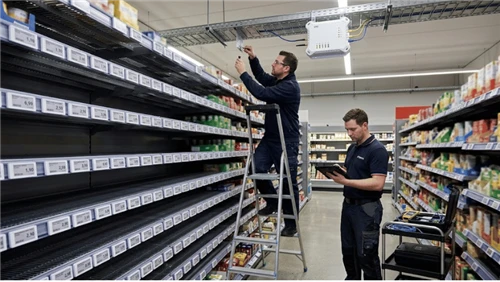
This is the part shoppers actually see. Each label is a small, self-contained unit with a display, a wireless receiver, a processor chip, and a battery. They typically attach to the shelf edge using clips, rails, or adhesive mounts.
The display technology is where things get interesting.
E-Ink vs. LCD: The Two Display Technologies Behind ESLs
Not all electronic shelf labels use the same screen technology. The choice between e-ink and LCD affects how the label looks, how much power it consumes, and how long the battery lasts.
E-Ink (Electronic Paper)
E-ink - the same technology in a Kindle e-reader - is the dominant choice for ESLs. About 80% of ESL installations worldwide use some form of e-paper display.
Here's why: e-ink only draws power when the display changes. Once an image is on the screen, it stays there with zero energy consumption. That means a single coin-cell battery can power an e-ink ESL for 5 to 10 years before it needs replacing.
E-ink screens also look great under store lighting. They offer high contrast, wide viewing angles, and paper-like readability - no backlight glare, no washout under bright fluorescents.
The tradeoff? Traditional e-ink is limited to black and white (with some models adding red or yellow as a third color). And because the display only refreshes during updates, it can't show video or animations.
LCD
LCD-based ESLs use liquid crystal displays similar to what's in a basic calculator or small digital screen. LCD ESLs can display more colors and can theoretically support more dynamic content.
However, LCD requires continuous power to maintain an image. That means shorter battery life - typically 2 to 5 years depending on screen size and refresh rate - or the need for a wired power connection.
LCD currently holds about 52% of the market by revenue (Mordor Intelligence, 2024), largely due to lower upfront costs in certain sizes. But full-graphic e-paper is the fastest-growing segment, projected at a 20.5% CAGR through 2030, as color e-ink technology improves and prices come down.
For most retail applications - especially grocery, pharmacy, and general merchandise - e-ink is the preferred choice because of its readability, battery longevity, and near-zero maintenance.
If you're comparing display technologies for your broader in-store signage strategy, we wrote a detailed comparison in our guide to e-ink vs. LCD for retail displays.
What Can Electronic Shelf Labels Actually Display?
Modern ESLs do a lot more than show a price. Here's what a typical label can handle:
- Product price (obviously)
- Product name and description
- Barcode or QR code - shoppers can scan to see nutrition info, reviews, or online pricing
- Promotional badges - "SALE," "NEW," "2 for $5," loyalty member pricing
- Stock status - "Low Stock" or "Available Online"
- Multi-page content - some ESLs support up to 7 display pages, flippable via a button on the label
- LED indicator lights - color-coded LEDs can flash to guide staff during restocking or online order picking
- NFC tap point - customers or staff tap a phone to the label for product details or mobile payment links
That LED feature is worth highlighting. Instacart's Carrot Tag software connects to ESLs at Aldi, Gelson's, and Hornbacher's stores, using the flashing LED to guide online order pickers directly to the right product on the shelf. Walmart uses a similar feature for restocking efficiency.
What Do Electronic Shelf Labels Cost?
This is the first question every retailer asks - and the answer depends on what you need.
Per-Label Hardware Costs
| Label Type | Typical Price Range | Notes |
|---|---|---|
| Basic e-ink (small, B&W) | $5 – $10 per unit | 1.5"–2.9" screens. Price and barcode only. |
| Mid-range e-ink (B&W + accent color) | $10 – $20 per unit | 2.9"–4.2" screens. Black/white/red display. QR codes, promo badges. |
| Advanced e-ink (full graphic, color) | $15 – $50+ per unit | 4.2"–7.5"+ screens. Full graphic display, NFC, multi-page, LED. |
| LCD-based ESL | $8 – $30 per unit | Lower upfront cost but shorter battery life. Better color range. |
Infrastructure Costs
Beyond the labels themselves, you'll need:
- Communication gateways / base stations: $150 – $300 each. A mid-size grocery store (10,000 sq ft) typically needs 8–15 gateways for full coverage.
- Management software: Varies widely. Some vendors charge a one-time license fee ($500 – $2,000), others use a monthly SaaS model ($10 – $30 per month per store or per set number of labels).
- Installation and integration: Professional setup, POS/ERP integration, and staff training add $5,000 – $15,000 depending on store complexity.
Total Deployment Example
For a mid-size retail store with approximately 5,000 SKUs:
- 5,000 basic e-ink labels at ~$8 each = $40,000
- 10 gateways at ~$200 each = $2,000
- Software license = $1,500
- Installation and integration = $8,000
- Total: approximately $51,500
That's a meaningful upfront investment. But the ROI story is where it gets compelling.
For a deeper look at pricing across different label sizes and configurations, see our detailed breakdown of electronic shelf label costs.
The ROI Case for Electronic Shelf Labels
Paper labels are cheap individually, but they're expensive at scale. A single large supermarket can spend 50+ hours per week on manual price changes - printing tags, walking the aisles, physically swapping them out. At $15/hour average labor cost, that's over $39,000 annually in labor alone, just for price tag management.
Add in printing supplies, the cost of pricing errors (mismatches between shelf and register), and the inability to react quickly to market changes, and the true cost of paper becomes clear.
Here's a realistic ROI example based on published industry data (ComQi, 2025):
Scenario: A retailer spends $100,000 on a full ESL deployment.
- Annual labor savings: ~$39,000
- Annual print/material savings: ~$10,000
- Annual pricing error reduction: ~$5,000
- Total annual savings: ~$54,000
- Payback period: ~1.85 years
- Annual ROI after payback: 54%
In practice, payback timelines vary:
- High-volume grocery with frequent price changes: 3–12 months
- General retail with moderate price updates: 12–18 months
- Low-frequency environments: 18–24+ months
One IGA grocery store owner who deployed VusionGroup ESLs reported saving up to 50 labor hours per week and expected to recoup his full investment in under two years. His words to the U.S. Chamber of Commerce: "There's definitely a payoff on these. I can't wait to see what the future brings."
When you combine ESLs with complementary in-store digital signage - like stretched bar displays above the shelf or digital endcap screens - the operational and marketing benefits multiply. The same back-office platform can manage both your shelf pricing and your promotional displays, reducing the total number of systems your team has to learn.
Real-World Deployments: Who's Using ESLs and What They're Seeing
Walmart
The world's largest retailer announced in 2024 that it would bring ESLs to 2,300 U.S. stores by 2026 after positive results from 500+ test locations. Walmart cited dramatically faster price changes (minutes instead of two days for 120,000 items) and improved picking/stocking efficiency as primary drivers.
Lidl (UK)
Lidl GB completed an ESL rollout across all UK stores by end of 2024 after trialing the technology in 35 locations starting in September 2022. The result: an estimated 206 tonnes of carbon savings annually from eliminated paper and packaging. Over two-thirds of shoppers surveyed didn't even notice the change - a testament to how seamless the transition is.
Kroger
Kroger has been expanding ESL testing across more stores after an initial 20-store pilot. The grocer says the technology helps manage inventory and identify opportunities to lower prices on perishable or seasonal items that need to move faster.
Aldi
Like Lidl, Aldi deployed ESLs across its UK store network and was among the first major grocers to go fully digital on shelf labeling. Aldi also connected its ESLs to Instacart's pick-to-light system, enabling the flash-to-find functionality that speeds up online order fulfillment.
Albert Heijn (Netherlands)
Ahold Delhaize's Albert Heijn chain has been testing AI-enabled ESLs since 2022, using the labels to automatically mark down prices on perishable items approaching expiration - reducing food waste while recovering revenue that would otherwise be lost.
For a broader look at which grocery chains are adopting this technology, see our overview of grocery stores using electronic shelf labels.
How to Implement ESLs in Your Store: A Practical Walkthrough
Step 1: Assess Your Needs
Start with a few questions:
- How many SKUs do you carry?
- How frequently do prices change? (Weekly? Daily? Multiple times per day?)
- What's your current labor spend on manual price management?
- Do you need integration with an existing POS or ERP system?
Stores with frequent price changes and high labor costs will see the fastest payback. If your prices rarely change, the ROI timeline extends.
Step 2: Choose Your Hardware
Pick the label type that matches your store environment. Grocery and pharmacy stores generally do well with small-to-mid-size e-ink labels (2.2"–4.2"). Electronics or home improvement stores may need larger labels to display more detailed specs.
If you're also investing in digital shelf-edge displays or stretched bar screens for promotional content above the shelf, consider a vendor ecosystem that lets you manage both ESLs and signage from a unified platform.
Step 3: Plan Your Infrastructure
Work with your vendor to do a site survey. Gateway placement depends on store layout, shelf height, building materials (concrete and metal shelving can affect wireless range), and the communication protocol your labels use. A typical access point covers a 20–30 meter radius.
Step 4: Integrate With Your Systems
Your ESL management software needs to talk to your POS system and/or ERP. This is where most deployment complexity lives. Budget time for integration testing, especially if your POS system is older. Some retailers have reported that legacy POS integration is the single biggest challenge in ESL deployment.
Step 5: Install and Train
Physical installation is straightforward - labels clip or slide onto shelf rails. Budget 1–3 days for a mid-size store. Staff training typically takes a few hours, focused on the management dashboard and handling edge cases (label not syncing, label damage, battery replacement).
For more detail on the physical setup process, see our guide to installing electronic shelf labels.
Step 6: Go Live and Monitor
Most vendors recommend a phased rollout - start with one department, validate everything works, then expand. Use the CMS dashboard to monitor sync rates, spot labels that aren't updating, and track system health.
Addressing the Dynamic Pricing Concern
We'd be remiss not to mention this, since it's been in the news.
Some consumer advocates and lawmakers have raised concerns that ESLs could enable "surge pricing" - raising prices on groceries based on time of day, weather, or demand. U.S. Senators Elizabeth Warren and Bob Casey wrote to Kroger in 2024 questioning whether ESLs would be used to "extract maximum profits."
Here's what the data actually shows: A peer-reviewed study examining five years of pricing data at a grocery chain found "virtually no surge pricing" before or after electronic shelf labels were adopted. Temporary price increases affected just 0.005% of products on any given day. After ESLs were installed, that figure barely moved - and discounts actually became slightly more common.
Kroger, Walmart, and other retailers have consistently stated that their ESL deployments are aimed at operational efficiency and waste reduction, not demand-based price surging. Kroger specifically noted that ESLs help them "pinpoint opportunities where we can lower prices on items that are perishable, seasonally specific or which otherwise need to move more quickly."
A study from UC San Diego's Rady School of Management found that dynamic pricing on perishable goods actually reduces food waste by up to 21% - which benefits both the retailer and the consumer.
The Market Is Growing Fast
The global ESL market was valued at approximately $1.97 billion in 2025 and is projected to reach $7.54 billion by 2033 (Grand View Research), growing at a 15.8% compound annual rate. Over 600 million ESL units are already deployed globally, and major retailers in North America are just getting started.
Roughly 60% of North American supermarket chains plan at least a partial ESL rollout by 2026 (Mordor Intelligence). The Bluetooth SIG's new ESL standard is expected to accelerate adoption further by enabling interoperability between vendors - so retailers aren't locked into a single supplier's ecosystem.
For retailers evaluating their next technology investment, ESLs pair naturally with broader in-store digital infrastructure. A shelf label updates the price; a digital endcap display promotes the product; a stretched bar screen above the aisle highlights the promotion. When all three are connected through a single content management system, the store becomes a coordinated, responsive marketing environment that paper simply can't match.
Frequently Asked Questions
How long do electronic shelf label batteries last?
Most e-ink ESLs last 5–10 years on a single battery, depending on how frequently the display updates. LCD-based labels have shorter battery life (2–5 years) since they require continuous power to maintain the display. Battery replacement is simple - most labels use standard coin-cell batteries that snap in and out.
Can electronic shelf labels work without internet?
ESLs communicate with local gateways using RF or BLE, so they don't require each label to have internet access. However, the central management software needs an internet connection for cloud-based platforms, remote management, and POS/ERP syncing. Some systems can operate in offline mode with locally cached data.
Are electronic shelf labels hard to install?
No. Labels attach to standard shelf rails using clips, slides, or adhesive. A mid-size store can typically be fully installed in 1–3 days. The more complex part is the software integration with your existing POS and inventory systems.
What happens if a label stops working?
Most ESL platforms include remote monitoring that flags labels that haven't synced or have low battery. Failed labels can simply be swapped out - it takes about 10 seconds per label. Failure rates in mature deployments are low; industry data puts daily sync failure rates at under 0.1% for well-maintained systems.
Can ESLs show more than just prices?
Yes. Modern ESLs can display product names, barcodes, QR codes, promotional badges, stock levels, nutritional highlights, loyalty pricing, multi-page content, and even color-coded LED alerts. Some labels support NFC for tap-to-learn functionality with smartphones.
Do I need to replace all paper labels at once?
No. Many retailers take a hybrid approach - deploying ESLs in high-turnover departments first (produce, dairy, deli) where price changes are most frequent, then expanding over time. Starting small lets you validate the ROI before committing to a full-store rollout.
Ready to Explore Electronic Shelf Labels?
Electronic shelf labels have moved well beyond early-adopter territory. With Walmart, Kroger, Aldi, and Lidl all committing to large-scale deployments, the technology is becoming a standard part of modern retail infrastructure - not a niche experiment.
Whether you're running a single independent grocery store or managing signage across a regional chain, the operational math is straightforward: less labor on price tags, fewer pricing errors, faster promotional execution, and a shelf edge that can do more than just show a number.
We carry a range of electronic shelf labels alongside our broader portfolio of retail digital signage solutions - from e-ink price tags and shelf-edge displays to stretched bar screens and digital endcap displays. If you're weighing your options or planning a pilot deployment, get in touch - we're happy to walk through the hardware, software, and integration considerations for your specific setup.