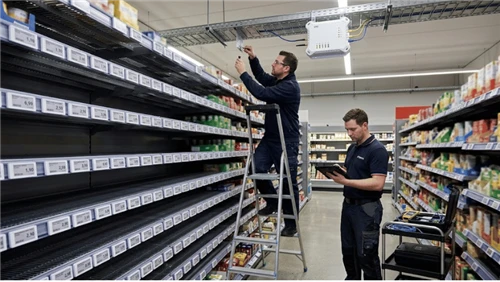
E-ink price tags were built to show product prices on supermarket shelves. They run on coin cell batteries for years, hold an image with zero power draw, and read like paper under any lighting. What's changed in the past two years is that buyers outside retail - hotel operators, restaurant groups, coworking managers, property developers, logistics companies - have started deploying the exact same hardware for completely different jobs.
A 2.9-inch e-ink tag that costs $4–$12 depending on source and volume can serve as a hotel room door plate, a restaurant table display, a meeting room availability sign, or a warehouse bin label. No wiring, no backlight, no charging. The open-source community proved the concept at scale through the OpenEPaperLink project - thousands of hobbyists running surplus retail tags on Home Assistant. Now commercial buyers are catching up, and the supply chain is ready.

This guide covers where to buy, how to choose, what the full system costs, and which manufacturers to evaluate - whether you're outfitting a single vacation rental or rolling out 500 tags across a hotel chain.
Who's Buying E-Ink Smart Displays (And Why It's Not Just Hobbyists)
We fielded over 40 display-related inquiries in Q4 2025 alone. Fewer than a third came from home automation enthusiasts. The rest:

Warehouse and 3PL operators replacing handwritten bin labels with e-ink tags linked to the WMS, enabling pick-to-light workflows. One logistics manager in Rotterdam told us his team was spending four hours a day on manual relabeling - and still running a 2.1% mis-pick rate. Our warehouse rack labeling guide covers this application in detail.
Boutique hotels and B&Bs replacing plastic-sleeve room inserts with e-ink door plates that pull the guest's name and checkout date directly from the property management system at check-in.
Restaurant and café owners mounting table tags for QR ordering links, daily specials, wait-time estimates, or allergen callouts - without running power to each table.
Office and coworking managers deploying meeting room tags that sync with Google Workspace or Microsoft 365. This is the single most common non-retail ESL use case globally - multiple vendors now offer plug-and-play kits for it.
Short-term rental operators wanting guest-facing screens that show Wi-Fi credentials, house rules, and checkout times - updated remotely between stays without reprinting laminated cards. A host managing 12 Airbnb units told us she was spending $15/month on printed inserts and 90 minutes per turnover day distributing them. A set of 2.9-inch tags with a cloud CMS eliminated both.
Smart building integrators specifying always-on displays for lobby directories, unit-level info panels, and common-area signage in residential and mixed-use developments.
For all these buyers, the question isn't technical - it's commercial: where do I source these, what system do I actually need, and what will it cost once it's running?
LCD vs. E-Ink: Choosing the Right Tool for Each Touchpoint
This isn't a pick-one decision. Most commercial deployments that work well end up using both - each where it makes sense. We manufacture both e-ink ESL tags and LCD bar displays, so here's the honest trade-off rather than a sales pitch for either side.
| E-Ink ESL Tags | LCD Screens | |
|---|---|---|
| Best for | Status info that changes every 15 min–24 hrs: prices, names, schedules, bin labels | Promotional content, video, animations, rich-color branding |
| Power | Coin cell battery, 2–5 year life, zero wiring | Requires continuous AC power or battery with daily charging |
| Visibility | Excellent in ambient light; invisible in darkness without frontlight | Self-illuminated; visible in any lighting but can feel intrusive in intimate settings |
| Refresh | 3–15 seconds per full redraw; not suitable for real-time data | Instant; handles video, live feeds, scrolling content |
| Color | Black/white, or BWR/BWY with one accent color; full color exists but slow and expensive | Full RGB, millions of colors, photo-quality |
| Cost per unit | $4–$15 per tag (plus gateways and CMS) | $80–$400+ per screen (plus media player and mounting) |
| Aesthetic | Paper-like, subtle, blends into environment | Bright, attention-grabbing, clearly "digital" |
In practice, most venues do this: put e-ink where information sits quietly (door plates, table tags, shelf edges, bin labels, status boards) and LCD where information needs to sell (entrance displays, endcaps, menu boards, promotional screens). For a detailed look at how the two technologies work together in food service, see our 2026 smart restaurant display guide. For retail shelf-edge applications specifically, our comparison of stretched LCD screens for grocery environments covers the LCD side of the equation.
Where to Buy: Three Sourcing Paths by Scale
Path 1: Surplus retail tags + open-source firmware (1–20 units, proof of concept)
Surplus BLE e-paper tags from Solum (ZBS243-based) are available on AliExpress and eBay for $3–$8 each. You'll need an ESP32 board (~$5–$10) as an access point and a Home Assistant instance. Tags ship with retail firmware and must be reflashed - Aaron Christophel's YouTube channel covers model-specific guides.
This path is cheap but hands-on. Best for: a single Airbnb host testing one guest-info display, a maker validating the concept before pitching it to their company, or an integrator building a demo unit for a client presentation.
Path 2: Commercial starter kits (10–100 units, pilot)
For operators managing multiple properties, small hotel groups, or restaurants running a 30-day trial, buy directly from an ESL manufacturer. You get pre-flashed tags, preconfigured gateways, and access to a content management dashboard - no firmware work required.
What to request in a pilot kit: tags in your target sizes (typically 2.9" and 4.2"), 1–2 gateways, CMS access, and API documentation so your dev team can test integration with your PMS, POS, or booking system before you commit. Our guide on how to choose an ESL solution covers evaluation criteria in detail.
Path 3: Full-system deployment (100+ units, rollout)
At scale, you're buying a system, not tags. That means gateways with coverage planning, a CMS with API integration, custom enclosures, firmware OTA updates, and after-sales support. Expect 40–120 hours of integration development time depending on back-end complexity.
Request formal quotes from at least two vendors. Ask for gateway placement recommendations based on your floor plan. Insist on API sandbox access before procurement. See the manufacturer comparison below for where to start.
Top ESL Manufacturers for Smart Display Projects
The ESL market has a handful of established players and a growing number of Chinese manufacturers offering competitive pricing. Here's an honest overview of the major suppliers - their strengths, and what to watch for.
SES-imagotag
The largest ESL vendor globally by installed base, headquartered in France. Their VUSION platform powers deployments in major retail chains including Walmart (U.S.) and Carrefour (Europe). Strong enterprise-grade software, robust cloud infrastructure, and the widest range of tag sizes.

Best for: Large-scale enterprise deployments (1,000+ tags) where software maturity and global support infrastructure matter more than unit price.
Watch for: Pricing tends to be premium. Minimum order quantities and contract terms may not suit small pilots or single-venue operators. According to industry estimates (Displaydata, 2023), enterprise ESL systems from top-tier vendors like SES-imagotag typically run $8–$15 per tag at volume, before gateway and software costs.
Solum (Samsung subsidiary)
Manufactures the Newton series of e-ink tags - some of the most commonly used hardware in both retail and the open-source community. The ZBS243 chipset used in many surplus tags originates from Solum's product line. Their commercial platform, Solum ESL, offers cloud-based management with retail-focused features.

Best for: Mid-to-large retail deployments. Also the de facto hardware standard for OpenEPaperLink community projects, making Solum tags the easiest to source for proof-of-concept work.
Watch for: Commercial support is primarily retail-oriented. Non-retail use cases (hotels, restaurants) may require more self-service integration work.
Hanshow
Chinese manufacturer with aggressive global expansion - claims 30,000+ store deployments worldwide as of 2024. Their Nebular series includes tags from 1.54" to 11.6", and they've invested heavily in computer-vision-integrated ESL solutions for retail analytics.

Best for: Cost-sensitive deployments at volume. Hanshow's pricing is generally 20–40% below European vendors at comparable tag sizes, according to distributor quotes reviewed by our procurement team.
Watch for: Software platform maturity and English-language documentation can lag behind SES-imagotag. Evaluate the API documentation and CMS yourself before committing.
Pricer
Swedish company, one of the original ESL pioneers (founded 1991). Uses an infrared optical communication system rather than BLE/RF, which offers higher reliability in environments with heavy RF interference (e.g., warehouses with dense metal shelving). Their latest SmartTAG Power series adds BLE for supplementary communication.

Best for: Warehouse and logistics applications where RF reliability through metal racking is critical. Also strong in European grocery retail.
Watch for: The proprietary IR protocol means you're locked into Pricer's gateway ecosystem. Less flexible for mixed-protocol or open-platform deployments.
Legoyo (that's us - disclosure)
We manufacture e-ink ESL tags in 2.66" to 7.3" sizes, LCD bar displays from 28" to 49.5", transparent LCD showcases, and self-service kiosk terminals. We're a mid-scale manufacturer based in Xiamen, not a global enterprise platform like SES-imagotag.

Best for: System integrators and venue designers who need multiple display formats (e-ink + LCD + kiosk) from a single factory. Small-to-mid-scale deployments (50–5,000 tags) where direct-from-manufacturer pricing and customization flexibility matter. Also a good fit for projects that combine ESL status tags with LCD promotional screens under one roof.
Watch for: We're not the right choice if you need a global enterprise SaaS platform with 50,000-tag management out of the box. Our strength is hardware manufacturing, custom enclosures, and multi-format sourcing - not competing with SES-imagotag's software ecosystem.
When comparing suppliers, download our ESL cost breakdown to benchmark pricing across tiers.
Deployment Examples: What Real Projects Look Like
A hotel in Lisbon that started with a housekeeping problem
A 120-room boutique hotel in Lisbon wasn't looking for display technology. They were trying to fix a housekeeping bottleneck. Every turnover day, front-desk staff printed 120+ guest name cards, walked them to each room, and slid them into plastic door sleeves. At peak season that meant 240 inserts a week and roughly three hours of staff time per day - time the GM would rather have spent on guest interaction.
Their integrator pitched 2.9-inch BWR e-ink tags in custom brushed-aluminum door plate frames. Three BLE gateways covered four floors. The CMS hooked into their Opera PMS via REST API: when a guest checks in, the door plate auto-populates with their name, checkout date, and a welcome line in their language. Sixty hours of developer time for the API integration, about $2,800 in hardware.
Eighteen months later, zero battery replacements. Print costs gone. The GM mentioned in a follow-up call that multiple guests had commented on the personalized door display - the kind of detail that shows up in reviews without being asked for.
A restaurant group in Dubai that wanted to kill paper table inserts
Two locations, 85 tables total. The kitchen manager was reprinting daily specials every morning on card stock, inserting them into acrylic table stands, and throwing them away every night. The group also wanted QR-code ordering but didn't want powered tablet stands cluttering the tables.
They went with 85 BW tags in clear acrylic stands, plus four 4.2-inch tags at hostess stations showing live wait times. Two gateways per location. The kitchen manager updates the daily content each morning from a centralized CMS - takes about five minutes.
The paper and printing line item (~$400/month across both sites) disappeared. QR ordering hit 35% adoption among dine-in customers within the first month, which took measurable load off serving staff. The hostess-station wait-time displays are harder to quantify, but the operator says walkaway rates during peak hours dropped noticeably.
Total hardware: ~$1,600. Integration took 30 hours - their POS was already cloud-based with a documented API, which made things significantly easier.
A 3PL warehouse in Rotterdam with a mis-pick problem
A third-party logistics operator running a 10,000-bin facility was consistently above their client's SLA threshold on mis-picks - 2.1% against a 1.5% target. The root cause wasn't staff negligence; it was handwritten labels on adhesive tape that faded, peeled, or got stuck on the wrong bin during reorganization.
They deployed 10,000 2.13-inch BW tags on metal bracket mounts, with red LED flash on multi-color models for pick-to-light guidance. Forty-five Sub-1GHz RF gateways covered the facility. Integration with their Manhattan Associates WMS took 120 hours, including floor-plan gateway mapping and picker training.
Mis-pick rate fell to 0.8% in the first quarter. The two-person crew that had spent four hours a day on manual relabeling was reassigned. The operator's internal review showed ROI breakeven at month nine - driven primarily by the labor reallocation and SLA penalty avoidance rather than the hardware savings.
How to Choose: The Decision Checklist
Display size
2.9" is the default starting point. Fits a QR code, 3–4 lines of text, and a small icon - covers table tags, door plates, meeting room signs, and shelf labels. 4.2" for detailed schedules or multi-line status. 7.5"+ for lobby-level or dashboard displays. See our write-up on the full pros and cons of ESL tags for a detailed feature-by-feature comparison.
Color capability
Black/white: cheapest, fastest refresh, longest battery. Fine for most use cases. BWR (black/white/red): adds one accent color for status highlighting - "available" vs. "occupied," regular vs. sale price. Slightly slower refresh. Full-color ACeP: 15+ second refresh, significantly more expensive, poor color fidelity vs. LCD. Not recommended for most projects today.
Wireless protocol
BLE: standard for small-to-mid deployments. Short range (10–15m through walls), requires more gateways in large venues. Sub-1GHz RF: longer range (20–30m+), better wall penetration, more reliable in high-interference environments (metal shelving, industrial spaces). Common in large retail and warehouse setups. Proprietary IR (Pricer): highest reliability in RF-hostile environments but locks you into one vendor.
Integration capability
This is where most projects succeed or fail. Can the CMS pull live data from your PMS, POS, WMS, or booking engine via API? Is the API documented and sandboxed for testing? Our overview of the complete ESL solution architecture covers the integration layer in depth.
Refresh rate vs. battery
Every refresh costs battery. At one refresh per hour, expect 3–5 years on a CR2450 coin cell. At one per minute, expect months. Guest info that changes per stay, menus that change per shift, and room status that changes per booking are all comfortably within the 15–60 minute window.
Environmental ratings
Standard: 0–40°C (any indoor climate-controlled space). Cold-rated: down to -25°C (walk-in coolers). IP67: waterproof (commercial kitchens, outdoor-adjacent). Specify your environment upfront - a wrong-rated tag in a freezer is a preventable procurement error. Physical installation guidance is in our ESL installation guide.
What the Full System Costs
A per-tag price is 30–40% of your real cost. Here's what the full picture looks like at three common deployment scales:
Small deployment - single restaurant or small hotel
| Component | Qty | Estimated Cost |
|---|---|---|
| 2.9" BWR tags | 50 | $250–$750 |
| BLE gateways | 2 | $100–$400 |
| CMS software (annual) | 1 | $0–$1,000 |
| Enclosures / mounting | 50 | $100–$400 |
| Integration development | - | 20–60 hours |
| Total hardware | ~$500–$1,500 + integration labor |
Mid deployment - mid-size hotel or multi-location restaurant
| Component | Qty | Estimated Cost |
|---|---|---|
| 2.9"–4.2" tags | 200 | $1,000–$3,000 |
| BLE gateways | 6–8 | $300–$1,600 |
| CMS software (annual) | 1 | $500–$2,000 |
| Enclosures / mounting | 200 | $400–$1,600 |
| Integration development | - | 60–120 hours |
| Total hardware | ~$2,200–$8,200 + integration labor |
Large deployment - warehouse or retail chain
| Component | Qty | Estimated Cost |
|---|---|---|
| 2.13"–4.2" tags | 5,000+ | $20,000–$60,000 |
| Sub-1GHz / BLE gateways | 30–50 | $3,000–$10,000 |
| CMS software (annual) | 1 | $2,000–$10,000 |
| Enclosures / brackets | 5,000+ | $5,000–$15,000 |
| Integration development | - | 120–300 hours |
| Total hardware | ~$30,000–$95,000 + integration labor |
For context: 200 powered LCD tablets at $150–$300 each, with charging infrastructure and a 2–3 year replacement cycle, would run $30,000–$60,000 in the first term. E-ink's TCO advantage compounds over time because there's essentially no ongoing power or hardware replacement cost.
Figures based on distributor quotes and manufacturer list prices reviewed by our team in Q1 2026. Your actual costs will vary. Always request quotes from at least two suppliers.
For a more granular price analysis, see our 2026 e-ink display cost guide and ESL cost breakdown by deployment size.
Common Mistakes
Buying tags without buying the system. Fifty surplus tags from AliExpress cost $200. Discovering you also need specific gateways, compatible firmware, and an integration layer costs $2,000 and three weeks of lost time. For anything beyond a home experiment, buy the complete system.
Over-refreshing. E-ink refreshes take 3–15 seconds and drain battery proportionally. Operators from LCD backgrounds set refresh intervals at 60 seconds and then wonder why batteries die in weeks. Set stakeholder expectations upfront: e-ink is for minutes-to-hours update cycles.
Ignoring lighting. E-ink is reflective - invisible in darkness without a frontlight. If your venue dims lights for evening service, test tag readability at actual operating light levels during the pilot.
Treating enclosures as an afterthought. A bare retail tag on a shelf clip looks fine in a supermarket. On a hotel door it looks like a prototype. Budget enclosures alongside tags, not after.
Skipping integration validation. The vendor demo shows a pretty template. Can it pull your guest data from your PMS, through their API, with your dev team? Test this before signing a PO.
Frequently Asked Questions
Q: Do e-ink displays need internet to work?
A: No. Tags communicate with gateways over BLE on your LAN. Once an image is pushed, it stays indefinitely - even if the gateway goes offline. Internet is only required if you use a cloud CMS or manage displays across multiple locations remotely. A single-site deployment with an on-premise server can run the entire ESL system completely offline.
Q: Can I mix different tag sizes?
A: Yes. A hotel might use 1.54" for room numbers, 2.9" for guest welcome plates, and 7.5" in the lobby. All connect to the same gateways and CMS. This ability to deploy different display formats at different touchpoints - without duplicating infrastructure - is one of ESL's strongest practical advantages.
Q: How often can displays update without killing battery?
A: Sweet spot: every 5–60 minutes. A 2.9" tag refreshing every 15 minutes on a CR2450 lasts 2–4 years. Once per minute: months. Guest info per stay, menus per shift, room status per booking - all well within range.
Q: E-ink or LCD for my venue?
A: Use both. E-ink for distributed, low-power information (door plates, table tags, bin labels, room signs). LCD signage for high-impact promotional positions (entrances, endcaps, menu boards). If your project also needs interactive stations, see our overview of touchscreen kiosk scenarios.
Q: Do I need three different vendors for e-ink, LCD, and kiosks?
A: Not necessarily. Some manufacturers produce e-ink tags, LCD displays, and kiosks from one factory - Legoyo is one (disclosure: that's us). Consolidated sourcing simplifies logistics, but evaluate each product line on its own merits before assuming consistency across categories.
Q: What about harsh environments?
A: Standard tags: 0–40°C. Cold-rated: -25°C. Waterproof: IP67. Share your site conditions - temperature, humidity, chemical exposure - with your supplier during specification. A tag failure in a freezer because someone ordered standard-rated hardware is avoidable.