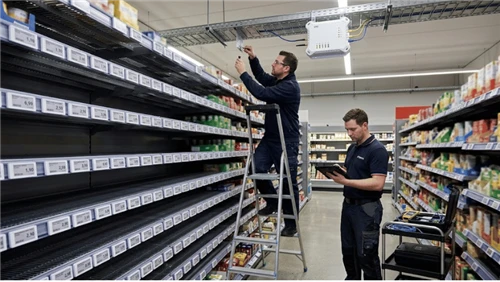
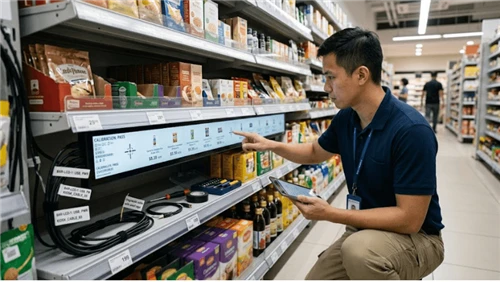
Walk into any major grocery chain today and you will likely spot small digital displays where paper shelf labels used to be. The shift to electronic shelf labels is no longer an experiment - according to MarketsandMarkets, the global ESL market reached $2.34 billion in 2024 and is projected to grow at a CAGR of 12.3% through 2029, driven primarily by grocery and hypermarket adoption.
The economics are straightforward. Supermarkets manage thousands of SKUs, run frequent promotions, and operate on margins where manual pricing errors translate directly into lost revenue or compliance penalties. Paper tags cannot keep pace. When a weekend promotion needs to go live across 8,000 shelf positions at 6 a.m. Saturday, the only realistic option is remote, automated price delivery.
This guide is written for supermarket operations managers, retail technology buyers, and anyone responsible for evaluating whether digital price tags are the right investment for their stores. It covers the technology types available, the criteria that matter most in a grocery environment, how to think about ROI, and what a realistic deployment actually looks like - including the mistakes most operators wish someone had warned them about first.
What Are Digital Price Tags (Electronic Shelf Labels)?
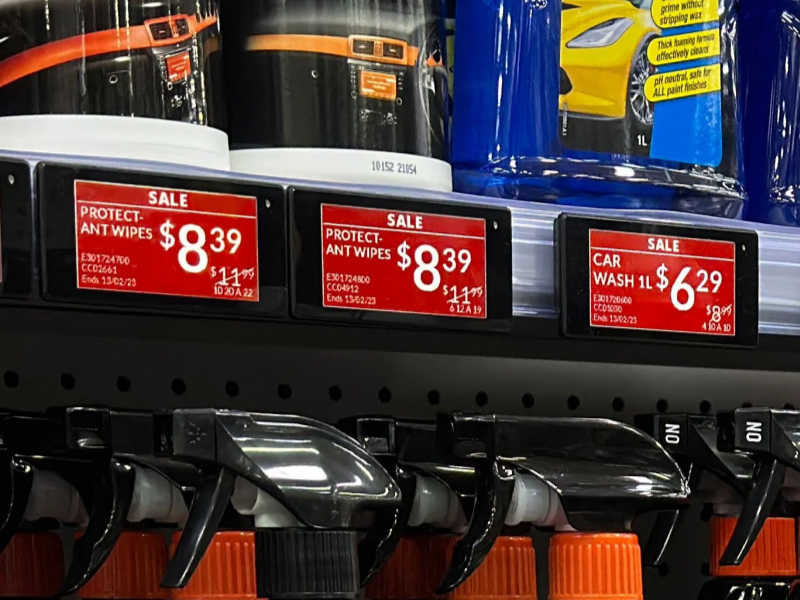
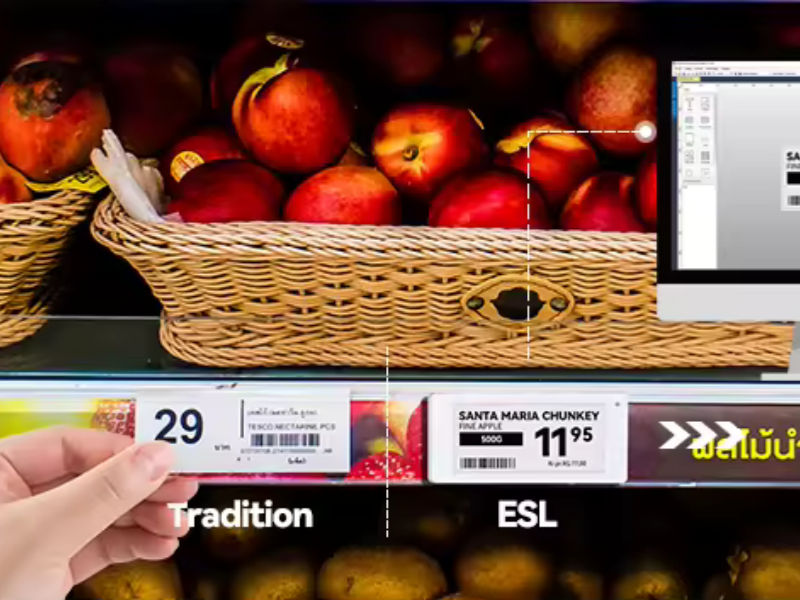
Digital price tags are electronic displays mounted on shelf edges that show product pricing, promotional information, and additional data such as unit pricing or nutritional flags. Unlike static paper tags, their content updates remotely - in seconds, across an entire store - through a software platform connected to your pricing and inventory systems.
How ESL Systems Work
Each label communicates wirelessly with a network of in-store gateways or access points. When a price change is triggered in your ERP or POS system, the update is transmitted automatically to the relevant labels. The three primary communication protocols are radio frequency (RF), Bluetooth Low Energy (BLE), and near-field communication (NFC) - each with trade-offs around range, update speed, infrastructure cost, and power draw. If you want to understand how ESL systems communicate with store infrastructure before talking to vendors, it is worth clarifying which protocol a system uses and how many access points your store layout would require.
Beyond pricing, modern ESL platforms also support: LED-guided picking (flashing indicators to direct warehouse or click-and-collect staff), nutritional and allergen information display, and centralised campaign management - all from a single dashboard.
Types of Digital Price Tags - Which Technology Fits Your Store?
The decision between LCD vs e-paper display technologies is one of the first real choices you will make, and it affects battery life, image quality, power infrastructure, and total cost significantly. Here is how the three main options compare.
E-Paper (Electronic Ink) ESLs
E-paper ESLs use electronic ink - the same technology found in e-readers. They consume power only when the display updates, which is why they can last five to fifteen or more years on a single battery depending on update frequency. The reflective display is easy to read in bright store lighting without requiring a backlight, which makes them the dominant choice for standard grocery shelving: ambient aisles, dry goods, produce, and most chilled sections.
Modern e-paper labels support multi-colour displays (black, white, red, yellow) and come in sizes ranging from roughly 1.5 inches for small SKU tags up to 7.5 inches for category headers. They are typically the most cost-effective option over a five- to ten-year horizon because the hardware investment is offset by near-zero consumable costs.
LCD ESLs
LCD digital price displays use a backlit liquid crystal panel. They support full-colour graphics, animations, and richer product imagery - making them well suited for high-traffic promotional zones, end-caps, fresh counters, or any area where visual impact justifies the extra infrastructure cost. The trade-off is power: LCD labels either require more frequent battery replacement or a wired power solution, so they are typically deployed selectively rather than store-wide.
Segmented ESLs
Segmented labels use fixed numeric and character segments, similar to a digital clock display. They cannot show arbitrary graphics but reliably display price and basic product codes. For large-scale rollouts where budget is the primary constraint and display flexibility is less critical - a warehouse cash-and-carry format, for example - segmented ESLs offer a practical entry point without the full investment of graphic e-paper labels.
Side-by-Side: Which Technology Fits Where?
| Feature | E-Paper (E-Ink) | LCD | Segmented |
|---|---|---|---|
| Display type | Reflective electronic ink | Backlit LCD panel | Fixed-segment LCD |
| Colour options | BW, BWR, BWRY, full colour | Full colour, video capable | Usually monochrome |
| Power consumption | Very low (only on update) | Higher (continuous backlight) | Low to moderate |
| Typical battery life | 5–15+ years | 1–3 years (or wired) | 3–7 years |
| Sunlight / bright aisle | Excellent | Good (needs brightness adjustment) | Moderate |
| Best suited for | Standard shelves, dry goods, produce | End-caps, promotions, fresh counters | High-SKU budget rollouts |
| Freezer-compatible versions available | Yes (specialist models) | Limited | Some models |
6 Criteria for Choosing the Right ESL for Your Supermarket
Once you understand the technology landscape, the next step is evaluating solutions against your actual operating requirements. These six criteria separate a good choice from a costly mistake.
1. Display Quality and Readability
Labels need to be legible for customers across a range of ages and from multiple viewing angles, under both bright produce-section lighting and dimmer back-of-store aisles. When evaluating options, request physical samples and test them in your own store environment before committing to a pilot. Key questions to ask vendors: What is the contrast ratio? What viewing angle does the display support? How does it perform in direct light versus shadowed shelf positions?
2. System Compatibility (ERP and POS Integration)
The most capable label is worthless if it cannot communicate reliably with your existing systems. Compatibility with your ERP and POS platforms should be a threshold requirement - not a feature to negotiate after shortlisting. During evaluation, ask specifically: Does your system have a certified integration with our ERP, or does it rely on custom middleware? What happens to shelf pricing if the integration breaks during a promotion window? Who is responsible for troubleshooting synchronisation failures?
Vendors who cannot give direct answers to these questions during a sales conversation are unlikely to give them during deployment either.
3. Battery Life and Total Cost of Ownership
The unit price of the labels is one component of the real cost. Battery replacement at scale is another, and it is the one most buyers underestimate. A label with a ten-year battery life has a fundamentally different TCO profile from one needing replacement every two to three years when multiplied across five thousand or ten thousand labels. Ask vendors for battery life estimates under your specific update frequency - a store that reprices 200 SKUs daily will drain batteries differently than one that does weekly bulk updates. For a practical framework to model ROI calculation specific to your store, it is worth building this estimate before entering vendor negotiations.
4. Durability and Environmental Ratings (IP65 / IP68)
Supermarket aisles are demanding environments: liquid spills from leaking products, cleaning chemicals applied weekly, temperature swings between ambient and chilled sections, and physical contact from staff and customers throughout the day. Look for labels certified under IEC 60529 ingress protection standards. IP65 certifies protection against low-pressure water jets and dust ingress - a minimum baseline for grocery environments. IP68 certifies submersion protection, which is relevant for seafood counters, wet produce sections, and store cleaning cycles that involve hosing down shelving. A surface hardness rating of 3H or above indicates meaningful scratch resistance, which matters for labels that will be handled, bumped, and cleaned hundreds of times over their service life.
5. Freezer and Low-Temperature Performance
This is the criterion that catches the most buyers off guard. Standard ESLs are designed for ambient conditions - typically 0°C to 50°C operating range. Install them in a frozen-food aisle or chilled beverage section and you will see condensation failure, display corruption, or outright shutdown.
Specialist low-temperature ESLs are rated for −25°C to +50°C and include gasket sealing to prevent condensation when labels are moved between temperature zones during restocking. If your store has frozen food, ice cream, or chilled dairy sections - which is to say, if it is a supermarket - you need to confirm that these zones are covered by a certified cold-chain ESL variant, not by the standard product your vendor defaults to quoting. Check display performance specifications carefully: some e-paper displays slow their refresh rate significantly below −10°C, which can cause visible lag during busy promotional update cycles.
6. Software Usability and Staff Training Requirements
The management dashboard will be used by your team every day - often by staff who are not technical specialists. A system with powerful features but a poor interface creates adoption problems that compound over time: update errors, skipped label changes, and IT dependencies that were not in the original scope. During evaluation, insist on a live demonstration of the management software with actual store staff present, not just with the IT team. Key practical questions: How many steps does a bulk price update take? Can the system automatically flag labels that failed to receive an update? What does a connectivity outage look like from the store floor?
Understanding the ROI - Is the Investment Worth It?
For most supermarket operators, the financial question is the decisive one. ESLs carry a meaningful upfront investment, and the internal case needs to be clear before procurement can proceed. Understanding the real deployment costs is the right place to start.
What You Are Actually Paying For
Total ESL investment typically comprises: hardware (labels, gateways, access points), software licensing or SaaS subscription fees, installation and infrastructure work, and ongoing support contracts. Vendors vary significantly in how they bundle these - some include software in the hardware price, others charge separately for each update above a monthly threshold. Understand the full commercial structure before comparing quotes; headline unit prices are not a reliable basis for comparison.
Where the Savings Actually Come From
Operators typically report savings across four areas: reduced labour from eliminating manual repricing cycles; elimination of paper and print consumables; reduction in pricing errors; and improved promotional agility. On the compliance side, pricing errors carry real financial risk beyond lost margin. Under the EU Omnibus Directive (2019/2161), retailers are required to display accurate prior prices whenever a price reduction is announced - inaccurate shelf pricing during promotional periods can expose EU-market operators to consumer protection penalties. In the US context, the FTC's Pricing Guide similarly requires displayed prices to be honoured at checkout.
Beyond cost reduction, some operators also report shelf compliance improvements when ESLs are used to coordinate picking and stock-check workflows - staff follow LED indicators to the correct location rather than relying on printed shelf plans.
A Simple Framework for Your Business Case
Before requesting vendor quotes, estimate your current annual cost of manual pricing: staff hours per price-change event × number of events per year × local hourly labour cost, plus print and paper consumables. This will not give you a precise ROI, but it will tell you which variable drives your specific business case - labour-intensive stores typically see faster payback than low-turnover formats. For a direct comparison of ongoing costs, the paper labels vs ESLs cost analysis is a useful reference. Reputable vendors will run a store-specific TCO model using your actual SKU count, update frequency, and labour cost data - if a vendor refuses to do this, treat that as a red flag.
Deploying ESLs in Your Supermarket: A 4-Step Process
Understanding what to buy is genuinely only half the challenge. The operational complexity of deploying at scale - and the places where rollouts typically stall - is where experienced buyers distinguish themselves from first-timers.
- Audit and Scope (Weeks 1–2). Before approaching vendors, map your current label estate: count labels by zone (frozen, chilled, ambient, end-caps, pharmacy if applicable) and document your ERP and POS systems in detail. Identify any atypical environmental requirements - freezer aisles, outdoor-facing sections, wet-zone counters. This information determines how many gateways you need and which label variants to specify. The most common scoping mistake is underestimating gateway count for large stores with thick shelving or structural steel.
- Vendor Evaluation and Pilot (Weeks 3–10). Issue a structured RFP covering integration requirements, temperature certifications, battery life guarantees, and support SLAs. Before committing to a full rollout, run a controlled pilot in one aisle or department for four to eight weeks. A pilot will surface integration issues, coverage gaps, and staff usability concerns at manageable cost. Refer to the installation process documentation for your shortlisted vendors early - installation complexity varies considerably.
- Infrastructure and Integration (Weeks 8–16). Install gateway infrastructure and connect the ESL management platform to your pricing systems. Run end-to-end validation tests: trigger a price change in your ERP and confirm it propagates correctly to the shelf edge before any customer-facing deployment. The most common failure point at this stage is ERP middleware configuration - allow more time than vendors typically quote for this step.
- Phased Rollout and Training (Weeks 16+). Deploy store-wide in phases rather than all at once. Train staff on the management dashboard - specifically the processes for bulk updates, error alerts, and connectivity fault-finding. Establish a written protocol for what to do when a label does not update during a promotion window; this scenario will eventually happen, and the response needs to be faster than a support ticket.
Common Deployment Mistakes Worth Avoiding
- Specifying the wrong label for freezer zones. Standard labels look identical to low-temperature variants in vendor catalogues. Confirm the operating temperature certification explicitly in your purchase order, not just in the sales presentation.
- Underestimating gateway coverage requirements. Vendors often model gateway count based on floor area. Real stores have metal shelving, refrigeration units, and structural elements that reduce signal propagation significantly. Request a site survey before finalising your infrastructure quote.
- Skipping the ERP integration stress test. A pilot that only tests manual price updates via the management dashboard will not catch the integration failures that occur when your ERP pushes a bulk promotional update to 3,000 labels simultaneously.
- Delaying staff training until post-launch. Staff who encounter the system for the first time during a live promotion are more likely to revert to manual workarounds - undermining the efficiency gains the system was purchased to deliver.
For a deeper look at common ESL issues encountered post-deployment, including connectivity and update failures, it is worth reviewing before finalising your vendor SLA terms.
Making the Right Decision for Your Store
Digital price tags are a mature technology with a clear and verifiable value proposition for supermarkets. The financial case is strongest for stores with high SKU counts, frequent promotional cycles, and meaningful labour costs associated with manual repricing - which describes most full-service grocery formats.
The variables that most affect your specific decision are: which display technology matches your store zones (particularly your frozen and chilled sections), how cleanly a given system integrates with your existing infrastructure, and what the genuine five-to-ten-year total cost of ownership looks like once battery replacement, support, and software costs are included alongside hardware.
The next practical step is to shortlist two or three vendors, run a site-specific TCO analysis, and pilot one department before committing to a full-store rollout. The data from four to eight weeks of live operation will answer questions that no guide can answer in the abstract.
If you are at the shortlisting stage or want to explore specific ESL options, the electronic shelf label solutions overview is a useful starting reference for understanding available product ranges and configurations.
Frequently Asked Questions
How much do digital price tags cost for a supermarket?
Hardware costs are typically calculated per label and vary by display technology and size. E-paper labels generally represent the most cost-effective option over a five-to-ten-year horizon. Total investment also includes gateways, software licensing or SaaS fees, installation, and support. The most meaningful comparison is total cost of ownership over five years, not unit price. Request a store-specific TCO model from vendors using your actual SKU count and update frequency before comparing proposals.
How long do ESL batteries last?
E-paper labels typically offer five to fifteen or more years under normal supermarket update patterns. LCD-based labels have significantly higher power requirements and generally need more frequent replacement or a wired power solution. Battery life estimates from vendors should always be qualified by your specific update frequency - a store that reprices 500 SKUs daily will drain batteries faster than one that does weekly bulk updates.
Do digital price tags work in freezers and cold storage aisles?
Standard ESLs are not rated for freezer temperatures and will malfunction in sub-zero conditions. Specialist low-temperature models are rated for approximately −25°C to +50°C and include sealing to prevent condensation failure. If your store has frozen food or chilled sections - and most supermarkets do - you need to confirm that these zones are covered by a certified cold-chain ESL variant. Verify this in the purchase specification, not just in the sales conversation.
Can digital price tags integrate with any POS or ERP system?
Most enterprise ESL platforms support integration via standard APIs, though the ease and cost of integration varies significantly by system. Some vendors maintain certified integrations with major retail ERP and POS platforms; others rely on custom middleware. During vendor evaluation, request a specific integration statement for your existing systems rather than a general assurance, and ask who is responsible for resolving synchronisation failures.
What is the typical ROI payback period?
Payback periods vary considerably by store size, update frequency, and local labour costs. Stores with high SKU counts, frequent promotional pricing, and high labour costs tend to see faster returns - sometimes under three years for large-format grocery. Rather than relying on vendor-provided estimates, model your own scenario using current repricing labour hours and print consumable spend as the baseline. Reputable vendors will support this analysis.
Can ESLs support dynamic pricing and promotions?
Yes - this is one of the most commercially valuable capabilities of modern ESL systems. Prices can be updated across all relevant shelf positions in seconds, enabling time-of-day pricing, end-of-day markdown automation for perishables, and rapid response to competitor price changes. For more detail on how this works operationally, the overview of dynamic pricing capabilities explains the mechanics and practical limitations.