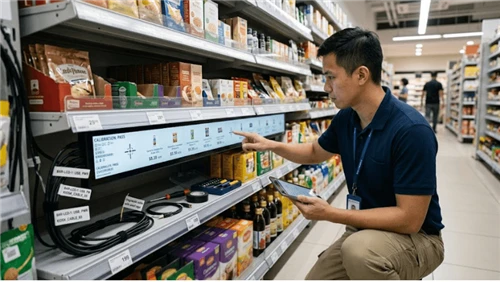
This guide covers how electronic shelf labels in grocery stores work in practice, what operational benefits they deliver, how to evaluate the business case, and what the transition actually involves.

Why Grocery Pricing Is More Complex Than It Looks
A typical supermarket carries between 5,000 and 30,000 individual SKUs. With fresh food promotions, supplier price changes, seasonal adjustments, and weekly specials all running concurrently, around 20% of those products may need a price update in any given week. For a mid-size store, that can mean managing changes across thousands of products - every seven days, without fail.
With paper labels, every update means printing new tickets, walking the aisles, locating the right shelf position, and physically replacing each label - then verifying the work before the store opens. The labor cost adds up quickly. But the larger risk is accuracy.
In most markets, the price displayed on the shelf must match the price charged at the register. A single missed label update after a promotion ends creates compliance exposure and customer disputes. Knowing what happens when shelf prices are wrong is often the first reason retailers begin evaluating a better system.
How a Grocery Store Shelf Labeling System Works
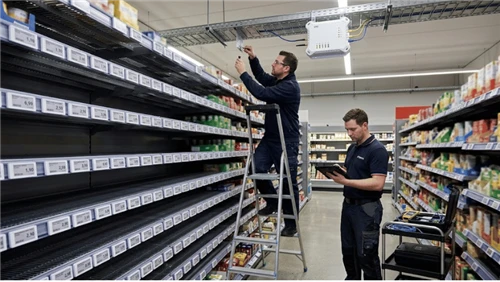
An ESL-based grocery store shelf labeling system replaces paper tickets with small digital displays mounted at the shelf edge. Each label connects wirelessly to a central management platform, which integrates with your point-of-sale (POS) or enterprise resource planning (ERP) system. For a full technical walkthrough, see how ESLs work from a retailer's perspective.
When a price changes in your POS - for a promotion, a cost adjustment, or an end-of-sale reset - that update flows automatically to the corresponding label on the shelf. No printing, no walking the floor, no manual replacement. Updates can be triggered in three ways: immediately when a change is made in the system, scheduled in advance to activate at a set time, or automated by rules - for example, a price reduction applied when a product's expiry date falls within a defined window.
On the display side, current ESL models are available in three-color (red/black/white or yellow/black/white) and four-color (yellow/red/black/white) configurations - the same color combinations grocery retailers rely on for promotional visibility. If you're evaluating hardware, understanding LCD vs e-ink display options will help you match the technology to your store environment.

Six Operational Benefits for Supermarkets and Grocery Retailers
1. Automated Price Updates at Scale
A price change that previously required hours of staff time - printing, walking, replacing, verifying - can now be executed across every affected label in the store in minutes from a central dashboard. For stores running weekly specials or time-sensitive franchise promotions, this recovers significant labor hours every single week. There are compelling operational reasons to make the switch, and this is the most immediate one.
2. Full-Color Promotional Displays Without the Logistics
Three-color and four-color ESL screens replicate the red-and-yellow promotional color conventions that grocery shoppers recognize. Because promotions are deployed from a central template, every label in the store shows the correct price at the correct time - with no variation caused by staffing levels on a given morning. Many retailers find they can run more promotions, more reliably, once the logistics of physical label changes no longer set the pace.
3. Pricing Compliance and Accuracy
Because ESLs pull from the same data source as your POS system, the price on the shelf and the price at the register stay in sync automatically. This closes the most common source of pricing errors: human error during manual label transitions. For franchise operators, it means head-office promotions activate and expire with precision, without relying on each individual store's execution on a given day.
4. Faster Order Picking and Smarter Restocking
Most commercial ESL systems include LED indicators built into each label. These can be triggered remotely to flash in a specific color, guiding staff directly to the exact shelf location for a Click & Collect order - no printed pick lists, no separate scanning device. The same function works for restocking: when inventory flags a product below par level, the label flashes to direct the team member to the right location. With multiple LED colors available, different staff can work simultaneously without confusion about which items have already been picked.
5. Dynamic Pricing and Near-Expiry Markdown Automation
One of the most underutilized capabilities in advanced ESL deployments is rule-based markdown automation. When a perishable product approaches its use-by date, the system can automatically reduce the price on the corresponding shelf label - without any staff action. This runs more consistently than manual markdown processes, drives incremental sales on products that would otherwise be wasted, and reduces the labor involved in daily markdown decisions.
Food waste is a significant cost center in grocery retail. According to the UN Food and Agriculture Organization, roughly one-third of all food produced globally is lost or wasted - and store-level markdown automation is one of the most direct interventions available to retailers. For more on how this works technically, see ESL dynamic pricing capabilities and how automated markdown pricing is configured in practice.
6. Consistent Omni-Channel Pricing
For grocery stores operating online ordering, delivery, or click-and-collect alongside their physical locations, keeping prices consistent across channels requires constant manual reconciliation with paper-based systems. ESL management platforms integrate with the same pricing infrastructure as your online channels, meaning a single update flows to the shelf label, your website, and any connected delivery platform at the same time - eliminating the reconciliation step entirely.

ESL vs Paper Price Labels: A Side-by-Side Comparison
For a more detailed breakdown of the trade-offs, see ESL vs paper labels: a practical comparison. The table below covers the dimensions most relevant to grocery retail operations:
| Dimension | Paper Price Labels | Electronic Shelf Labels |
|---|---|---|
| Price update process | Manual - print, walk, replace | Automated from central system |
| Time per update cycle | Hours of staff time | Minutes, system-wide |
| Promotional accuracy | Depends on staff availability | Consistent, scheduled precisely |
| Compliance risk | Higher - error during transitions | Lower - shelf and POS in sync |
| Click & Collect support | Not applicable | LED-guided picking |
| Near-expiry markdown | Manual, staff-dependent | Can be fully automated |
| Paper and print costs | Ongoing, recurring | Eliminated after installation |
| Omni-channel price sync | Requires separate manual process | Automated through shared data source |
What the Implementation Process Actually Involves
Implementation is one of the questions most often left unanswered in ESL marketing materials. The reality is more straightforward than most retailers expect - but it does require proper planning. A typical grocery store ESL installation covers five stages:
- Compatibility and scope assessment: Your provider evaluates your POS or ERP system, store layout, and wireless network infrastructure to map the integration requirements and confirm overall scope.
- System integration: The ESL management platform connects to your existing pricing system so that price changes trigger automatic label updates. This is the most technically intensive stage of the project.
- Template and branding configuration: Label layouts are set up to reflect your store's promotional color conventions, pricing format, and brand standards.
- Physical installation: Labels are installed on shelf edges, connected to the wireless network, and tested. Well-planned installs are designed to minimize disruption to trading hours.
- Staff training and ongoing support: Day-to-day platform operation is generally straightforward. Training and local support should be included as standard in any implementation package.
For a step-by-step technical walkthrough, this guide on how ESLs are installed covers the full process. If you are still in the evaluation stage, how to choose the right retail ESL solution for your store format is a useful starting point before beginning any supplier conversations.
Understanding the ROI Before You Commit
The business case for a grocery store shelf labeling system centers on labor recovery. If your store updates prices on 20% of its SKUs each week and each manual cycle consumes meaningful staff time, the hours recovered translate directly into a measurable cost reduction - one that can be calculated against the upfront investment.
Additional value accumulates through fewer pricing errors, more reliable promotion execution, reduced food waste from automated markdowns, and operational improvements to Click & Collect and restocking workflows. To model the numbers against your own store's specifics, this ESL ROI calculator guide provides a structured framework. For a transparent view of what the upfront investment involves, see a breakdown of ESL costs for retailers.
Stores with fewer than 1,000 SKUs and infrequent price changes may find the economics harder to justify in the near term - and a reputable supplier will tell you so. For mid-to-large format grocery stores with active promotional calendars and high label-change frequency, the question is less whether ESLs deliver value, and more which system is the right fit for your infrastructure.
FAQ
Q: Will ESLs integrate with my existing POS system?
A: Most ESL management platforms are designed to work with a wide range of POS and ERP systems. Before committing to any solution, confirm with your supplier that they have completed integrations with your specific platform and ask for examples from comparable grocery installations.
Q: What happens to the display if the wireless connection drops?
A: ESL screens retain their last-shown content if the connection is interrupted - they do not go blank or display an error message. Pricing remains visible on the shelf while connectivity is restored. Retail ESL installations typically use dedicated wireless infrastructure built for reliability in a busy store environment.
Q: Can ESLs be used in refrigerated and frozen sections?
A: Yes. Refrigerated-rated ESL models are available and designed for cold-chain grocery environments. If your store includes chilled or frozen aisles, confirm with your supplier that the specified hardware is rated for those temperature ranges before finalizing the installation scope.
Q: How long does a typical grocery store installation take?
A: Smaller stores can often be fully operational within a few days. Larger operations with complex ERP integrations may require several weeks of planning and testing before go-live. A reliable supplier will give you a realistic project timeline during the initial compatibility assessment rather than an optimistic generic estimate.
Getting Started
A grocery store shelf labeling system built on ESL technology is most likely to deliver clear, measurable value if your store carries more than 3,000 SKUs, runs frequent promotions, operates Click & Collect, faces pricing compliance pressure, or manages significant labor costs around manual label changes. For most mid-to-large format supermarkets and grocery retailers, the technology is mature, the integration options are broad, and the operational benefits are well established.
To explore ESL solutions suited to grocery retail, or to discuss your store's specific requirements, contact our team for an initial compatibility assessment.